
RCA DLP Lamp Replacement “How-To” Guide

RCA Lamp Replacement Guide
Please note that this article may be outdated. Visit guides.fixyourdlp.com for more comprehensive installation and repair guides!
Do you have a RCA TV and need a replacement lamp, part number: 265866, 265919, 269343, or 270414? Click here for the best price online! Did that RCA DLP lamp go out on you? It’s a simple fix. Don’t throw that TV away or go with an expensive TV repairman. Often times it’s cheaper to first change the lamp than to call a service technician for $150+. Always buy an OEM part.
We also recommend replacing the entire enclosure if it looks damaged or warped as this may cause your lamp to be misaligned inside the television!
To replace just your lamp, all you need is:
- An RCA DLP lamp made by Philips
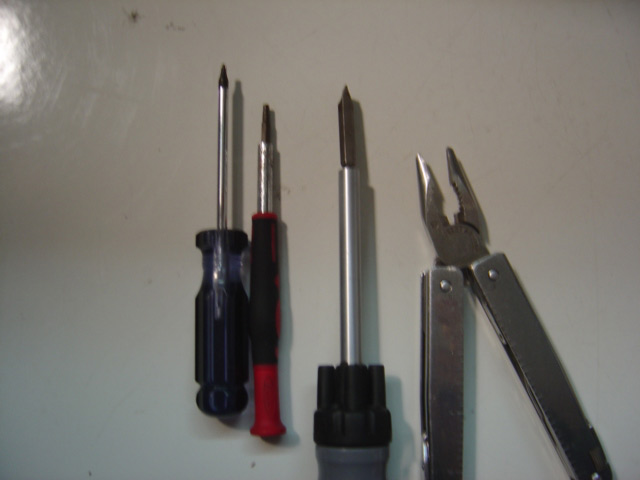
- A flat-head screwdriver
- A T-10 & T-15 Torx driver
- A pair of plyiers
- A pair of gloves or a lint-free cloth (to wipe the glass down afterwards)
Step 1: Locate the lamp.
Here is the back of a typical RCA DLP TV… your TV may look slightly different.
The lamp is behind this rectangle door!
You’re going to need your flat-head screwdriver to loosen this screw:
Loosen the screw and then use the two “clips” to open the compartment door.
What we’re looking at it is the lamp enclosure. There is one screw on each side that need to be loosened.
Now you can gently pull back the tray and viola, you have removed your lamp!
This is what it should look like pulled straight back…
Step2: Remove the lamp from the enclosure
This is a picture of the enclosure with your old lamp facing downward. Visually inspect the area labeled
“Clip.” They are on the top and bottom of the enclosure. Between them, there is about a 3″ gap where
you need to push in with your thumb to be able to pull out the rear lamp cover.
The following picture looks at the other side of the lamp enclosure. As you are pushing in on the lamp enclosure,
you want to release these:
Here is a fuzzy picture with that part of the enclosure disassembled and now it is held together by the wiring
Now we have access to unscrew the lamp connectors with your plyer and torx driver. Once the back of the
enclosure is removed…
Now you have access to remove the three screws circled above…Here is a recap of your parts so far…
I’ve swapped out my old Lamp / Bulb with a new, original replacement lamp above…remember the washer!
When assembling the rear enclosure back on, remember to double check and make sure everything is in place.
The bottom has not been installed correctly in this picture.
Installation is in reverse order… here are some more photos
It took me about 5 minutes from enclosure removal to enclosure re-install… it might take an inexperienced user 10-15 mins…
IMPORTANT: The bulb should be handled with a clean cloth to avoid any dirt or oil. Our hands are naturally oily… this is a no-no for these lamps. It doesn’t hurt to do a final wipe with a clean, non-abrasive, lint free cloth before reinstalling your lamp. Alternatively, you can wear a pair of latex gloves!
If you need a replacement lamp, part number: 265866, 265919, 269343, or 270414? Click here for the best price online!
Thank you so much for these instructions, they are perfect and made the changing of our DLP bulb very easy.
You guys saved me a bunch of time and money by allowing me to pick up a new lamp bulb on eBay instead of the entire housing from RCA. Thanks!!!
One note: I found I needed the Torx T-8 to remove the old bulb from the housing, but other than that, spot on.
I have an RCA HD61THW263. Is there a replacement lamp for this TV? I have 2 housings that need bulbs, at ~$500 for the assembly, I’m trying to justify keeping this TV.
Thanks for any replies.
please informe lamp Tv general electric,”RCA” mod holiiwood color green is available and price, my .thank
Hi I am a rca parts seller and i would like to be a dropship dealer on yur store do i qualify thanks hope we could make lots of money together
If my dlp tv makes a horrible noise while it is on, could that be the bulb? Even if you mute it, the noise is still there, when you turn it on the noise starts as soon as you get a picture and when you shut it off as soon as the picture goes black the noise stops. It is a real high pitch squeely noise, thanks
Hi Patty,
The problem you’re describing is 99% the ccolor wheel. There usually is an apparent, high pitched noise coming from RCA TVs that have bad color wheels. If you do not get the wheel replaced in the next couple of months, your color wheel will eventually fail completely and the TV will not turn on after that point.
Good info! My RCA HD61WLP52 suddenly lost the red. Everything else is fine – brightness, no noise from colour wheel… All the standard settings are normal. I have seen no postings on the net re:colour loss. Any idea on the problem would be greatly appreciated.
Thx
We have replaced the lamp,but we still do not have a picture.HD61LPW62.What do we do next?
I am thinking about buying a used RCA big screen I think it is 50 inch the owner said it is three years old. Is it worth $500?? The out side looks good. What should I be Looking For?
Thanks
I have the same problem as Patty and the TV is not working now. I was going to replace the lamp. Is the lamp and the color wheel the same thing, or two different things?
I have purchased a new color wheel (part # 212184) for my RCA HD50LPW42 and am looking for instructions on how to install. Any help would be appreciated.
Hello,
I have a HD50LPW164 and have a buzzing when I turn the TV on. I took the back assembly where the bulb is and I think the noise is coming from the fan. It’s not a high pitched noise as Patty describes above but more of a constant buzz that gets progressively louder.
I found Fans and Heat Sinks on a RCA website part # 265943 and 265940.
Does anybody have any experience with this same sound? Does replacing with one of the above parts fix it?
Any help/direction would be much appreciated.
Thanks,
Erik
Hey Erik I have the same buzzing noise, its not a high pitch noise but just a constant annoying buzz. I just ordered a new lamp but now I’m worried it isnt the lamp that is the problem. I have a toshiba 52hm95 I believe. Is replacing the fan or color wheel a difficult task? Time to do more google searches
HI. I just replace my RCA DLP lamp assembly and all seemed to go well. However, the picture is still not coming on. Is there a reset or something I’ve missed? Or could there be another problem which caused the lamp to blow?
Thanks, Wes
WE are having the same problem right now!! What did you end up doing?
i have a rca dlp50151 it has a faint se thru black bar down the left its about 5″ wide it does not move with adjustment in the horizontal and i did what i thought was a total clean of colour wheel all mirrors and any thing that could get dusty any ideas
What about the color wheel. How easy is that to replace. I bought the TV for $788 and less then 2 yrs later (out of warranty) the color wheel went out, the repair man wanted with part/labor $1000 to fix it. I gave him the $40 to throw it away, now I am wondering how easy would it have been for me to replace the color wheel?
I have a rca model number M50W187 have replace the bulb i still have no picture want else do i need to try.
My RCA M50WH92SYX1 has white dots over the screen but the picture is clear and bright. Will replacing the bulb cure this or is it the DLP chip? Thanks for the comments!
Hi there my HD50LPW42 comes on and everything works great but after turning it on 5-10 mins later the picture goes out but sound is ok was wondering if it might be the cooling fan at all
because once the bulb cools down picture comes back on
any help on this would be greatly appreciated
Al
Hi Al,
The first thing to check is your lamp life. If the lamp is reaching end of life that may cause the picture to go out. Are you seeing any warning lights on the front panel indicating the lamp is reaching it’s end of life? You need to check that under Lamp power menu. If the lamp life is ok, the check the fan. Do you hear it turning on at all? The problem could also be the colour wheel or weakened solder joints on the circuit board. Do you have any warranty on the set? You may need to call a technician for a repair.
Sir
From what I have read I believe the problem with my RCA HDTV DLP model HD61LPW42 to be the “Color Wheel??”
Do you have a “HOW TO” on replacing the Color Wheel?? and a link on where to purchase a new
Color Wheel??
I am an fairly old guy (83) who has spent most of his adult career (since 1949) in Data Processing. I
am fairly good at with computer repairs – so – I THINK I could handle some simplified instructions.
Hope you can help as my wife are on limited income but are desperate for our home theater to be fixed.
Thanks
Loran
Hi Loran,
The challenge for replacing the color wheel is that is it tremendously fragile made of wafer thin glass. Here is an online video showing replacing the color wheel in a Samsung television. I would contact Discount Merchant at 1-800-281-8860 and ask if they have that particular colour wheel in stock. http://www.discount-merchant.com/ They are very helpful.
Here is a you tube video that will show you step-by-step how to replace it. https://www.youtube.com/watch?v=B4C-zwGnpWQ
I hope this helps.
Regards,
Shelagh
I have a 42″ rca that went to just black and white this morning. Is this an expensive fix?
Hi Gerry,
It may be a number of things such as the colour wheel, ballast, main board or DMD chip. It’s hard to tell. Any of those components to replace are moderatetly pricey depending on how old the TV set is. I would suggest joining our forum where there is a community of experts who can help you further.
Forum: http://www.fixyourdlp.com/forum/
Regards,
Shelagh
Just took apart a large projection tv and the lap assembly has a liquid in it; is this oil?
Hi Lori,
It’s not oil. It’s a type of coolant made up of ethylene glycol and water with a temperature-vulcanized silicone used as a sealant and for bonding the panels to the bracket. The ethylene glycol used is usually an optical grade (99 percent pure) 70 percent mono denatured ethylene glycol and 30 percent glycerol/glycerine. It’s extremely toxic and should be disposed of properly. It’s absorbed easily through the skin but ethylene glycol vapors may cause eye and respiratory tract irritation. Treat it like anti-freeze and dispose of it in the same way. Your community may have a special depot to drop it off or you can contact http://www.earth911.com to find out how to dispose it properly in your neighborhood. Do NOT put it into conventional garbage or pour it down the drain. Make sure you have ventilated your room well.
Cheers,
Shelagh