
Damage or Fire Warning on Samsung DLP Television BP96-01653A Lamp

Please read carefully!
FixYourDLP.com has identified a potential hazard that may severely damage your Samsung TV with lamp code BP96-01653A!
Samsung DLP lamp units, model BP96-01653A may fail due to improper insertion. We discovered this while doing some tests on these enclosures. If you don’t install the BP96-01653A firmly into the TV, the housing connector may cause damage to both the ballast and the lamp—or even worse a fire.
You’ll know immediately if there’s something wrong because as soon as you turn your television on, and there’s white smoke emanating from the back of your television.
You should shut your television off immediately and open your lamp door and pull out that lamp. Inspect it and hopefully, you’ve just burned the connectors to the ballast, and not the ballast itself. Our testing has only caused the connectors to burn or melt, but don’t take any chances—we’ve never seen a fire, but we also don’t rule out the possibility of fires either.
Here is a correct installation method and the reasons why a bad installation will cause the connectors to burn:
IMPORTANT SAFETY WARNING
Regarding the installation of a BP96-01653A lamp unit into a Samsung DLP Television.
Installation
Step 1
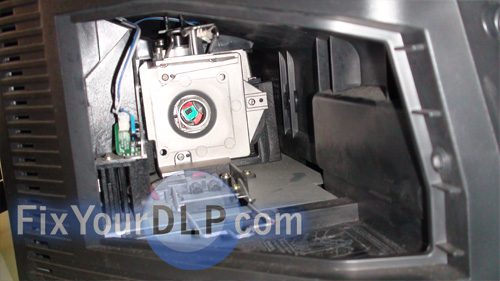
Figure A – Open panel, lamp unit removed
You must install the lamp unit to fit snug with the ballast connector.
To do this, align the lamp unit with the female ballast connector facing down, on the bottom side of the enclosure, then slide the lamp unit until it snaps into place. Check to make sure the unit is firmly inside the television.
Step 2
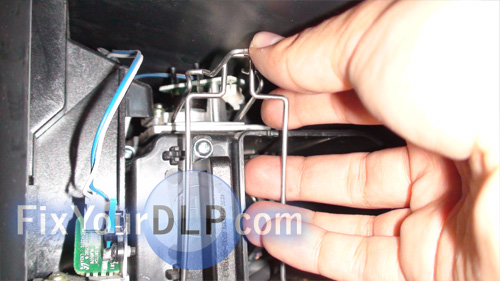
Figure B – Snapping the lamp into place
Snap the wire brackets in tightly by lifting the bottom set up to meet with the top bracket. The wire bracket keeps the lamp and lamp enclosure seated properly to reduce the risk of fire.
when installed properly, the unit should sit secure and slightly elevated from the floor of the compartment.
Step 3
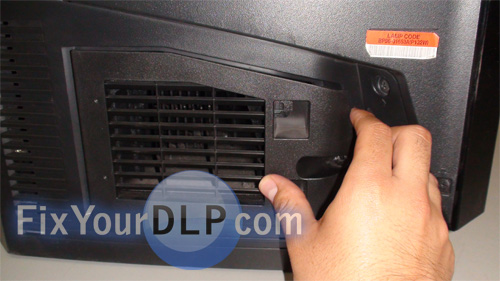
Figure C – Close back panel securely
Once the lamp is firmly secure, close the back panel to engage the blue lamp door sensor switch. Leaving the door open will prevent the television from starting up.
Important Damage or Fire Warning
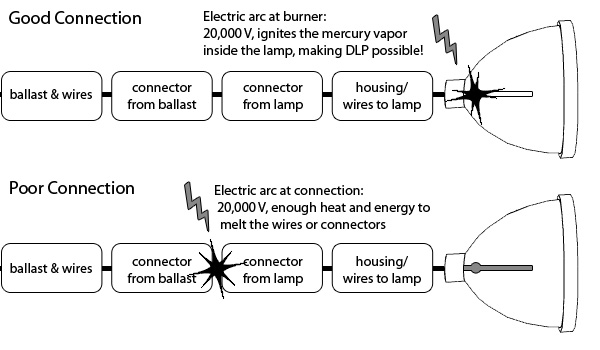
Because of the nature of the ballast or lamp driver, there is a risk of damage or fire to your television set.
The ballast ignites the lamp with up to 20kV of electricity to arc the gas tube inside. If the ballast does not have a firm connection with the lamp unit, the arc will occur between the ballast connectors (from the ballast to the lamp), which may cause a fire, or melt your plastic connectors. Indications of this are a rapid clicking sound, a burning smell, and/or a non-functioning lamp. If you improperly install the lamp into your television causing a ballast or lamp failure, this may void your warranty for the television or the lamp product.
thanks. I have one of these tv’s. I always made sure to make sure the wire clamps down. but after seeing this it makes me want to double check.
I have had this TV for about a year and a half and in that time I have replaced the bulb 4 times. I always make sure the lamp is secure but for some reason the bulb keeps going out within about 3-4 months. Any help would be appreciated.
We are having the same issue. We had the same bulb for almost 2 years and then in the last 4 months we have replaced it 3 times! Not sure what is going on but it is getting to the point of major major major frustration
i have had my samsung for about 18 months replaced the bulb 2 months ago and it just went again did you have any luck yet i have heard a weak ballast can cause it and i found them for 65 bucks i don’t want to get one if i don’t need to
Does this apply to more tv’s?????????? the thing is that my friends have a panasonic tv and that happened, he took out the enclousure and he saw the bare wires from the connectors that goes to the ballast they were melted and everything around it was craking i dont have the tv model but the lamp was a TY-LA1000, thanks.
My Lamp got burned, do you know where can I buy this Lamp?? thanks
I wish i would have seen this before this weekend my bulb melted the right side post to the right side wire to the ballist
I just had the same thing happen when I replace the lamp and did not get the connectors seated properly. Melted one end of connector in side TV and on new lamp. Worked and did not go out but smelled bad so unplugged and determined issue.
This just happened to me as well – on my 2nd replacement bulb. Worked fine for 10 days and then suddenly the bulb blew out causing smoke and smell. Now I cannot remove the bulb since it appears to be melted and glued somewhere. If this is problem due to improper seating – how did it work for 10 days?
Just replaced my BP96-01653A lamp with 8,300 hours on it. The lamp did not fail, just got quite dark over the last month. Amazing how bright the TV is again. Thanks for the heads up on the fire risk. It is very important to have the wire bracket secured properly.
I think mainly the risk is in the lamp change process, the contact in the lamp body is attached through phillips screw and you need to adjust it tight, if not, loose contact may result in overheating weaker junctions of the line between ballast and lamp. The other contact is easily secured because is with a nut intead of a screw, so you can fix it tight enough with a wrench. User is not aware of this and may not have a good screwdriver, so he would think that a good tight is not neccesary. That problem would not arise if you order the complete part at samsung because this union comes perfectly tighten at factory.
What position should the door push the blue safety switch to. I have a HLT5075 bulb and door panel look exactly like the ones in your photos, and when I close it, the switch is pushed up. Everything that I read online says that the switch should be pushed down by the arm on the door. This door does not have an arm and I see no way for it to hold the switch down. Just trying to make sure that I am putting this thing back together correctly. Thansk for any help that you may be able to give
I seem to have the same issue that many have posted about this… I’ve recently replaced bulb/housing in May ’11, then after 2 months usage, had to replace it again in July… and now a 3rd time. Wonder if there is a defect in these TV’s or is it just normal… I was told to unplug the TV on extended leave… or is it normal that these bulbs have a 3-4 month lifespan under normal usage?
i have the same problems you guys are having same b.s buying lamps and making rich this fake lamps companis i al redy sped like 350.00 please don buy this dlp tvs eny more i am to dup my samsung w/the same bulp bp96-01653a tv was 3 years old
I own the above mentioned model and have never changed the bulb in my 3 years of owning. However, last week a thick black smoke was emanating from the back of the TV, though the DLP was still working perfectly. I immediately unplugged the TV. This week I plugged it back in and it works with no problem. Before I call the repair man, does anybody have a clue what could be going on with this TV. Im pretty savvy with electronics, but this one has me stumped.
So if I have replaced the bulb a few times and the most recent time I did the the tv powered on but no picture came up, should I assume that the ballast needs replacement or could it be something else?
I think I have the answer to the frequent lamp failure problem. I called to order my latest lamp and the fellow who answered the phone was very knowledgeable. He said that these Samsung TV’s have a problem with two capacitors in the power supply which in turn damage a capacitor in the ballast, which in turn causes the lamp to burn too hot and basically fry the bulb! He said this makes a lamp which should last 2 years last only a few months. After changing the caps the tv should work fine he says. The capacitors cost me about 35 bucks. I’m a little too scared to fiddle with them myself. I’m going to find an electronics guy who wont charge me too much to change them.
where are these capacitors located?
Good question Bruce. I’ve asked one of the experts over in our forum for an answer. They should be getting back to us shortly.
Cheers,
Shelagh
I’ve recently purchased Samsung DLP TV Bulp from Amazon. It was shipped from China. I herd little cracking sound, then smell and smoke appeared to come from vent in back as soon I turned on the tv. Does this happens because of the voltage difference between china and North America? From 210 to 110 voltage.
Hi Ron,
That smoke is because the wires are actually burning. Lamps from China bought off Amazon are usually counterfeits made with inferior materials. They also don’t have the right technology so can’t be calibrated to your model. What happens that that when the lamp is put into the projector it starts to melt and burns. You could take this lamp out of your TV immediately before it causes more damage. These bad lamps can damage your TV colour wheel or ballast and result in the TV being damaged beyond repair. I would suggest contacting discount.merchant.com for their inventory. They manufacture their lamps in North America and are Philips certified.
Regards,
Shelagh