
Change your Sanyo PLC-XE32 lamp in 6 easy steps

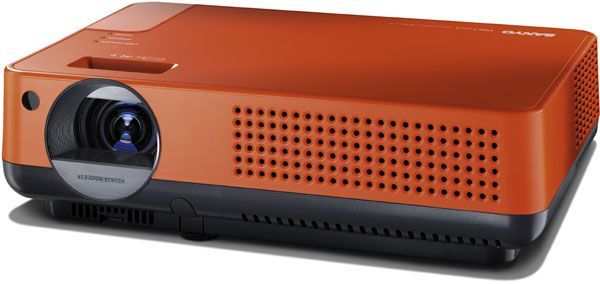
Sanyo PLC-XE32 projector
When it’s time to change your projector lamp on your Sanyo PLC-XE32 projector, the lamp replacement indicator turns yellow and starts blinking. When this happens, it’s time to replace your Sanyo POA-LMP107 (service parts no 610 330 4564) lamp.
Be sure to purchase only a genuine POA-LMP107 to protect your projector from being damaged by counterfeit lamps. Beware of cheaper versions that can damage the sensitive mechanisms in your Sanyo PLC-XE32 projector.
STEP-BY-STEP INSTRUCTIONS FOR LAMP REPLACEMENT
Before installation: Turn off the projector and unplug the AC cord. Allow the Sanyo PLC-XE32 projector to cool for one hour – it should be cool to the touch. Inside of the projector can be very hot since these machines operator under high temperatures.
Replacing the Sanyo POA-LMP107 (610-330-4564) lamp
Caution: Don’t touch the screen or the actual bulb with your finger since the oil from your skin can cause a black spot on the bulb.
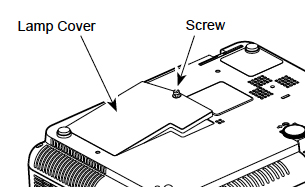 1. Underneath the Sanyo PLC-XE32 projector you’ll find the Lamp Hazard cover. Gently turn it upside down protecting the top of the projector. Using a Philips screwdriver loosen the screw holding the cover in place. Put the cover to one side.
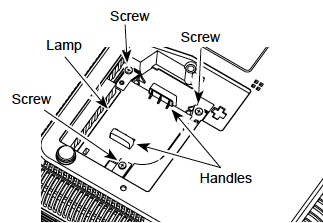
2. Remove the two screws on either side of each the Sanyo POA-LMP107 (service parts no 610 330 4564) lamp. Grab the handle on the lamp cage and gently pull out the lamp. Place to one side.
3. Take the new Sanyo POA-LMP107 (6103304564) lamp cage by the handle and gently maneuver it into place.
POA-LMP107
4. Avoid touching the glass or the bulb. The lamp should slide in easily – don’t force it. Once the lamp is in, tighten the screws on the Lamp Assembly.
5. Replace the Lamp Hazard Cover and tighten screws.
6. Re-connect the power cord and turn on the Sanyo PLC-XE32 projector.
Resetting the Lamp Replacement counter on the Sanyo PLC-XE32 Projector
Reset the Lamp Replacement Counter only when the Sanyo POA-LMP107 (service parts no 610 330 4564) lamp has been replaced.
Do not operate the projectors while any of the lamps are removed as this may result in malfunctions, fire hazard and other accidents.
- Turn the Sanyo PLC-XE32 projector on.
- Press the Menu option to display the On-Screen Menu.
- Press Point left/right button(s) to move a red frame poster to Setting Menu icon.
- Press the black arrow point button to move the red framed pointer to the Setting Menu Icon.
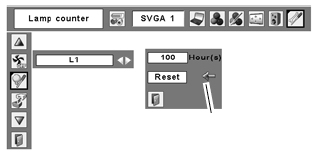
- Press Point Down button to move the red frame pointer to Lamp counter reset.
- Press the Select button.
- Another confirmation dialog box appears, select YES.
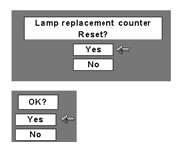
- The Lamp box will disappear and the Lamp Replace Dialog box appears.
- Select YES to reset Lamp Replace Counter.
NOTE: When you reset the Lamp Replace Counter the Lamp Replace indicator stops lighting.
Cleaning the air your filter in the Sanyo PLC-XW32 will ensure a longer life for your newly installed Sanyo POA-LMP107 (service parts no 610 330 4564) projector lamp.
Leave a Reply