
Your quick guide to a new ASK DP-6155 XGA projector lamp

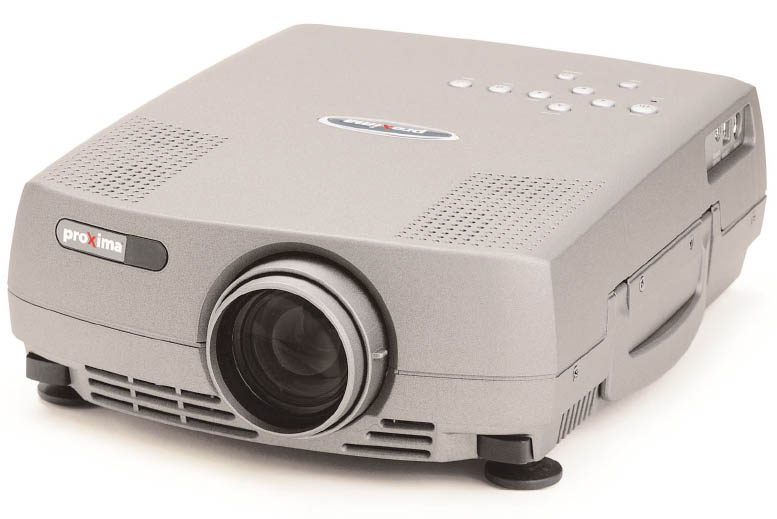
DP-6155 XGA projector
The projector lamp for the ASK DP-6155 XGA projector lamp will run for approximately 1500-2000 hours before needing to be replaced.
When the ASK Proxima LAMP-031 lamp is approaching end of life the ALARM indicator will light up red.
Buying the right lamp
The correct lamp to use is the ASK Proxima LAMP-031. Be sure to install a genuine ASK Proxima LAMP-031 and avoid generic knock-off lamps. Even though they appear to be a bargain, these so-called “compatible” can end up costing more in the long run. These lamps are prone to explosion and have been created using the carcinogenic substance Krypton-85.
Using a counterfeit generic lamp can damage the sensitive components since these knock-off lamps have not been created with the correct components and can cause malfunction. The light provided by these lamps is also substandard with poor illumination.
Installing a generic lamp will also void any warranty for your ASK DP-6155 XGA projector. Go with an authentic ASK Proxima LAMP-031 OEM lamp sold by a dependable seller. Learn the 7 Ways to spot a counterfeit lamp.
Replacing the ASK Proxima LAMP-031 lamp
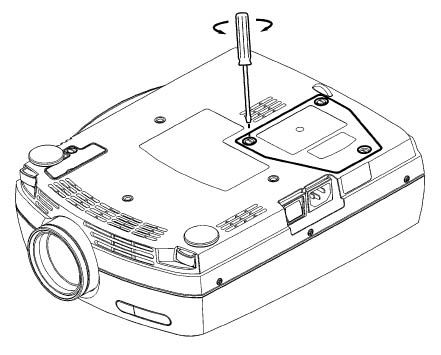 1. Disconnect the power cord and allow the projector to cool for one hour before replacing the lamp. The ASK DP-6105 XGA operates under high heat and can cause burns.
2. The lamp lid for the ASK DP-6105 XGA is found on the bottom of the projector. Be sure to protect the top of the projector before turning it over to access the ASK DP-6105 XGA lamp. 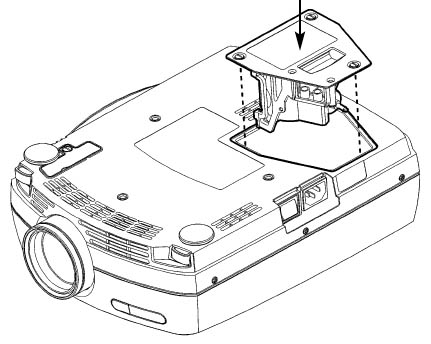
3. Unscrew the three safety screws holding the ASK Proxima LAMP-031 lamp holder in place.
4. Gently grab the lamp holder and pull the ASK Proxima LAMP-031 out of the projector. Be sure to dispose of the used ASK Proxima LAMP-031 lamp through a local recycling program. Don’t throw this lamp into regular garbage as it contains mercury.
5. Inset the new ASK Proxima LAMP-031 lamp all the way into the ASK DP-6105 XGA unit. Tighten the three screws that hold the ASK Proxima LAMP-031 lamp in place. You’re now ready to reset the lamp timer.
Reset the lamp timer
In order for the ASK DP-6155 XGA to correctly track the lamp life of your newly installed ASK Proxima LAMP-031 lamp, you’ll need to reset the
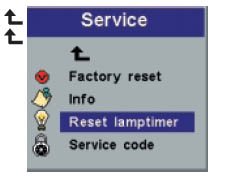

Reset the lamp timer:
- Open the MENU system.
- Scroll down to BASIC. Press ENTER.
- Scroll down to ADVANCED. Press ENTER.
- Scroll down to SERVICE. Click on LAMP TIMER RESET. Click on YES.
Leave a Reply