We're now Screen and Projector! For updated content, visit ScreenAndProjector.com and follow @screenandproj on social media!

10 Tips for projector lifeFollow these simple tips for projector care to extend the life of your projector and projector lamp.
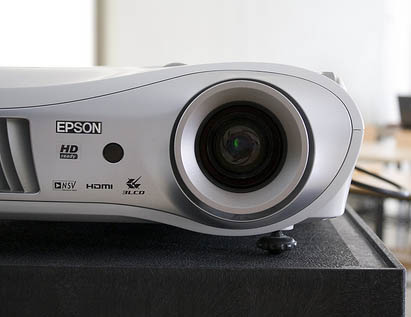
Your projector represents a major investment so want to keep it happy and working for you.

The following projector care tips are easy to follow and will extend the life of your projector lamp as well as your projector.


  1. Let it cool. Don’t shut down your projector too fast but let the fans run for at least two minutes. These machines operate under high temperatures and the fans are designed cool down any super hot elements. Shutting down too quickly your projector’s components.
  2. Chill out. Packing up your projector while it’s still hot may cause lamp filaments and other wires to break. Let the lamp cool down before packing up.
  3. Keep it clean. Your projector’s filters allow airflow throughout the projector and prevent overheating. Clogged air filters means decreased ventilation, which means increased temperatures, which means a possible lamp meltdown or explosion. Dust and dirt also affect the image quality. Check your air filters every few weeks and keep them clear.
  4. Keep it flowing. If your projector has a permanent mounting, make sure the mounting plates don’t block the fan vent and there is enough airflow around the projector to keep it from overheating.
  5. Watch the on/off switch. Don’t be trigger-happy. Turning your projector constantly on and off creates a power surge that will make your projector wear out faster. If you do leave your projector running, make sure that it gets a two-hour rest every 24 hours.
  6. Hands off. Never, ever touch a hot lamp. You can end up with one nasty burn. Never touch a cool lamp bulb either since the oil from your skin leaves a residue on the lamp. Once the lamp heats up the oil residue will burn, creating a black spot on the lamp that shows up on the screen. A large enough oil spot can cause the lamp to shatter.
  7. Watch the lamp life. Be sure the lamp timer has been properly set so the projector will accurately track the lamp life and give you a status update in time for you to replace the projector lamp. You don’t want to be caught off guard with a projector suddenly shutting down because the lamp has run out of time.
  8. Buy genuine OEM lamps. Don’t be cheap. We all like to save money but generic, “compatible” lamps should be avoided because of their inferior materials and workmanship. The few bucks you save can end up costing you much more in the long run when these counterfeit lamps damage your projector and compromise your health. Read 7 tips for spotting counterfeits to learn more.
  9. Go green. Try using the power saver or econo mode on your projector. The only time you’ll really need full brightness is when you are presenting outdoors. Indoor settings, particularly if the room is darker will be fine with the econo mode. You’ll reduce the heat used, lengthen the life of your lamp, reduce wear and tear on the projector and helping the environment.
  10. Read the manual. Ok—so it’s not the most exciting read but at least glance through the manual so you have a working knowledge of your projector. For quick, easy instructions on replacing your lamp projector, check out this website.
 

Tagged with: , ,

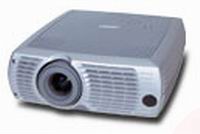
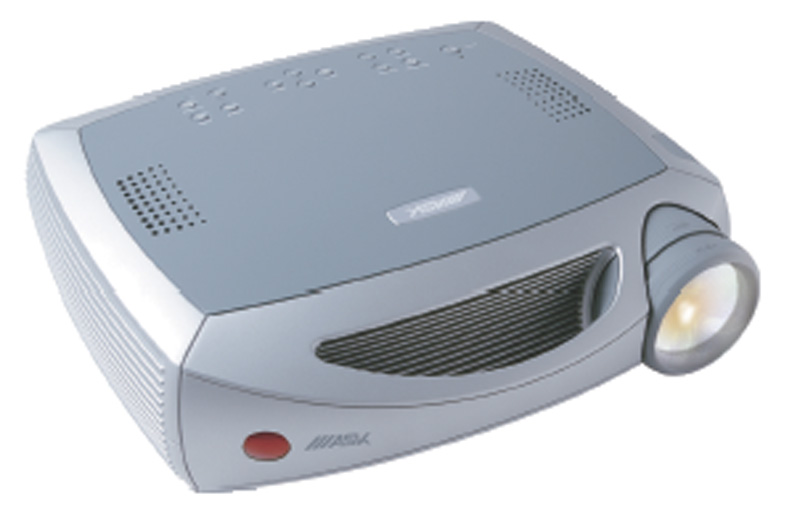
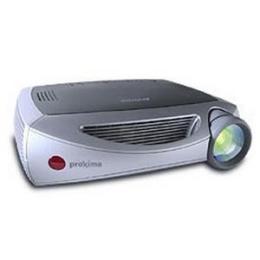
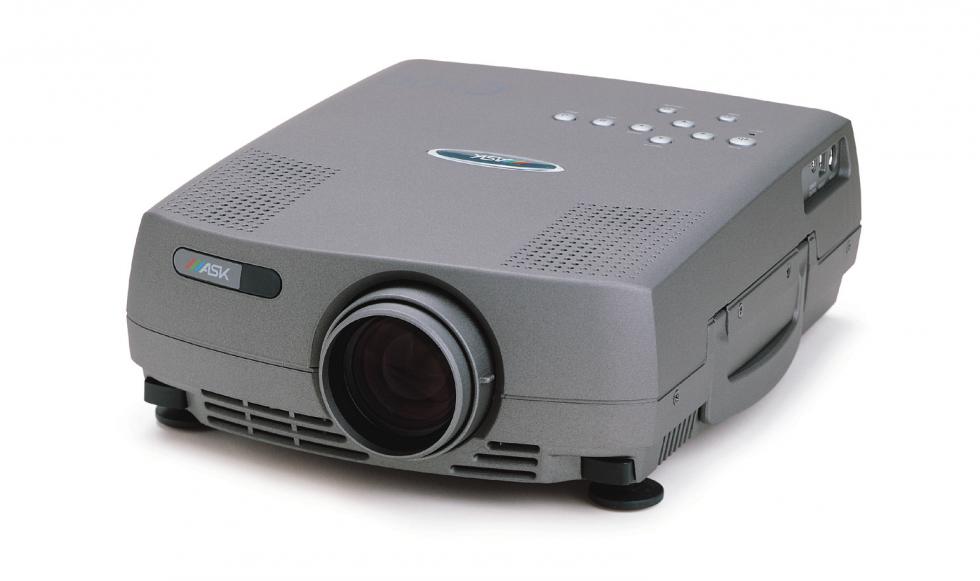
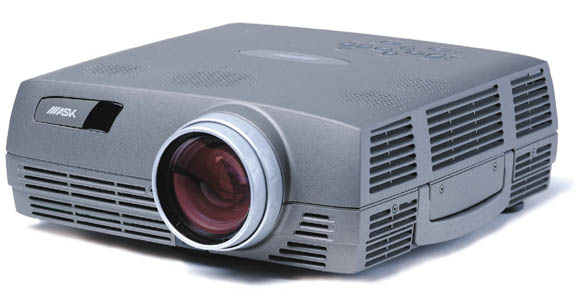
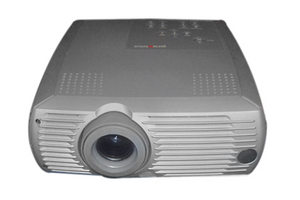
ASK Proxima DP-2000s projector

Installing a replacement ASK Proxima DP-2000s projector lamp

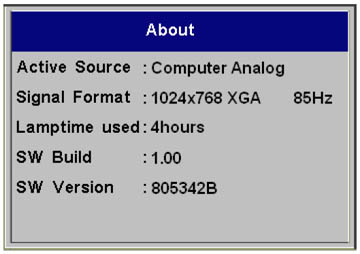
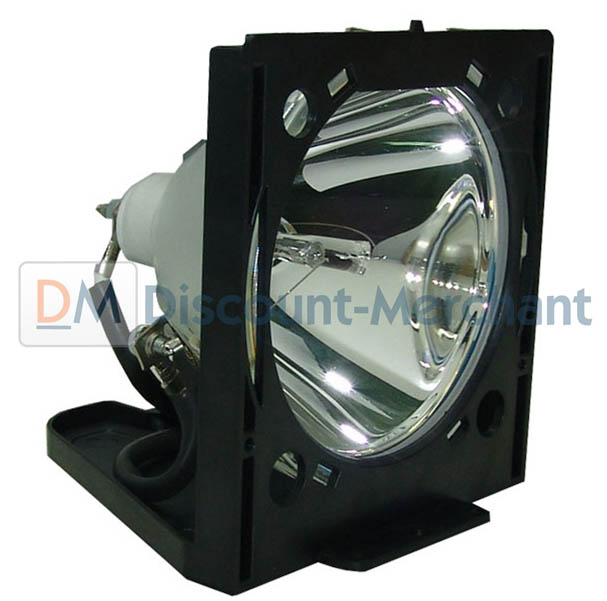
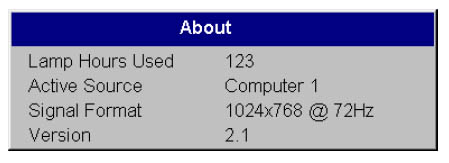
The ASK Proxima DP-2000s projector lamp needs replacing when the LED light is blinking red. Shortly afterwards a “Change Lamp” message appears on screen. You should also check the ABOUT menu and see the lamp hours used is hitting close to 2000 hours–the maximum life span of your ASK Proxima SP-LAMP-007 lamp. It’s time for a new lamp.

STEP 1: Buy the correct lamp

Finding the right lamp for your ASK Proxima DP-2000s projector can be a daunting. The market has been flooded with counterfeit lamps being advertised as “compatible.” They are tempting because of the cheaper price tag but they come with a hidden cost.

These lamps have been created with inferior and often toxic parts, such as the carcinogenic Krypton-85 (known to cause cancer in humans). Their poor workmanship means these generic lamps are also not going to work properly with the sophisticated components in your projector. You run the risk of damaging your projector which will no longer be under warranty once a generic lamp has been installed.

Buy your authentic lamp from an authorized dealer selling the OEM ASK Proxima SP-LAMP-007 lamp. You’ll be getting guarantee on the lamp, technological support but more importantly protecting your health and safety.

Buy this lamp on Amazon from the following authorized dealers:

STEP 2: Installing the new lamp

1. Turn off the ASK Proxima DP-2000s projector and unplug the power cord. NEVER operate the projector with the lamp door removed and this will cause the projector to overheat and the lamp to break. Wait 60 minutes for the ASK Proxima DP-2000s projector to cool thoroughly. The projector operates at a high temperature and there is a danger of burning if the projector is not cool enough.

ASK Proxima DP-2000X, ASK Proxima SP-LAMP-007
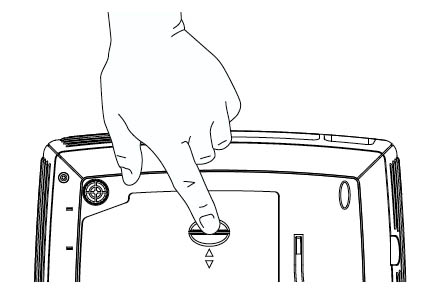
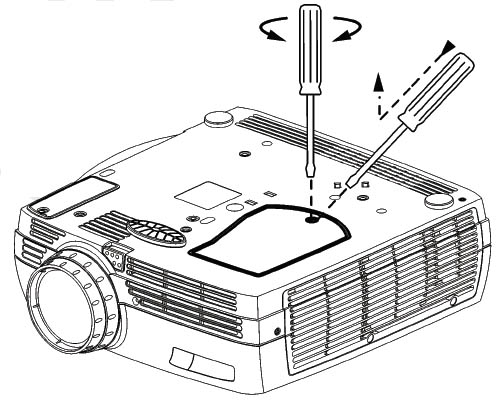
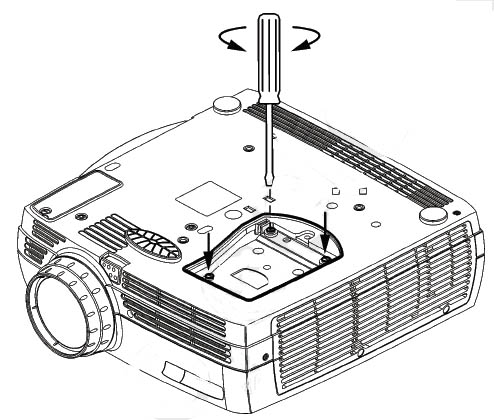
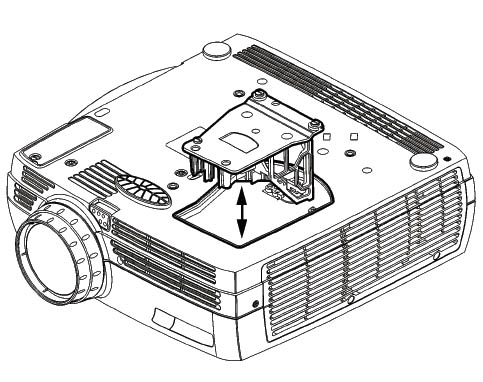
2. Turn the ASK Proxima DP-2000s projector upside down. Remove the lamp cover by pressing the tab forward towards the lens.

ASK Proxima DP-2000X remove lamp, ASK Proxima SP-LAMP-007 lamp

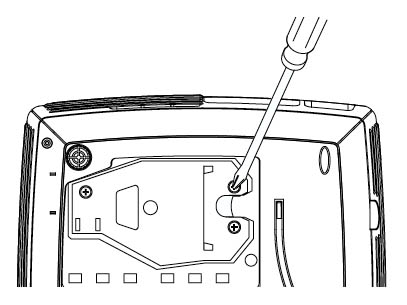
3. Loosen the three screws holding the ASK Proxima SP-LAMP-007 lamp in place.
ASK Proxima DP-2000X, ASK Proxima SP-LAMP-007


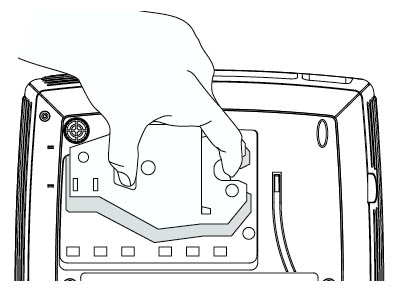
4. Grab the ASK Proxima SP-LAMP-007 lamp by the two indents and carefully lift it out of the projector. Place it to one side.
NOTE: Be sure to properly recycle your used ASK Proxima SP-LAMP-007 lamps. These lamps contain mercury so can’t be placed into regular garbage

5. Tighten the three screws on the newly installed ASK Proxima SP-LAMP-007.
6. Slide the lamp cover back into the tabs. Plug the power cord in and press the POWER button to turn the ASK Proxima DP-2000s projector back on. You are now ready to Lamp Timer.

Step 3: Resetting the Lamp Timer

Now you’ve installed a new ASK Proxima SP-LAMP-007 you’ll need to reset the LAMP TIMER so the ASK Proxima DP-2000s projector can accurately track the lamp life. To reset the Lamp Timer:

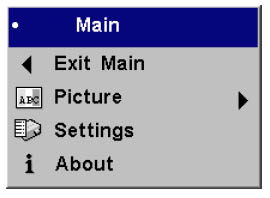
ASK C50 Menu option, ASK Proxima SP-LAMP-007Press the MENU button on the remote or keypad.
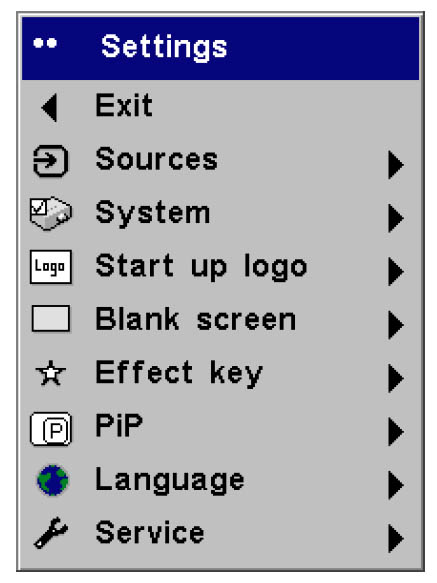
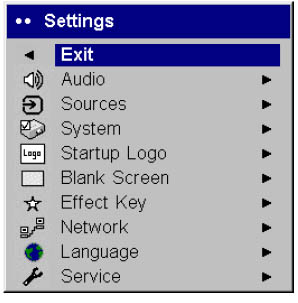
Use the ARROW button to scroll down to the SETTINGS menu. Press SELECT button.

ASK Proxima DP-2000X projector settings menu, ASK Proxima SP-LAMP-007

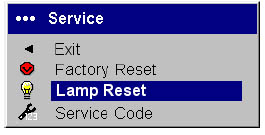
ASK Proxima DP-2000X projector, Service Menu, ASK Proxima SP-LAMP-006

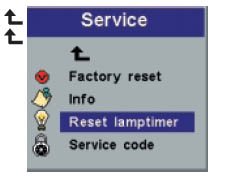
Scroll down to the SERVICE option.Press the SELECT button.
Scroll down to the RESET LAMP option. Press the SELECT button.

The lamp hour will be reset to zero and track the lamp life.

Green your projector

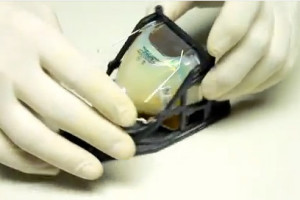
Replace_lamp_keep_plastic_cage

Looking for a less expensive but more environmentally friendly option? Want more information? Watch our step-by-step video on replacing just the ASK Proxima SP-LAMP-007 bulb instead of the entire lamp housing.


Tagged with: , , ,

ASK C50 projector

Install a new ASK C50 projector lamp

Iit’s time to change the ASK C50 projector lamp LED light is blinking red. You may also notice a  “Change Lamp” message on screen when you start up the ASK C50 projector.
ASK C50 ABOUT option, ASK Proxima SP-LAMP-007

The maximum time for the ASK Proxima SP-LAMP-007 lamp is 2,000 hours and when it reaches this limit the projector will shut off. Track the amount of time left by using the ABOUT menu option found on the MAIN menu.

Choose a genuine lamp

The first step towards changing your ASK C50 projector lamp is to go with an original lamp from an OEM manufactutuer. Generic compatible lamps are advertised as great bargains but in fact cost more in the long run when you factor in the shorter lamp life and various problems. Copycat manufacturers have neither the technology or the correct parts to create an ASK Proxima SP-LAMP-007 lamp that will work properly with your ASK C50 projector.

Knock-off lamps susceptible to explosions and can damage the precise components in your ASK Proxima DP-6500X projector. Installing a knock-off generic lamp also voids your warranty. An additional worry are the toxic chemicals used by copy-cat manufacturers such as carcinogenic Krypton-85 to duplicate the designs they are stealing. There are a lot of generic lamps posing as real so protect yourself and learn  the 7 tips for spotting counterfeits.

Buy this lamp on Amazon from the following authorized dealers:

Replacing the lamp

1. Turn off the ASK C50 and unplug the power cord. NEVER operate the projector with the lamp door removed and this will cause the projector to overheat and the lamp to break. Wait 60 minutes for the ASK C50 to cool thoroughly. The projector operates at a high temperature and there is a danger of burning if the projector is not cool enough.

ASK C50 lamp cover, ASK Proxima SP-LAMP-007
2. Turn the C50 projector upside down. Remove the lamp cover by pressing the tab forward towards the lens. ASK CO 50 remove lamp, ASK Proxima SP-LAMP-007 lamp

3.  Loosen the three screws holding the ASK Proxima SP-LAMP-007 lamp in place.

ASK C50 remove lamp, ASK Proxima SP-LAMP-007

4. Grab the ASK Proxima SP-LAMP-007 lamp by the two indents and carefully lift it out of the projector. Place it to one side.

NOTE: Be sure to properly recycle your used ASK Proxima SP-LAMP-007 lamps. These lamps contain mercury so can’t be placed into regular garbage.

5.  Tighten the three screws on the newly installed ASK Proxima SP-LAMP-007.
6.  Slide the lamp cover back into the tabs. Plug the power cord in and press the POWER button to turn the projector back on. You are now ready to Lamp Timer.

Step 3: Resetting the Lamp Timer

Now you’ve installed a new ASK Proxima SP-LAMP-007 you’ll need to reset the LAMP TIMER so the ASK C50 projector can accurately track the lamp life. To reset the Lamp Timer:

ASK C50 Menu option, ASK Proxima SP-LAMP-007Press the MENU button on the remote or keypad.
Use the ARROW button to scroll down to the SETTINGS menu. Press SELECT button.

ASK C50 settings menu, ASK Proxima SP-LAMP-007

ASK Proxima DP-6500X Service Menu, ASK Proxima SP-LAMP-006

Scroll down to the SERVICE option.Press the SELECT button.
Scroll down to the RESET LAMP option. Press the SELECT button.

The lamp hour will be reset to zero and track the lamp life.

Green your projector

Replace_lamp_keep_plastic_cage

Looking for a less expensive but more environmentally friendly option? Want more information? Watch our step-by-step video on replacing just the ASK Proxima SP-LAMP-007 bulb instead of the entire lamp housing.

Tagged with: , ,

Projectors compatible with ASK Proxima SP-LAMP-006
ASK Proxima SP-LAMP-006

The ASK Proxima SP-LAMP-006 has a lamp life of 2,000 hours.  When it’s time to replace the ASK Proxima SP-LAMP-006 lamp, the LED button on your projector’s panel will blink red. To check lamp life go to the ABOUT menu found on the MAIN projector menu. Don’t be caught short!

Have your replacement ASK Proxima SP-LAMP-006 bought and ready for use before the current lamp reaches its end of life.

Go with genuine

ASK Proxima SP-LAMP-006It’s important to install a genuine ASK Proxima SP-LAMP-006rather than a generic “compatible” lamp.

Although lower in price, copycat lamps end up costing much more in the long run. Counterfeit generic lamp offer poor illumination and have a shorter lamp life. Made with inferior parts and poor workmanship, knock-off lamps often bypass safety features including the properly fitted parts. As a result these lamps are  prone to explosionand can also damage the sensitive electronics inside your projector.

Copycat manufacturers are also not following safety protocols and install parts offering no protection to your eyesight from UV rays. In order to create the same results as genuine lamps, these generic manufacturers are also using highly toxic chemicals such as the carcinogenic Krypton-85. Exposure can compromise your helath.

Why risk your health, void your warranty and possible ruin your projector to save a few dollars? Save yourself the hassle.  OEM lamp resellers offer technical support as well as a guarantee Learn more about spotting dangerous projector lamps by reading our article: 7 tips for spotting counterfeits.

Buy this lamp on Amazon from the following authorized dealers:


Compatible Projectors

The ASK Proxima SP-LAMP-006 is compatible with the following projectors:

For step-by-step instructions on replacing your ASK Proxima SP-LAMP-006 projector lamp, click on your projector listed below:

ASK C200 projector, ASK Proxima SP-LAMP-006

Click here for step-by-step instructions on how to change the ASK Proxima SP-LAMP-006 projector lamp for the ASK C200 projector.

ASK Proxima DP-6500X, ASK Proxima SP-LAMP-006

ASK Proxima DP-6500X projector


Click here for step-by-step instructions on how to change the ASK Proxima SP-LAMP-006 projector lamp for the ASK Proxima DP-6500X projector.

Tagged with: , , , ,

ASK C200 projector, ASK Proxima SP-LAMP-006

Installing  a new ASK C200 projector lamp

When the ASK C200 projector lamp reached 2,000 hours, the LED  light will blink red and the projector will turn off. Replace the ASK C200 projector lamp immediately.

To check the lamp life go into the ABOUT menu found on the MAIN menu page.

Buy authentic!

Invest in an original ASK Proxima SP-LAMP-006 projector lamp and protect your ASK C200 projector from harm. Only authentic lamps can give you the quality and proper components needed for your ASK C200 projector.

Although generic-compatible lamps look like a great bargain since they are sold at discount prices, these knock-off lamps will actually cost you more money. They’ve created with inferior materials and poor workmanship so actually have a shorter life span than 2,000 hours. They are also highly susceptible to explosions and can damage the precise components in your ASK C200 projector. An additional worry are the toxic chemicals used by copy-cat manufacturers to duplicate the technology. Many of these lamps have been manufactured with the carcinogenic Krypton-85.

Why risk your health, void your warranty and possible ruin your ASK C200 projector just to save a few dollars? Save yourself the hassle and go with a genuine ASK Proxima SP-LAMP-006. Learn more about spotting dangerous projector lamps by reading our article: 7 tips for spotting counterfeits.

Buy this lamp on Amazon from the following authorized dealers:

STEP TWO: Installing the new lamp

ASK Proxima DP-6500X remove lamp cover, ASK Proxima SP-LAMP-0061. Turn off the ASK C200 projector and unplug the power cord. You don’t want to operate the projector with the lamp door removed and this will cause the projector to overheat.
2. Wait 60 minutes for the ASK PC200 projector to cool thoroughly. The projector operates at a high temperature and there is a danger of burning if the projector is not cool enough.
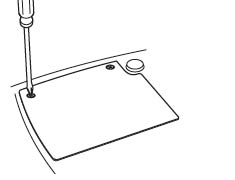
3. Turn the ASK C200 upside down. Remove the lamp cover by unscrewing the two screws holding the cover in place. Slide the lamp out of its slot.

NOTE: Be sure to properly recycle your used ASK Proxima SP-LAMP-006 lamps. These lamps contain mercury so can’t be placed into regular garbage.

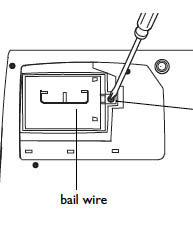
ASK Proxima DP-6500X remove lamp, ASK Proxima SP-LAMP-0064. Loosen the screw holding the ASK Proxima SP-LAMP-006 lamp in place.
5. To remove the ASK Proxima SP-LAMP-006 lamp, grasp the bail wire handle and gently pull the lamp module out. Be careful not to touch the glass bulb as this may cause it to shatter. Oil from your finger will also leave traces on the bulb and cause black spots when the lamp heats up.
6. Put the new ASK Proxima SP-LAMP-006 lamp into the housing. Be sure the wire handle is down flat.
7. Tighten the top screw on the lamp to secure it in place.
8. Slide the lamp cover back into the tabs. Tighten the two screws on the cover.
9. Plug the power cord in and press the POWER button to turn the projector back on.
10. Reset the lamp hour time.

Step 3: Resetting the Lamp Timer

Now you’ve installed a new ASK Proxima SP-LAMP-006 you’ll want the ASK C200 projector to accurately track the number of hours left in the lamp life. You’ll need to reset the Lamp Timer. There are two ways to reset the Lamp Timer:

Using the menu options:

ASK Proxima DP-6500X, ASK Proxima SP-LAMP-006Press the MENU button on the remote or keypad.
Use the ARROW button to scroll down to the SETTINGS menu. Press SELECT button.

ASK Proxima DP-6500X Setting Menu, ASK Proxima SP-LAMP-006ASK Proxima DP-6500X Service Menu, ASK Proxima SP-LAMP-006Scroll down to the SERVICE option.Press the SELECT button.
Scroll down to the RESET LAMP option. Press the SELECT button.

The lamp hour will be reset to zero.

Using the projector’s keypad:

Hold down both VOLUME keys simultaneously for 10 seconds. The LED with turn green and the ASK C200 projector will turn on.

Tagged with: , , , ,

ASK Proxima DP-6500X, ASK Proxima SP-LAMP-006

Guide to installing a replacement  ASK Proxima DP-6500X projector lamp

When the ASK Proxima DP-6500X projector lamp  is reaching end of life you will notice the LED light blinking red. The maximum time for the ASK Proxima DP-6500X projector lamp is 2,000 hours and when it reaches this limit the projector will shut off.

ASK Proxima DP-6500X About Page, ASK Proxima SP-LAMP-006


To check the lamp life go into the ABOUT menu found on the MAIN menu page..

Step 1: Buying the correct lamp

Save money and protect your ASK Proxima DP-6500X projector  projector by investing in an original ASK Proxima SP-LAMP-006 projector lamp. Although generic-compatible lamps look like a great bargain since they are sold at discount prices, these knock-off lamps will actually cost you more money.

Because they have been created with inferior materials and poor workmanship, they are susceptible to explosions, have a shorter life span and can damage the precise components in your ASK Proxima DP-6500X projector. Installing a knock-off generic lamp also voids your warranty. An additional worry are the toxic chemicals used by copy-cat manufacturers to duplicate the technology. Many of these lamps have been manufactured with the carcinogenic Krypton-85.

Protect the life of your ASK Proxima DP-6500X as well as your own. Go with a genuine ASK Proxima SP-LAMP-006. Learn more about spotting dangerous projector lamps by reading our article: 7 tips for spotting counterfeits.

Buy this lamp on Amazon from the following authorized dealers:

STEP TWO: Installing the new  lamp

ASK Proxima DP-6500X remove lamp cover, ASK Proxima SP-LAMP-0061. Turn off the ASK Proxima DP-6500X projector and unplug the power cord. You don’t want to operate the projector with the lamp door removed and this will cause the projector to overheat.
2. Wait 60 minutes for the ASK Proxima DP-6500X projector to cool thoroughly. The projector operates at a high temperature and there is a danger of burning if the projector is not cool enough.
3. Turn the ASK Proxima DP-6500X projector upside down. Remove the lamp cover by unscrewing the two screws holding the cover in place. Slide the lamp out of its slot.

NOTE: Be sure to properly recycle your used ASK Proxima SP-LAMP-006 lamps. These lamps contain mercury so can’t be placed into regular garbage.

ASK Proxima DP-6500X remove lamp, ASK Proxima SP-LAMP-0064.  Loosen the screw holding the ASK Proxima SP-LAMP-006 lamp in place.
5.  To remove the ASK Proxima SP-LAMP-006 lamp, grasp the bail wire handle and gently pull the lamp module out. Be careful not to touch the glass bulb as this may cause it to shatter. Oil from your finger will also leave traces on the bulb and cause black spots when the lamp heats up.
6.  Put the new ASK Proxima SP-LAMP-006 lamp into the housing. Be sure the wire handle is down flat.
7.  Tighten the top screw on the lamp to secure it in place.
8.  Slide the lamp cover back into the tabs. Tighten the two screws on the cover.
9.  Plug the power cord in and press the POWER button to turn the projector back on.
10. Reset the lamp hour time.

Step 3: Resetting the Lamp Timer

Now you’ve installed a new ASK Proxima SP-LAMP-006 you’ll want the ASK Proxima DP-6500X projector to accurately track the number of hours left in the lamp life. You’ll need to reset the Lamp Timer.  There are two ways to reset the Lamp Timer:

Using the menu options:

ASK Proxima DP-6500X, ASK Proxima SP-LAMP-006Press the MENU button on the remote or keypad.
Use the ARROW button to scroll down to the SETTINGS menu. Press SELECT button.

ASK Proxima DP-6500X Setting Menu, ASK Proxima SP-LAMP-006ASK Proxima DP-6500X Service Menu, ASK Proxima SP-LAMP-006Scroll down to the SERVICE option.Press the SELECT button.
Scroll down to the RESET LAMP option. Press the SELECT button.

The lamp hour will be reset to zero.

Using the projector’s keypad:

Hold down both VOLUME keys simultaneously for 10 seconds. The LED with turn green and the ASK Proxima DP-6500X projector will turn on.

Tagged with: , , , ,

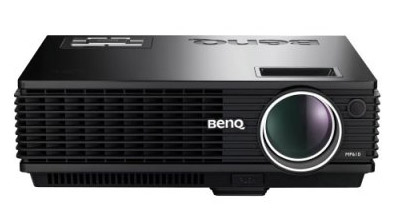
BenQ MP610 projector

Learn more about the BenQ MP610 projector

With its bright 2000 lumens, the BenQ MP610 projector is a multipurpose projector designed primarily for an office setting. It performs well under harsh office lighting with a lamp life of 3,000 hours (more if the economy setting is used).

Retailing at $1000, this projector uses a 0.55″ DLP chip, employing an 800 x 600 resolution to compress higher-resolution inputs for a crisp picture on screen. There’s a 16:9 mode, which digitally re-sizes the picture and uses the golden ratio wheel to increase color depth.

The extremely quiet operating system (25dB) means the presenter won’t have to shout over the machine and its lightweight (6.4lbs) means easy transportation.

The BenQ MP610 can have trouble handling more complicated photos and some may appear washed. It also has a limited range of inputs, with D-sub, S-video and composite the only available options. There are no digital inputs. The projector does tend to run hot and the initial set-up can be difficult. The only maintenance needed is regular cleaning of the lens and lamp replacement.

BenQ MP610is ideal for businesses, education and government offices on a budget.


PROS: BENQ MP610

CONS: BENQ MP610

  • bright 2000 lumens
  • operates well under harsh lighting
  • long lamp life at 3000 hours using regular settings
  • econo mode gives an additional 1000 hours of lamp life (4000 hours)
  • uses 800×600 resolution to compress higher-resolution inputs
  • crisp picture on screen
  • extremely quiet (25dB)
  • extremely light 6.4lbs (3.3kg)
  • easy to transport
  • no regular maintenance needed except for cleaning lens
  • lamp installation can be done in under 10 minutes
  • initial set-up can be complicated
  • limited color range for more complicated slides
  • noticeable rainbow effect
  • limited range of inputs, with only D-sub, S-video and composite
  • no links for digital
  • runs hot and needs to be well ventilated
  • not suitable for entertainment venues
  • remote is clunky


Replacement lamp and accessories

Need to replace the lamp on your BenQ MP610 projector? Find it on Amazon!


Looking for a BenQ Universal Projector Ceiling Mount? Find it on Amazon!

Need lens cleaner for the BenQ MP610 projector? Find it on Amazon!


For more information

Click here for a step-by-step guide on replacing the BenQ MP610 projector lamp.

Tagged with: , , ,

ASK Proxima SP-LAMP-001

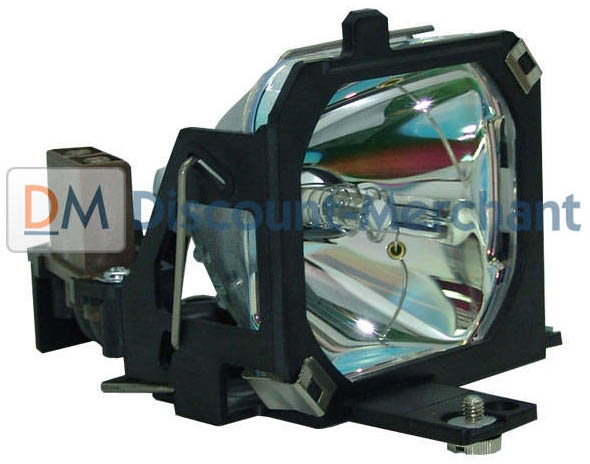
ASK Proxima SP-LAMP-001 projector lamp

Compatible projectors using the ASK Proxima SP-LAMP-001 projector lamp

You can expect between 1500-2000 hours from your ASK Proxima SP-LAMP-001 projector lamp depending on how usagae and maintenance
ASK Proxima SP-LAMP-001 replace lamp alarm

When it’s time to replace the ASK Proxima SP-LAMP-001 lamp, the ALARM button next to the power control will light up red.

Go with genuine

It’s important to install a genuine ASK Proxima SP-LAMP-003 rather than a generic “compatible” lamp.

Although lower in price initially, these copy cat lamps usually end up costing much more in the long run. Counterfeit generic lamp offer poor illumination that can damage your eyesight as well as a shorter lamp life. Since these lamps are made with poor workmanship and inferior materials they often damage the sensitive components in your projectors. “Compatible” generic lamps are prone to explosion so you also have the risk of being exposed to the carcinogenic substance Krypton-85 used in the making of these lamps.

Go with genuine and get a lamp that keeps your projector working and your warranty good. The OEM resellers offer technical support as well as a guarantee that the ASK Proxima SP-LAMP-001 lamp you are installing will work properly.

Learn the 7 Ways to spot a counterfeit lamp.

Buy this lamp on Amazon from the following authorized dealers:

Compatible Projectors

The ASK Proxima SP-LAMP-001 is compatible with the following projectors

For step-by-step instructions on replacing your ASK Proxima SP-LAMP-001 projector lamp, click on your projector listed below:

ASK C13 projector, ASK Proxima SP-LAMP-001

ASK C13 projector, ASK Proxima SP-LAMP-001

Click here for step-by-step instructions on how to change the ASK Proxima SP-LAMP-001 projector lamp for the ASK C13 projector.


ASK C300 projector, ASK Proxima SP-LAMP-001

ASK C300 projector

Click here for step-by-step instructions on how to change the ASK Proxima SP-LAMP-001 projector lamp for the ASK C300 projector.

ASK DP800, ASK Proxima SP-LAMP-001

ASK DP800 projector

Click here for step-by-step instructions on how to change the ASK Proxima SP-LAMP-001 projector lamp for the ASK DP800 projector.

Green your projector

ASK-Proxima-LAMP-001-projector-lamp_VIDEOLooking for an even less expensive option? Watch our step-by-step video on replacing only the bare ASK Proxima SP-LAMP-001 instead of the entire lamp housing.

Tagged with: , , , ,

ASK C13 projector, ASK Proxima SP-LAMP-001

Install a replacement ASK C13 projector lamp

Replacing the ASK C13 projector lamp is quick and easy. Follow our guide to a newASK C13 projector lamp

Go with authentic lamps

It’s important to install the correct ASK Proxima SP-LAMP-001 lamp. Educate yourself and learn how to spot a counterfeit lamp. Generic lamps often advertised as “compatible” should be avoided since they are manufactured with inferior parts that can damage the sensitive (and expensive) components in your ASK C13 projector. Knockoff lamps are prone to explosion and have been created using toxic substances such as Krypton-85, which can threaten your health and safety. Using a counterfeit generic lamp will also void any warranty for you have. Spend the few extra dollars for a genuine OEM lamp that guarantees proper components and workmanship to ensure your projector is working at its peak.  You’ll also be getting a lamp with a warranty that you’ll be able to return. Most legitimate resellers of these lamps also offer customer service help should you experience any difficulties when installing the ASK Proxima SP-LAMP-001. Go with authentic!

Buy this lamp on Amazon from the following authorized dealers:

Replacing the lamp

ASK C13 lamp cover, ASK Proxima SP-LAMP-001Step 1: Turn off the ASK C13 projector and disconnect the power cord. Allow the projector to cool down before replacing the ASK Proxima SP-LAMP-001. These projectors operate at high temperatures and you run the risk of burning yourself if the projector has not cooled. Loosen the screw holding the lamp cover on the ASK C13. Put the lamp cover to one side.

ASK C13 lamp cage, ASK Proxima SP-LAMP-001

Step 2: Unscrew the 3 screws holding the ASK Proxima SP-LAMP-001 in the place. Gently lift out the used ASK Proxima SP-LAMP-001. Gently insert the new ASK Proxima SP-LAMP-001 into the projector.

The ASK Proxima SP-LAMP-001 contains mercury and should not be thrown into regular garbage. Recycle your used lamps!

ASK C13 lamp replacement, ASK Proxima SP-LAMP-001

Step 3: Tighten the screws on the new ASK Proxima SP-LAMP-001 lamp. Place the lid back on and tighten the screw holding it in place. You’re ready to reset the lamp timer.

Resetting the Lamp Timer

It’s important to reset the lamp timer of the ASK C13 in order to properly track lamp life. Failure to reset the timer may result in the projector not knowing when the lamp is finished and shutting down suddenly.

To reset the lamp timer:

ASK C13lamp reset, ASK Proxima SP-LAMP-001ASK C13 change lamp icon, SK Proxima SP-LAMP-001


  • Open the MENU system.
  • Scroll down to OPTIONS. Press ENTER.
  • Scroll down to SERVICE. Press ENTER.
  • Click on LAMP TIMER RESET.
  • Click on YES.

Green your projector

ASK-Proxima-LAMP-001-projector-lamp_VIDEO

Looking for an even less expensive only try replacing the bare ASK SP-LAMP-001 bulb instead of the entire lamp housing.

Watch our step-by-step video on replacing only the lamp.

Tagged with: , , ,

DMD DLP Chip technology

DMD DLP Chip technology

Replace the DMD Chip to solve white death

White dots, white snow or sparkling stars on your DLP TV means only one thing – white death syndrome cause by a worn out DMD chip. The white death syndrome seems to happen when the DLP TVs have been in use anywhere from two to five years – usually when the warranty has expired

Certain brands seem more vulnerable than others to the white death syndrome. Samsung and Mitsubishi DLP TVs have been plagued with the problems for several years now. Sony and JVC choose to take the TVs set off the market in response to complaints from disgruntled owners.

If you read the various forums offering solutions, you’ll see customers being given quotes of $600 and upwards for solving the white spot syndrome or replacing the DMD DLP chip. Fortunately, there are companies offering the offering the DLP chip for under $300.

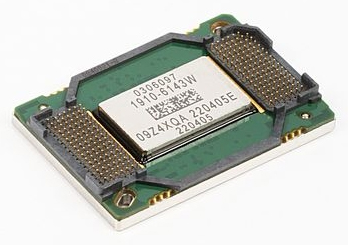
Find this New Mitsubishi/Toshiba 4719-001997 DLP Chip 1910-6143W on Amazon.

MItsusbishi DMD DLP chip

DMD DLP chip

Causes of DLP white death

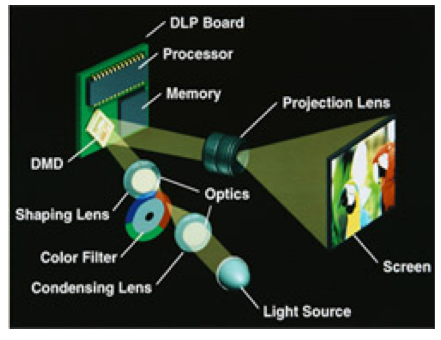
At the heart of every DLP TV, no matter what the brand is the DMD chip invented in 1987 by Dr. Larry Hornbeck of Texas Instruments. This optical semiconductor contains an array of up to 2 million hinge-mounted microscopic mirrors, so small they measure one-fifth the width of a human hair.

The DMD chip receives the digital or graphic signal reflecting it onto the TV screen to produce the stunning images that have made these TVs a frontrunner for the consumer. The mirrors themselves are made out of aluminum and mounted on a yoke with an axle that literally twists in the middle. The DMD micro mirrors switch on and off, either tilt towards the light or away from it.

This action creates the light or dark pixels on the screen and allows for a staggering 1,204 shades of gray. At the same time, the DLP lamp generates white light that passes through a red, green, and blue color filter to the surface of the DMD chip creating millions of colors.

DLP white dot syndrome happens when one of these micro mirrors gets stuck and can no longer reflect the signal. The result is a white or black dot on the screen. As more and more mirrors become stuck, more white dots appear on screen creating an image that can’t be viewed.

The affordable solution

In order to address the issue, Texas Instrument has created a replacement DMD DLP chip that is affordable and readily available from recognized distributors. While part numbers may vary, the chip remains the same. The following part numbers are interchangeable:

Samsung DMD Chip 4719-001997
Samsung DMD Chip 4719-001985
Samsung DMD Chip 4719-001999
Samsung DMD Chip W1272-5003
Mitsubishi DMD Chip 276P595010
Board Number DMD Panel IC# 1910-6143W
Board Number DMD Panel IC# 1910-6145W
Board Number DMD Panel IC# 1910-6103W

Avoid an expensive repair bill and keep your customers happy by purchasing a DMD DLP chip for under $300.
Find this New Mitsubishi/Toshiba 4719-001997 DLP Chip 1910-6143W on Amazon.

Tagged with: , , , , ,
Join the discussion on Facebook! All your questions, answered! The Screen & Projector Group