We're now Screen and Projector! For updated content, visit ScreenAndProjector.com and follow @screenandproj on social media!

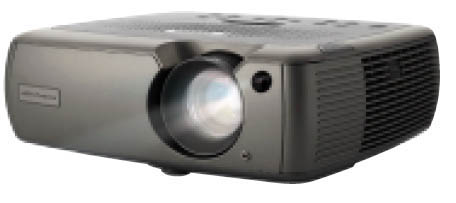
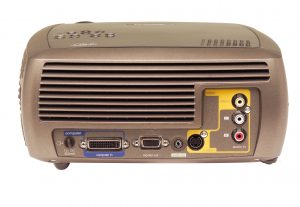
ASK Proxima C160/C180, ASK Proxima SP-LAMP-017

How to install a new ASK Proxima C180 projector lamp

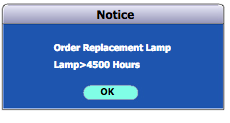
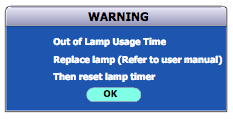
When the LED light is blinking red it’s time to replace the ASK Proxima C180 projector lamp. You may also see a “Replace Lamp” message on the screen. Don’t wait to replace the ASK Proxima SP-LAMP-017. The projector will turn off once the lamp life is approaching end of life.
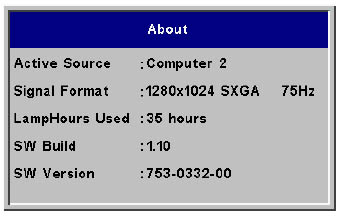
ASK Proxima C160/C180 ABOUT Menu, ASK Proxima SP-LAMP-017

Find out how many hours have been used on the ASK Proxima SP-LAMP-017 through the ABOUT option found on the main MENU.
nbsp

The importance of authentic lamps

Prolong the life of your ASK Proxima C180 projector by installing an original ASK Proxima SP-LAMP-017 projector lamp. Generic lamps look like a great bargain but these knock-off lamps are created with inferior materials making them susceptible to explosions when installed and they can damage the sensitive components in your ASK Proxima C180 projector. They’ve created using toxic substances such as Krypton-85 (which is carcinogenic to humans). “Compatible” lamps also  have a shorter life span so can actually cost more money in the long run.

Buying authentic guarantees a projector lamp created with genuine, non-hazardous materials by the original manufacturer. These lamps come with money-back guarantee and keeps your warranty entact. It’s worth the few extra dollars to eliminate potential problems and have a lamp built to work properly with your ASK Proxima C180 sensitive mechanisms. Learn more about spotting dangerous projector lamps by reading our article: 7 tips for spotting counterfeits.

Buy this lamp on Amazon from the following authorized dealers:

Aurabeam Replacement Lamp for Ask Proxima SP-LAMP-017 Projector with Housing
SpArc Bronze for Ask Proxima SP-LAMP-017 Projector Replacement Lamp with Housing

Replacing the  lamp
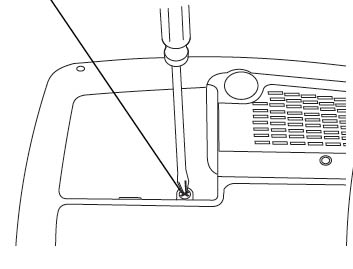
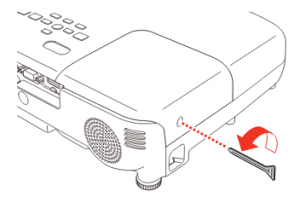
ASK Proxima C160/C180 lamp door, ASK Proxima SP-LAMP-017

  • Turn the ASK Proxima /C180 projector off and unplug the AC cord. Wait 60 minutes until the projector is fully cooled. These projectors work under extremely high heat and there is danger of burning yourself if you don’t let the projector cool off.
  • Turn the ASK Proxima C180 projector upside down.
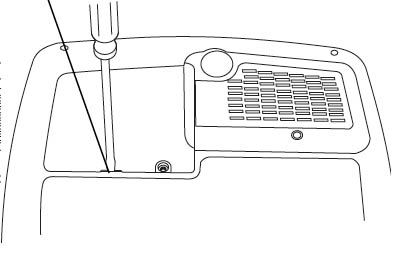
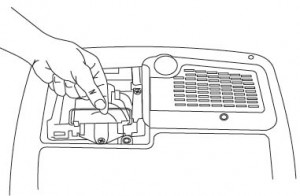
ASK Proxima C160/C180 door open, ASK Proxima SP-LAMP-017

  • Loosen the screw holding the lamp cover in place.
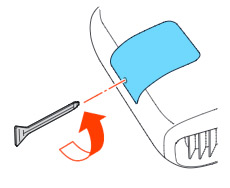
  • Pry the lamp door off using the tip of the screw driver.
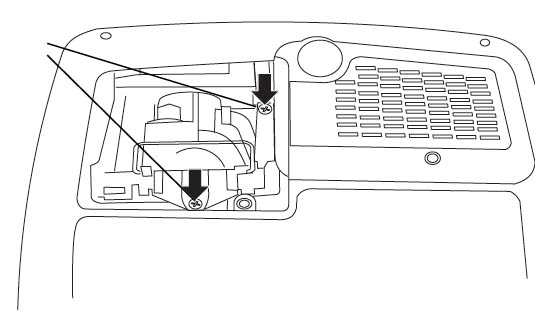
 

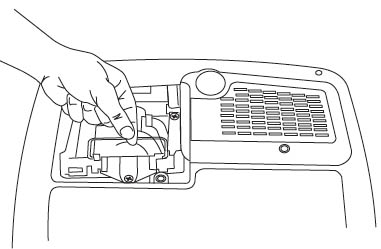
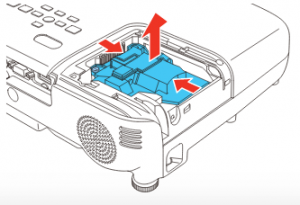
ASK Proxima C160/C180 lamp cage, ASK Proxima SP-LAMP-017

Be sure to send the used lamp to a proper recycling facility. Don’t throw the used lamp into the regular garbage.

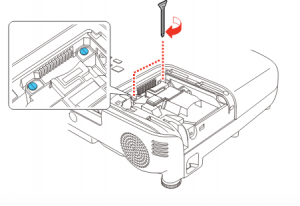
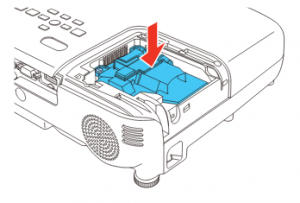
ASK Proxima C160/C180 lamp cage, ASK Proxima SP-LAMP-017

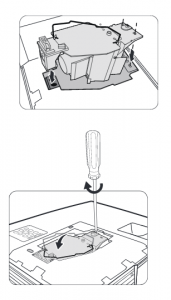
  • Put the new ASK Proxima SP-LAMP-017 lamp into the projector making sure it’s properly seated.
  • Replace the two screws on the lamp module.
  • Replace the door and tighten the screw.
  • Plug in the power cable and turn the projector back on. You are ready to reset the lamp timer.

Resetting the lamp timer

Once you have replaced the ASK Proxima SP-LAMP-017 it’s extremely important to reset the lamp timer. You want the the lamp life  to properly track the hours left for your ASK Proxima SP-LAMP-017. Otherwise you run the risk of the ASK Proxima C180 suddenly shutting down.
There are two ways of resetting the lamp timer.

Using the projector:

  • Press the decrease volume button on the remote first, followed by the increase volume button.
  • The LED light will blink green when the lamp hour has been reset.
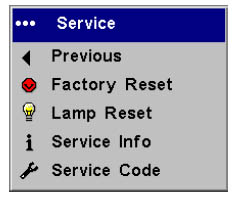
ASK Proxima C160/C180, ASK Proxima SP-LAMP-017Using the menu:

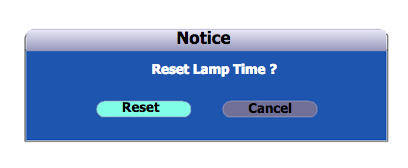
  • Open the MAIN menu.
  • Navigate to the SETTINGS menu. Press SELECT.
  • Scroll down to the SERVICE menu option. Press SELECT.
  • Scroll down to the LAMP RESET option. Press SELECT.


Learn more with Top tips for extending DLP projector lamp life.
Tagged with: , ,

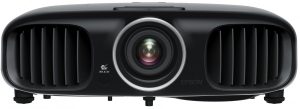
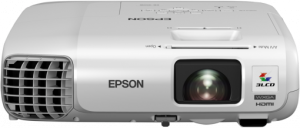
Epson EB-955W projector lampInstalling a new Epson EX7220 air filter is an important maintenance routine

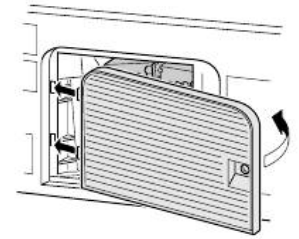
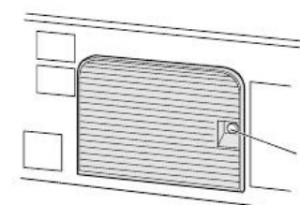
The Epson EX7220 air filter should be replaced regularly. Allowing dust particles to collect in the projector can cause it to overheat and cause the lamp to explode.

Cleaning the Air Filter and Vents

Clean the projector’s air filter or vents if they get dusty, or if you see a message telling you to clean them.

      1. Turn off the projector and unplug the power cord.
      2. Gently remove the dust using a small vacuum designed for computers or a very soft brush (such as a paintbrush).Note: You can remove the air filter so you can clean both sides of it. Do not rinse the air filter in water, or use any detergent or solvent to clean it.Caution:
        Do not use canned air. The gases may leave a flammable residue or push dust and debris into the projector’s optics or other sensitive areas.
      3. If dust is difficult to remove or the air filter is damaged, replace the air filter.

Replacing the Air Filter

    • You need to replace the air filter in the following situations:

      • After cleaning the air filter, you see a message telling you to clean or replace it
      • The air filter is torn or damaged

You can replace the air filter while the projector is mounted to the ceiling or placed on a table.

    1. Turn off the projector and unplug the power cord.
    2. Carefully open the air filter cover.
    3. Pull the air filter out of the projector.

      Note: Air filters contain ABS resin and polyurethane foam. Dispose of used air filters according to local regulations.
    4. Place the new air filter in the projector as shown and push gently until it clicks into place.
    5. Close the air filter cover.

Need to replace the Epson EX7220 projector lamp? Follow our guide.

Tagged with: ,

Optoma_HD141X_projectorWhy change the Optoma HD141X air filter?
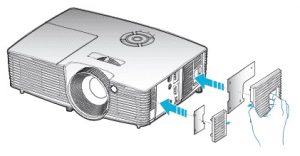
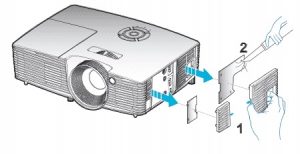
Optoma HD141X air filter should be replaced regularly, Keeping this The Optoma HD141X air filter properly is an important part of keeping the projector running.
Air filters stop dust from accumulating on the optical elements inside the projector. Allowing dust particles to collect in the projector can cause it to overheat and cause the lamp to explode. Cleaning and replacing the  Optoma HD141X should be done regularly every three months. If the projector is used in a dusty environment it should be changed more frequently.

Replacing the filter

TO start
  • Switch the power off button on the remote control or on the keypad of the projector.
  • Disconnect the power cord.
  • Slowly remove the dust cover. Don’t force the lid off as this could damage the lid.
 Gently clean dust from the filters using a small brush or small computer vacuum.
If the filters are very dirty you will need to replace them.
Re-install the filter cover.
After checking for filter, turn the projector back on.
Tagged with: ,

How to install a new Canon LV-X300 ST projector lamp

When it’s time to replace the Canon LV-X300 ST projector lamp you’ll see a lamp replacement icon appear on screen and the LAMP REPLACE indicator will light orange. Replace the lamp immediately. When the projector is in operation, the duration (in hours) of lamp usage is automatically calculated by the built-in timer.

Buy this lamp on Amazon sold by these authorized dealers:


Watch for the warning signs on screen:

Canon_LV-X300 ST_projector_Canon LV-LP38_replacement_lamp_warnings

First warning: The lamp has been in operation for 4500 hours. Install a new lamp

for optimal performance. If the Canon LV-X300 ST projector is operating in Economic mode, you can use the the to 4950 hour.

Second warning: The lamp has been in operation for 4950 hours. Get your authentic replacement projector lamp ready .

Third warning: The lamp has been in operation for 5000 hours. It is strongly recommended that you replace the lamp
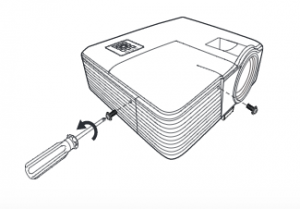
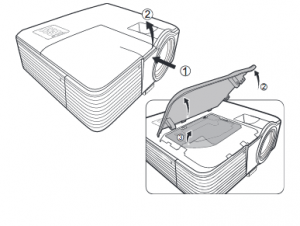
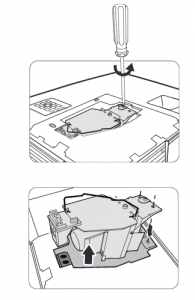
Final Warning: The lamp MUST be replaced before the projector will operate

Install the projector lamp

Your Canon LV-X300 ST projector uses the Canon LV-LP38 projector lamp model. Before replacing the lamp follow these safety instructions:

  • Unplug the electrical cord on the Canon LV-X300 ST so there is no chance the projector could get turned on during the installation.
  • The Canon LV-X300 ST operates under high temperatures so give it at least one hour to cool down before opening the projector to change the projector lamp.

Canon_LV-WX300_projector_Canon LV-LP38_replacement_lamp_remove_cover

Canon_LV-X300 ST_projector_Canon LV-LP38_replacement_lamp_remove

  • Loosen the screw holding the Canon LV-LP38 projector lamp cover in place.

    Lift the lamp cover up. Do not turn the power on with the lamp cover removed.

Canon_LV-WX300_projector_Canon LV-LP38_replacement_lamp_replace


Canon_LV-WX300_projector_Canon LV-LP38_replacement_lamp_install

  • Replace the lamp assembly with a new Canon LV-LP38 projector lamp. Be careful not to touch the actual bulb as oil from your fingers can leave black marks on the lamp.
  • Close the lamp cover


Resetting the lamp timer counter

After replacing the Canon LV-LP38 projector lamp, you’ll need to reset the lamp. To reset:

Canon_LV-WX300_projector_Canon LV-LP38_replacement_lamp_reset_timer

  • Restart the projector.
  • Open the On-Screen Display (OSD) menu.
  • Go to the SYSTEM SETUP: Advanced>Lamp Settings menu.
  • Press OK/IMAGE. The Lamp Settings page is displayed. Press to highlight/ Reset lamp timer and press OK/IMAGE.
  • A warning message is displayed asking if you want to reset the lamp timer. Highlight Reset and press OK/IMAGE . The lamp time will be reset to ‘0’.

Learn how to prolong lamp life with Top tips for extending projector lamp life.


Tagged with: , ,

Replace the Dukane ImagePro 7300dukane-7300-projector projector lamp

Warning sign

Be sure to replace the lamp when you see the message “Change lamp”  It may also be time to replace the projector lamp if you notice the colors on screen have faded or become distorted.

GO with authentic

It can be confusing finding the best Dukane ImagePro 7300 projector. Counterfeits, despite their bargain price, actually cost more in the long run. They should be avoided for the following reasons:

Find this lamp on Amazon from these authorized dealers:

Replacing the projector lamp

The Dukane ImagePro 7300 projector uses the Dukane 456-7300.  Before installing a new projector lamp do the following safety steps:

  • Reduce the risk of electrical shock by disconnecting the power cord on the projector.
  • Reduce the risk of severe burns by allowing the projector to cool for at least 45 minutes. It should be cool to the touch.
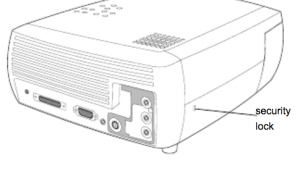
ImagePro-7300_projector_lamp_Dukane-456-7300_security_lockTurn the projector on its side so that the lamp door is facing you. Using a
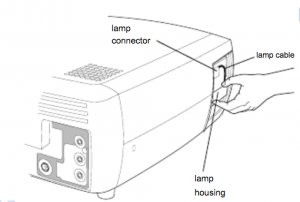
flat-blade screwdriver, gently pry the lamp door from the projector by
placing the screwdriver blade into the space between the top of the lamp
door and the projector.
ImagePro 7300_projector_lamp_Dukane 456-7300_remove


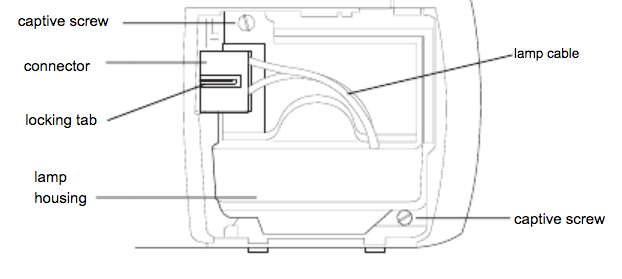
Loosen the two captive screws that attach the lamp housing to the
projector. Detach the lamp connector from the projector by depressing the locking
tab on the connector and lightly pulling it free. Be extremely careful when removing the lamp housing.  Carefully remove the lamp housing.

NOTE: The Dukane 456-7300 projector lamp contains mercury and should not be thrown into regular garbage. Recycle your used lamps!

ImagePro 7300_projector_lamp_Dukane 456-7300_disconnect

Install the new Dukane 456-7300 lamp housing and tighten the screws. Re-attach the lamp connector to the projector. The locking tab should engage when the connector is fully plugged in.
Replace the lamp door. Plug in the power cord and toggle the Power switch to turn the projector
back on.

Resetting the lamp timer

It’s important to set the lamp timer so the Dukane ImagePro 7300 projector can accurately track the life span of the Dukane 456-7300.

Reset timer_Image Pro_7300_projector_lamp

To reset the lamp hour timer:
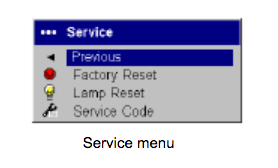
  • Navigate to the Settings
  • Service menu
  • Select Lamp Reset


After replacing the Dukane ImagePro 7330 be sure to clean the lamp filters.

If the dust filter becomes clogged it will cause  high temperatures and premature lamp failure.  To maximize lamp life you should clean the screen every 250 hours.
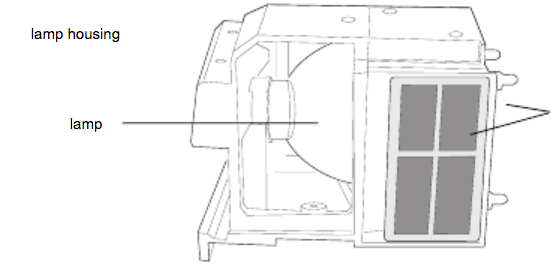
  • Remove the lamp housing.
  • Examine the dust filter screens on the lamp housing.
  • If necessary, use a vacuum cleaner set on low power to clean the screens. Be careful not to disturb any internal components when cleaning the screens. Replace the lamp housing and lamp door.

Learn more with Top tips for extending DLP projector lamp life.

Tagged with: , ,

Replace the Epson EX7220 projector lamp with our guide

Install a replacement Epson EX7220 projector lamp

When it’s time to replace the Epson EB945 projector lamp you’ll notice the power indicator is flashing blue, and the lamp indicator is flashing orange. You may also notice the picture has gone dimmer or the color is off. An on screen message will also appear; “Time to replace the lamp. ” You can expect 4900 hours of use when the projector is set to Normal and about 5900 hours when the ECO mode has been started. The Epson EB945 projector uses model Epson ELPLP78.

Why invest in authentic?

The best thing you can do to keep your prjector working properly is to buy an authentic Epson EX7220 projector lamp. Most counterfeit lamps cost more in the long run because they have a shorter life than original lamps. While counterfeits claim to be compatible they are often created with toxic materials including including Krypton-85. Lamps that are not OEM are prone to explosions and usually can damage the projector’s sensitive optics. Your eyesight is also at risk. Buy an OEM authentic Epson EB945 projector lamp and keep your projector working properly.

Find this authentic lamp on Amazon:

Installing the lamp

Before installation:

  • Turn off the Epson EB945 projector and unplug the AC cord.
  • Allow the projector to cool for one hour – it should be cool to the touch. Inside of the projector can be very hot since these machines operator under high temperatures and you run the risk of being burned if the projector has not cooled down.
  • Do not operate the projectors while any of the lamps are removed as this may result in malfunctions, fire hazard and other accidents.

Caution: Don’t touch the screen or the actual bulb with your finger since the oil from your skin can cause a black spot on the bulb.


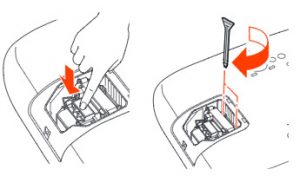
Loosen the screw holding the Epson EX7220 lamp cover in place.
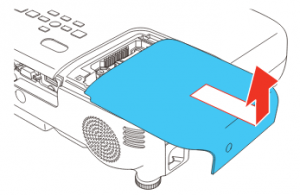
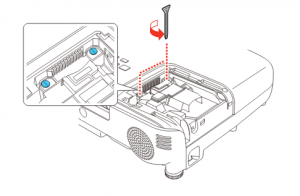
Remove the lamp cover.

Loosen the two screws holding the Epson ELPLP78 in place.

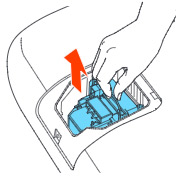
Grab the raised section of the lamp and gently pull the lamp out of the projector. NOTE: The Epson ELPLP78 lamp contains mercury and should not be thrown into regular garbage. Recycle your used lamp.


Take the new Epson ELPLP78 projector lamp by the handle and gently put it into place making sure the lamp is facing in the right direction.

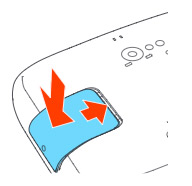
Don’t force the lamp into the projector. Replace the projector lamps screws.

Re-connect the lamp cover. Re-attach the power cord. Turn the projector on and let it warm up. You are ready to reset the lamp timer.

Reset Lamp Timer

Reset the Epson EX7220 Lamp Replacement Counter only when the Epson ELPLP78 lamp has been replaced.

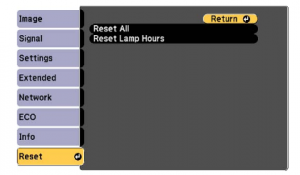
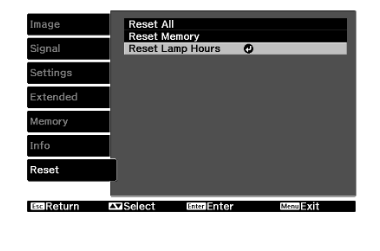
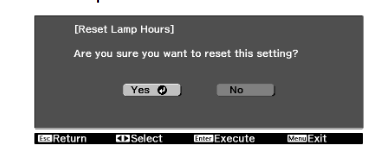
  • Press MENU to display the RESET menu.
  • Press Enter.
  • A prompt will display asking you if you want to RESET LAMP HOURS.
  • Select YES and press ENTER.
  • The lamp hours will be reset to zero.
  • Press MENU or ESC to exit the menu
  • The lamp timer will be a zero.


Extend the life of the newly installed Epson ELPLP78 with the following tips:

  • Keep your air filters clean to avoid overheating the projector.
  • Turn off the Epson PowerLite 93 and let it stand for at least one hour ever 24 hours. An average use of four to five hours per day will ensure longer lamp life.
  • Make sure there is enough airflow around the projector particularly if it’s been permanently mounted.
  • Learn more with Top tips for extending DLP projector lamp life


Tagged with: , ,

safety firstReview these important projector safety tips


Setting up your projector? Follow these important projector safety tips courtesy of Epson America.

 

Setting up

  • Be sure to place the projector on a stable surface. Avoid any unstable carts or tables.
  • Make sure the projector is level. Don’t operate while tilted on its side. Don’t tilt more than 30° forward or back.
  • Do not use the projector near water, near high heat, close to high voltage or magnetic fields.
  • Projectors side-by-side should have at least 2 feet (60 cm) of space between them for proper ventilation.
  • Never place the projector on a sofa, rug, loose papers or any other soft surface.
  • Never cover the projector with blankets, tablecloths or any other textiles.
  • Always have proper ventilation in closed-in cabinets so the projector doesn’t overheat.
  • Never place heavy objects on the projector.
  • Do not use where there is smoke, steam, corrosive gases, dust,
  • Do not use in hot locations or in direct sunlight or where there is exposure to sudden changes in temperature.
  • Do not use the projector outside of the required temperature range 41 to 95 °F (5 to 35 °C) at an altitude of 7500 feet (2286 m) or less, or 41 to 86 °F (5 to 30 °C) at a higher altitude.

Plugging in

electrical plugs

  • Use the correct power cord and power source as indicated on the projector model. Substitutes may result in fire or electric shock. If the power cord is missing contact your dealer. If you are using the projector outside the USA be sure to purchase the correct cord for the country, you are visiting.
  • Put the projector near a wall outlet where it can be plugged in easily. If you need to have a large extension cord make sure it is tapped down to avoid anyone tripping over the cord and pulling the projector with it. Don’t let the cord be walked on as this can cause fraying and damage to the plug.
  • Never hold the plug with wet hands.
  • Don’t insert the plug into a dusty socket as this can cause a power surge that can short circuit the projector.
  • Be sure to hold the plug when disconnecting and never pull the power cord to disconnect or turn the projector off.
  • Watch out for overloading wall outlets and extensions cords. You can cause electrical shock or make the extension cord over heat.

Operating

industrial-safety

  • Always lower the volume before turning off the projector.
  • Do not look into the lens when the projector is on. The bright light can damage your eyes.
  • Avoid standing in front of the projector so the bright light does not shine into your eyes.
  • Do not bring your hands or face close to the vents while the projector is running.
  • Never allow objects of any kind to enter any openings in the projector.
  • Do not leave flammable objects on top or near the projector.
  • Never spill liquid of any kind into the projector.
  • Keep the ventilation slots on the projector case open to keep the projector fan working and prevent overheating.

Mounting

caution sign

  • Install on the wall or ceiling using the mounting hardware designed for your model. Get a qualified technician to install your mounted projector.
  • When installing or adjusting a ceiling or wall mount never use adhesive to prevent the
  • screws from loosening. Avoid all oils or lubricants as they can make the projector case crack and fall from its mount injuring anyone underneath the projector.
  • Be sure to use the correct outlet for your country.
  • For wall mounts, leave at least 7.9 inches 7.9 inches (20 cm) of space between the wall and the air exhaust vent.

Cleaning

micro-fiber-cloth

  • Unplug the projector from before cleaning or replacing the lamp.
  • Clean with a dry cloth. If there is a stubborn stain, then use a damp cloth.
  • Avoid any liquid or aerosol cleaners and in particular any sprays containing flammable gas, alcohol or benzine. This can damage the projector and cause a fire.

Maintenance

maintenance

  • Clean the air filter and vent regularly. A blocked air filter and vent will cause the projector to overheat causing the lamp to explode.
  • Do not use canned air to clean the projector lens as the gas leaves a residue.
  • Never store the projector outdoors.
  • Except for changing the projector lamp, never remove covers as this can expose you to high heat and dangerous voltages. Call a service technician.
  • Never attempt to disassemble or modify the projector.
  • Never remove the lamp unless the projector is cool to the touch.
  • Never place the projector near an open flame.
  • Do not block the lens during projection with any object other than the lens cover. Books can catch on fire.
  • If the lamp breaks ventilate the room to prevent gases from the lamp being inhaled or coming in contact with your skin or eyes. Seek medical advice immediately if you do inhale any gases.
  • If the projector is mounted overhead and the lamp breaks, be careful to prevent pieces of glass from falling into your eyes or mouth when you open the lamp cover.

When to shut down

stop-

  • Unplug the projector immediately is there is a distinct change in performance or if there are any strange odors, noises or smoke coming from the projector.
  • Stop using the projector if:
    • the power cord is damaged or frayed.
    • liquid or objects have been inserted inside
    • if the power cord is damaged or frayed
    • if it’s been exposed to rain or water
    • if the projector has been dropped
    • if there are any damages to the projector’s housing.

Storage

storage

  • Unplug the projector when it will not be used for extended periods.
  • Do store the projector where there is smoke, steam, corrosive gases, dust,
  • Do store the projector or remote control in a hot location or in direct sunlight or may be exposed to sudden changes in temperature.
  • Don’t leave in hot car.
  • Before you move the projector, make the power is turned off and the plug is disconnected from the outlet.
Tagged with:

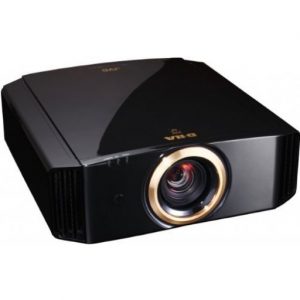
jvc_dla-rs55_projectorReplace the JVC DLA-RS55 projector lamp

You can expect up to 3000 hours of use before the JVC DLA-RS55 projector lamp needs replacing.
Look for these indicators when it’s time  to replace the JVC DLA-RS55 projector lamp:

  • the picture becomes dark
  • the tint becomes strange
  • the image flickers


Find this lamp on Amazon from the following authorized dealers:


Buy authentic

Be sure to invest in an authentic lamp for your JVC DLA-RS55 projector lamp. This projector uses the JVC PK-L2210UP projector lamp. Be sure to invest in an authentic lamp.

Why avoid counterfeit projector lamps:

Projector lamp replacement

BEFORE replacing the lamp:

  • Turn off the projector and unplug the AC cord.
  • Allow the JVC DLA-RS55 projector lamp to cool for at least one hour. Don’t open the projector until it is cool to the touch. These projectors operate under high temperatures and you can run the risk of burning yourself.

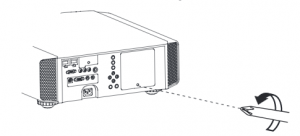
JVC_DLA-RS55_projector_lamp_PKPK-L2210UP_cover

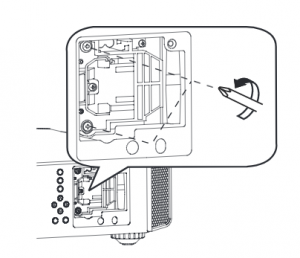
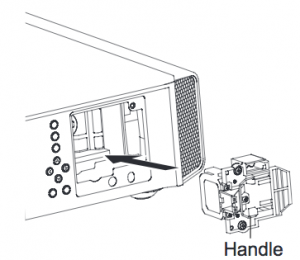
  • Loosen the screw holding the projector lamp cover into the projector. Place the cover to one side.JVC_DLA-RS55-install new lamp_JVC PK-L2210UP
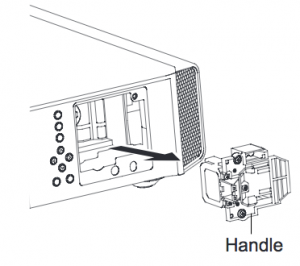
  • Loosen the two screws keeping the JVC PK-L2210UP projector lamp in place. Grab wire handle and gently pull the lamp out taking care not to hit the lamp.

JVC_DLA-RS55-install new lamp_JVC PK-L2210UP

  • Take the JVC PK-L2210UP projector lamp by the wire handle and gently pull it from the projector. NOTE: This lamp contain mercury and can’t be placed into regular garbage. Recycle this lamp.
  • JVC_DLA-RS55-install new lamp_JVC PK-L2210UPPlace the replacement JVC PK-L2210UP into the JVC DLA-RS65 projector. Avoid touching the glass or the bulb since the oil from your fingers may cause black spots on the bulb when the projector heats up.
  • Tighten the two screws on the new JVC PK-L2210UP lamp.
  • Replace the JVC DLA-HD1 projector lamp cover. You’ll need to reset the Lamp Counter.

Resetting the projector lamp timer

Each time you replace the JVC DLA-RS65 projector lamp you need to reset the lamp timer to zero. Not resetting the lamp timer will result in your projector not turning back on because it thinks the old lamp has not been replaced.

JVC_DLA-RS55-reset_lamp_JVC PK-L2210UP_timer

Reset the lamp timer using the projector:

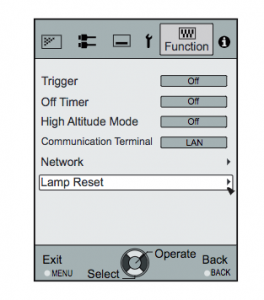
  • Display the Main Menu screen. Scroll over to select the FUNCTION option
  • Scroll down to the LAMP RESET option
  • JVC_DLA-RS55-reset_lamp_JVC PK-L2210UP_timerPress the Enter button
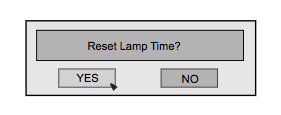
  • A second option screen will open asking toe Reset Lamp Timer
  • Scroll down to select YES
  • The lamp timer will be reset to zero.

Reset the lamp timer using the remote control:

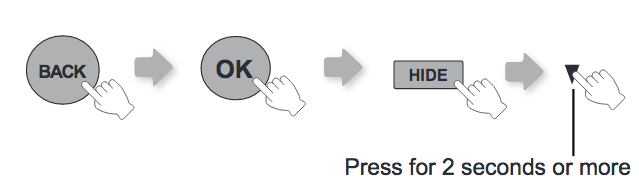
There is also the option of resetting the lamp timer using the remote control. Must operate with the remotecontrol in the standby mode (the projector is powered, but is not turned on).

JVC_DLA-RS65_projector_lamp_JVC PK-L2210UP_reset_RC

Press in the order as shown.: Back/OK/Hide
Press each button within 2-second intervals and press the last button for 2 seconds or more.
Finish by pressing [STANDBY/ON] indicator and [LAMP] indicator blink alternately for 3 seconds.
After that, the unit switches to standby mode.

Tips for longer projector lamp life:

  • Avoid frequent on and offs to avoid power surges.
  • Don’t let the JVC DLA-RS55 projector overheat as this puts stress on the lamp. Make sure there is enough airflow around the projector particularly if it’s been permanently mounted.
  • Let the projector stand unused for at least one hour ever 24 hours. An average use of four to five hours per day will ensure longer lamp life.
  • Keep the air filters clean and free of dust so it can do its job and keep the projector lamp for overheating.

Learn more with Top tips for extending DLP projector lamp life.

Save

Save

Tagged with: , , ,

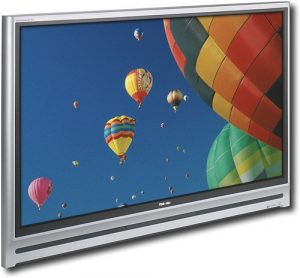
Toshiba_50HM66_TVReplace the Toshiba 50HM66 TV lamp

When the Toshiba 50HM66 TV lamp is reaching end of life the picture darkens and the colors fade. The LED indicator lamp will also stop lighting. If you hear a a loud noise and the picture goes black, replace the lamp immediately.

Buy authentic and be prepared

It may be confusing trying to find the correct TV lamp for your Toshiba 50HM66 TV lamp. Your key for a successful replacement lamp is to always install an OEM authentic TV lamp. Be sure to buy an authentic Toshiba Y66-LMP model.

Copycat lamps have a number of serious issues that include a shorter life and problems with exploding. Since they have been manufactured with toxic substitutes they are a threat to your health and safety. Counterfeits can also damage your TV optics as well as your eyesight. Installing a generic lamp also voids your warranty. Go with authentic.

Find this lamp sold on Amazon by these authorized dealers:

Installing the T V lamp

Follow these important safety tips before changing the projector lamp:

  • Switch off the TV.
  • Disconnect the power cord.
  • Allow the Toshiba 50HM66 TV to cool down for at least 30 minutes. If should be cool to the touch. The Toshiba 50HM66 TV operates under high temperatures and you can burn yourself badly if you don’t allow it to cool down.

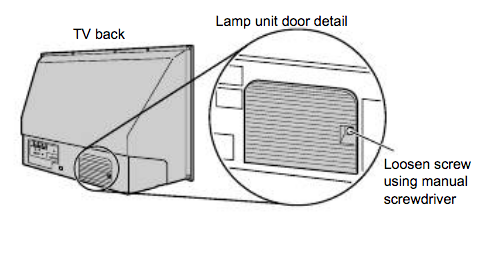
Toshiba_50HM66_projector_lamp_Y66-LMP_lamp door

On the lamp unit door on the back of the TV, loosen the screw by using manual screwdriver, and then remove the
lamp unit door.
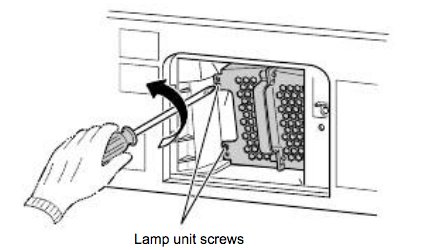
Toshiba_50HM66_projector_lamp_Y66-LMP _remove

Loosen the two screws holding the Toshiba Y66-LMP projector lamp in place.

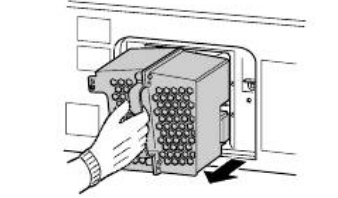
Toshiba_50HM66_projector_lamp_Y66-LMP_remove-2Grasp the lamp unit handle and gently pull the lamp unit straight out of the TV. Set the old lamp unit aside to be properly recycled. These lamps contain mercury and can’t be placed into regular garbage.
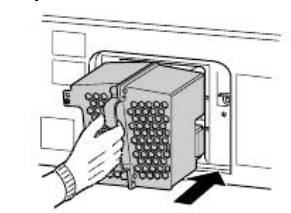
Toshiba_50HM66_projector_lamp_Y66-LMP_insert_new

Get the new Toshiba Y66-LMP replacement lamp ready. Carefully insert the new lamp unit straight into the TV until it is fully seated. Using a manual phillips screwdriver, tighten the two Toshiba Y66-LMP lamp unit screws. Note: Hand-tighten only. Do not use an electric screwdriver.

Toshiba Y66-LMP_close_door

Reattach the lamp unit door, making sure to insert the hooks on the left side of the lamp unit door inside the
opening in the TV cabinet.
Toshiba_50HM66_projector_lamp_Y66-LMP_door_screw
Replace the screw and tighten using a manual screwdriver.

Test the lamp

Plug in the power cord and turn on the TV. After the initial warmup period (which may take several seconds for full
picture brightness), the TV should operate normally. If any of the following conditions exist, turn off the TV,
unplug the power cord, and repeat steps 1–9 to ensure that the lamp unit and lamp unit door are installed correctly:
• No picture
• Dark picture
• TV will not turn on


Tagged with: , ,

Epson_tw6000_projectorHow to install a replacement Epson EH-TW6000 projector lamp

You can expect up to 4000 hours with your projector lamp depending on maintenance or how often you use your projector. When the Epson Epson EH-TW6000 projector lamp is reaching end of life, you may notice these warning signs:

  • The projector lamp indicator flashes orange or intervals of red.
  • The message “Lamp Replace” appears on the screen
  • The images gets darker or starts to deteriorates.

Keep your projector working

Look for the seal of approval before purchasing your replacement and buy from an authentic manufacturer. The Epson Epson EH-TW6000 needs the Epson ELPLP68 projector lamp. OEM authentic Epson ELPLP68 lamps have been manufactured to meet the specifications of the Epson Epson EH-TW6000 projector and should always be used.

Counterfeit projector lamps can damage the sensitive and expensive mechanisms in your Epson Epson EH-TW6000 and actually have a much shorter lamp life. They are also more prone to explosions due to the inferior materials used during their production.

Find this lamp on Amazon sold by these authorized dealers:

Installing the projector lamp

Pre-installation Preparation:

  • Turn off the projector power and wait for the cool-down period which is about two minutes. Disconnect the power cord after the two minutes is over.
  • Wait at least 30 minutes to one hour for the Epson EH-TW6000 projector to cool internally before opening it up. It should be cool to the touch.

powerlite_ Epson_EH-TW6000_remove_epson_elplp68_coverLoosen the screw holding the Epson EH-TW6000 projector lamp cover in place.
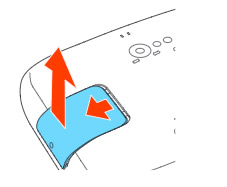
powerlite_Epson_EH-TW6000_remove_epson_elplp68_screw-coverSlide the Epson Epson EH-TW6000 cover off and place it to one side.Epson_EH-TW6000_epson_elplp68_remove_replacement_lamp_screws
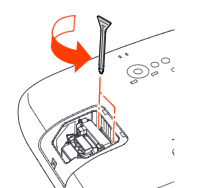
Loosen the two screws holding the Epson EH-TW6000 projector lamp in place.

Epson_EH-TW6000_remove_epson_elplp68_lamp

Lift up the wire handle on the Epson ELPLP68 projector lamp and gently pull the projector lamp out of the Epson EH-TW6000 projector lamp. Don’t knock the actual bulb as it may break.

NOTE: The Epson ELPLP68 projector lamp contains mercury and should not be thrown into regular garbage. Recycle your used lamps!

Epson_EH-TW6000_epson_elplp68_replacement_lampSlowly insert the Epson ELPLP68 projector lamp until it clicks into place. Be sure not to touch the actual bulb as the oil from your skin will case blackouts.Epson_EH-TW6000_re-install_epson_elplp68_lamp_cover

Tighten the screws on the newly installed Epson ELPLP68 projector lamp. Replace the lid on the Epson EH-TW6000 projector.

Tighten the screw on the projector lamp cover. Reset the lamp timer.

Resetting the lamp timer

The projector lamp timer will need to be reset after replacing the Epson ELPLP68 This timer helps the Epson EH-TW6000 projector to properly track the lamp life. Only reset the timer when a new Epson ELPLP68 lamp has been installed, otherwise the projector will NOT know when it’s time to replace the lamp. You run the risk of damaging your projector.

EH-TW6000_reset_lamp_timer

  • Press the MENU button on the remote control. The Lamp Reset Menu will appear.
  • Scroll down to the RESET. Press ENTER.
  • Scroll down to the option RESET ALL.

EH-TW6000_reset_lamp_timer-2

  • A prompt appears asking if you want to replace the lamp.
  • Select YES when the confirmation pop up screen is shown. Press ENTER.
  • Press MENU to exit.

The lamp hours will be reset to zero. The lamp usage timer shows 0H until you’ve used the lamp for at least 10 hours.

How to extend projector lamp life

Extend the life of the newly installed Epson ELPLP68 with the following tips:

  • Keep your air filters clean to avoid overheating the projector.
  • Turn off the Epson EH-TW6000 projector and let it stand for at least one hour ever 24 hours. An average use of four to five hours per day will ensure longer lamp life.
  • Make sure there is enough airflow around the projector particularly if it’s been permanently mounted.
  • Learn more with Top tips for extending DLP projector lamp life.

Save

Save

Tagged with: , ,
Join the discussion on Facebook! All your questions, answered! The Screen & Projector Group