We're now Screen and Projector! For updated content, visit ScreenAndProjector.com and follow @screenandproj on social media!

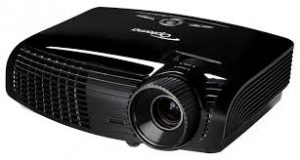
Optoma_TX542-3D_projectorUse this guide to quickly replace the Optoma TX542-3D projector lamp.

Your Optoma TX542-3D uses the Optoma BL-FP180E projector lamp. Be sure to buy an authentic projector lamp in order to keep your projector working properly and avoid safety and health issues from counterfeit lamps. See below for reasons to avoid counterfeit lamps.

Find this lamp sold on Amazon by these authorized distributors:

Warning signs

Optoma_TX542_BL-FPI80E_projector_lamp_warning You can expect 3000 hours of lamp life with your Optoma TX542-3D projector . When it’s reaching end of life, you’ll see a warning sign appear on screen. Replace the lamp immediately when you see this warning signs. You may also see the following signs that indicate your projector lamp is reaching end of life:

  • the Lamp LED flashing amber
  • picture has poor colour quality
  • image vibrancy and definition has deteriorated

Installing a new Optoma lamp

Your Optoma TX542-3D projector lamp uses the Optoma BL-FP180E projector lamp. Follow these important safety tips before installation:

  • Switch off the power to the projector by pressing the Power/Standby button.
  • Allow the projector to cool down for at least 30 minutes. If should be cool to the touch. The Optoma EX540 runs at a high temperature and you can burn yourself badly if you don’t allow the projector to cool down.
  • Disconnect the power cord.

Step-by-step instructions
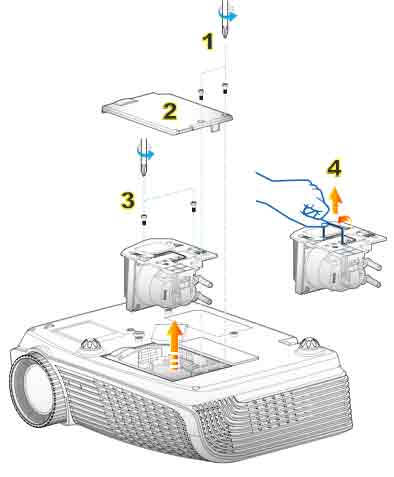
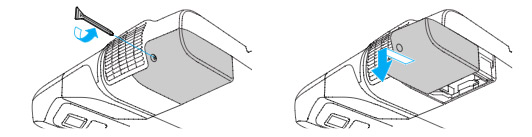
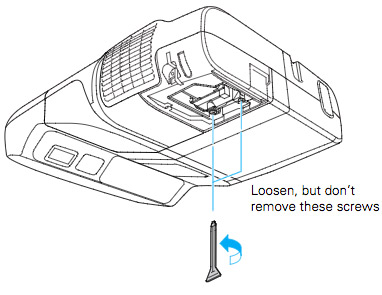
Optoma-EX542-3D_BL-FP180E_SP.8EF01GC01_replacement_projector_lampRemove the old lamp Figure 1: Use a screwdriver to loosen the two screws holding the projector lamp cover in place. The Optoma EX542-3D projector should be cool to the touch.

Figure 2: Remove the lamp cover and place to one side. Don’t lose the screws to the cover as the projector will not turn back on until the projector lamp cover has been properly installed.

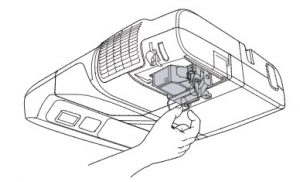
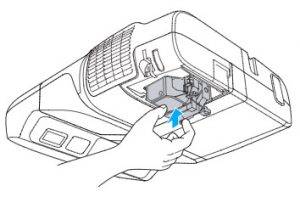
Figure 3: Remove both screws holding the BL-FP180E in place.Lift the wire handle on the lamp and gently remove it from the projector. Be careful not to hit the lamp or you can cause it to break.

Install the new lamp: Take the new Optoma BL-FP180E projector lamp out of its packaging and lift the handle on the lamp. Gently place it into the projector making sure not to touch the actual bulb. Oil from fingerprint marks can burn black spots onto the lamp when it heats up. Tighten the screws on the projector lamp. d. Close the lid. Tighten the cover screws. You are now ready to reset the lamp timer.

Reset the Optoma TX542-3D projector lamp timer

Your Optoma TX542-3D comes equipped with an automatic projector lamp timer that tracks the number of hours left for the Optoma BL-FP180E projector lamp. Each time you change the lamp you need to reset the lamp timer. Failure to do so may cause the projector to use the lamp over the recommended period of time resulting in the lamp exploding.
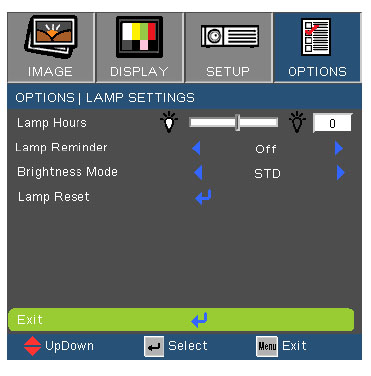
Optoma_TX542-3d_BL-FPI80E_reset_lamp_timer

To reset the lamp timer:

  • Press MENU
  • Select OPTIONS
  • Select Lamp Settings
  • Select Lamp Reset
  • Select Yes

TIP FOR LONGER LAMP LIFE: Under Brightness Mode:

  • Choose STD to dim the projector lamp and lower power consumption making the lamp last longer.
  • Choose BRIGHT to make the lamp brighter but decrease lamp life.

Why buy authentic?

Learn the TOP Tips for extending the lamp life in your Optoma TX542 projector.
Tagged with: , ,

Sony-VPL-VW40-projector

Our guide shows you how easy it is to replace the Sony VPL-VW40 projector lamp!

Buy authentic

Don’t settle for anything but the best for your Sony VPL-VW40 projector and install an authentic projector lamp. When buying look for the seal of approval — don’t get caught with a counterfeit lamp. They have shorter lamp and are more toxic due to the substitute materials used by counterfeit manufacturers. These lamps often don’t work properly with the sensitive electronics in your projector and are prone to explosions. Keep your projector working properly and invest in an authentic projector lamp.

Find this on Amazon sold by these authorized dealers:

When to replace?

When the this Sony VPL-VW40 projector lamp projector lamp is reaching end of life, the Lamp/Cover light will continue to flash red in 3 second intervals.  The message “Please replace the Lamp/Filter” will also start flashing on screen. If the projector lamp dims or the color looks strange, change it immediately. Sony recommends replacing the air filter at the same as replacing the lamp.

Replacing the Sony VPL-VW40 Lamp and Air Filter

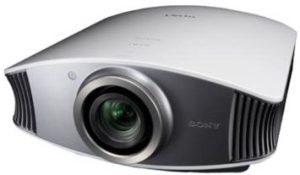
Before installations preparations:Sony-VPL-VW40-projector_Sony-LMP-H200_replacement_lamp

  • Unplug the AC power cord on the Sony VPL-VW40 projector.
  • Your Sony VPL-VW40 projector uses the Sony LMP-H200 projector lamp. Before installing the lamp, let the projector cool for at least 40 minutes. It should be cool to the touch. Don’t rush the cooling as these projectors operate using extremely high temperatures and you run the risk of a serious burn.
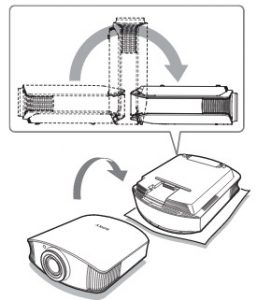
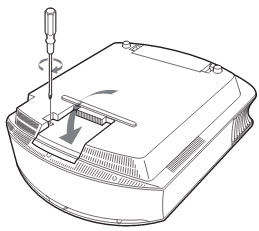
  • The projector lamp cover is on the bottom of the projector so you will need to turn it over. Put down a soft cloth on a flat surface to prevent the projector getting scratched. Turn the projector over gently. Don’t lean on the projector and make sure the surface is flat and stable. Sony-VPL-VW40-projector_
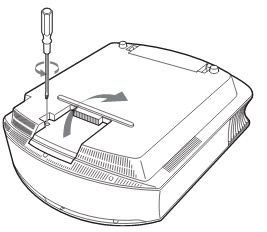
  • Using a Philips screwdriver, loosen the screw holding the projector lamp cover in place. Slide the projector lamp cover. Put it to one side.

Sony-VPL-VW40-projector_Sony-LMP-H200_remove_lamp

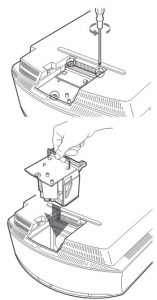
Loosen the 3 screws on the Sony LMP-H200 lamp using a Phillips screwdriver. Grab the wire handle on the Sony LMP-H200 projector lamp and gently pull the lamp straight out. Take care not to bang the lamp as you can cause the bulb to break.

NOTE: The Sony LMP-H200 projector lamp contains mercury and should not be thrown into regular garbage. Recycle this lamp!

To finish the projector lamp installation:

  • Remove the packaging from the new Sony LMP-H200 projector lamp.
  • Lift up the handle and slowly lower the Sony LMP-H200 projector lamp into the projector.
  • Push it in securely until it reaches the end. Sony-VPL-VW40-projector_Sony-LMP-H200_replacement_lamp_lid
  • Tighten the three screws on the lamp.
  • Also don’t touch the actual bulb in the new lamp as oily fingerprints can burn a black spot on the lamp when it heats up.
  • Slide the lamp cover back onto the Sony VPL-VW40 projector.
  • Close the projector lamp cover and tighten the screws.
    Remember to install the lamp cover properly as the projector will not turn on if the cover is loose or not installed correctly.

Replacing the Sony VPL-VW40 air filter

Sony-VPL-VW40-projector_Sony-LMP-H200_remove_air_filter_cover

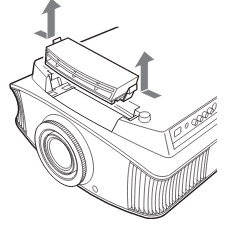
  • Remove the filter holder. The air filter will be inside the holder. Don’t touch the fan inside as this can damage the projector.
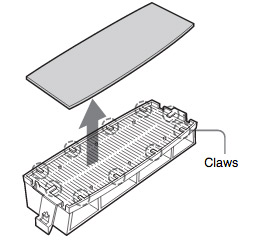
  • Sony-VPL-VW40-projector_Sony-LMP-H200_remove_air_filterRemove the old Sony VPL-VW40 filter and put it to one side. Attach the new air filter so that is fits into the 10 claws properly on the holder.
  • Aligning the air filter with the shape of the filter holder will make it easier to install.
  • Be sure to put the air filter holder back into the projector aligned up properly. If not, the projector will not turn back on!
  • Wipe off any dust from the ventilation intake holes using a soft cloth. Put the projector back in its original position

Resetting the Sony VPL-VW40 projector lamp timer

  • To reset the projector lamp timer, plug the AC power cord back into Sony VPL-VW40 projector. It it on.
  • Using the remote, scroll down to the Setup Menu.
  • Press Enter.

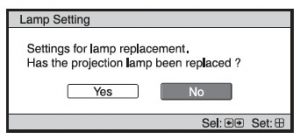
Sony_VPL-VW40_projector_LMP-H200_lamp_replacement_message


  • A Lamp Setting message will appear asking you if the projector lamp has been replaced.
  • Click on Yes.


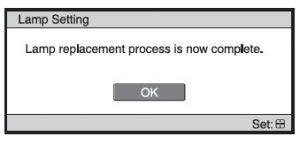
Sony_VPL-VW40_projector_LMP-H200_Final_lamp_replacement_message

  • You will see a confirmation message and the Projector Lamp Timer will be automatically reset to zero.
  • You can see the number of hours left on your lamp by going to the Information Menu.


You can extend the life of the Sony LMP-H200 projector lamp by always making sure the filter is clean and there is enough airflow around the projector. Learn how to get a longer projector lamp life with top tips for extending DLP projector lamp life.


Tagged with: , ,

Epson Brightlink 450wi_projector

This step-by-step guide shows how to replace the Epson BrightLink 450Wi projector lamp.

You can expect between 2500 to 3500 hours of usage with your Epson BrightLink 450Wi projector before it’s time to install a replacement projector lamp. End of life warnings include:

  • the image gets darker or starts to deteriorate.
  • the message Replace the lamp appears on the screen
  • the lamp light starts flashing orange or begins to flash red

Invest in authentic

Your EpsonBrightLink 450Wi uses the Epson ELPLP57 projector lampIn order to keep your projector working at its very best, be sure to invest in an authentic OEM projector lamp. Extremely cheap lamps bought over the internet are usually counterfeits and don’t offer the same performance as authentic lamps.

Find this lamp on Amazon sold by these authorized dealers:

Reasons to avoid counterfeit lamps:

Look for the seal of approval before buying your projector lamp. Read the 7 Ways to Spot a Counterfeit Lamp.

Installing the new Projector Lamp

Safety tips

Before installing the replacement Epson ELPLP57 projector lamp follow these important safety tips:

  • Turn off power switch on BrightLink 450Wi projector.
  • Unplug the electrical cord.
  • Allow the BrightLink 450Wi projector to cool down. It should be cool to the touch before you open it to change the projector lamp. Otherwise you run the risk of burning yourself.
  • Do not operate the projector while the lamp has been removed as this may result in malfunctions, fire hazard and other accidents.
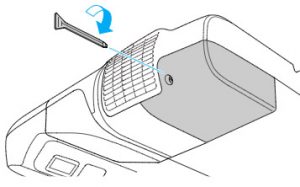
  • Loosen the lamp cover screw — you can’t remove it only loosen it.
  • Slide the projector lamp cover off.BrightLink-450Wi_projector_remove_cover-one_Epson_ELPLP57_replacement_lampBrightLink-450Wi_projector_screws_Epson_ELPLP57_replacement_lamp
  • Loosen the two screws holding the Epson ELPLP57 projector lamp in place.
  • Using the wire handle on the projector lamp, gently pull the lamp out. Be careful not to bang the lamp against the projector. BrightLink-450Wi_projector_remove_Epson_ELPLP57_replacement_lamp
  • NOTE: The Epson ELPLP57 projector lamp contains mercury and should be recycled properly.
  • BrightLink-450Wi_projector_install-1_Epson_ELPLP57_replacement_lampGently insert the replacement Epson ELPLP57 projector lamp. Be sure not to touch the actual glass bulb as the oil from your fingers will leave a black mark on the screen.
  • Tighten the screws on the new Epson ELPLP57 projector lamp. Be sure not to tighten too much or the lamp may not work.BrightLink-450Wi_projector_install_cover_Epson_ELPLP57_replacement_lamp
  • Replace the lamp cover and tighten the screw on the projector lamp cover.

You are now ready to reset the projector lamp timer.

Reset the projector lamp timer

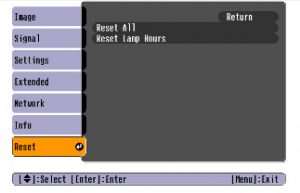
Reset the BrightLink 450Wi projector Lamp Replacement Counter only when the Epson ELPLP57 projector lamp has been replaced. You need the projector to track lamp life correctly. Otherwise the projector may run past the recommended lamp life and suffer an explosion.

BrightLink-450Wi_projector_reset_Epson_ELPLP57_replacement_lamp

  • Turn on the projector
  • Press the MENU button on the remote control.
  • Scroll down to the RESET MENU. Press ENTER.
  • Select RESET LAMP HOURS. Press ENTER.
  • Select YES to the prompt asking if you want to reset the lamp hours. Press ENTER.
  • Press MENU to exit.


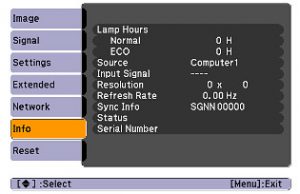
BrightLink-450Wi_projector_reset-2_Epson_ELPLP57_replacement_lampAfter resetting the lamp tracking function, check that the Lamp Hours have been reset to zero:

  • Press the MENU button
  • Scroll down to the INFO menu.
  • Lamp hours will be seen on the right hand menu. If not reset to zero, repeat the reset again.


Prolong the life of the projector lamp:

Extend the life of the newly installed Epson ELPLP57 projector lamp with the following tips:

  • Keep your air filters clean to avoid overheating the projector.
  • Turn off the BrightLink 450Wi projector and let it stand for at least one hour ever 24 hours. An average use of four to five hours per day will ensure longer lamp life.
  • Make sure there is enough airflow around the projector particularly if it’s been permanently mounted.
  • Learn more with Top tips for extending DLP projector lamp life


Tagged with: , ,

Why worry about labeling on a replacement projector lamp?

LAMP2
You want the best replacement projector lamp not only to keep your projector working but also to protect your health and safety. When shopping for your replacement projector lamp it pays to pay attention to the label, especially when buying over the Internet.

philips_logo

Labels and quality

You’ll often see replacement projector lamps labeled as either OEM (Original Equipment Manufacturer), compatible or generic lamps. While price can be a deciding factor, the cheapest lamp usually ends up costing more in the long run due to quality and performance issues.

OEM gold standard

OEM original projector lamps deliver the best performance and safety. The technology used for DLP projectors and RPTVs is a collaborative effort between two key companies. Texas Instruments (TI) invented the actual DLP technology while Philips created the UHP lamp used in DLP technology. Both companies have spent countless hours on research and development to perfect their inventions.

Top brands such as Sony, InFocus, BenQ, Sanyo (now Panasonic), Toshiba and Epson use these OEM bulbs to create the lamps needed for each of their particular projector. OEM lamps are of the highest quality offering the brightest luminosity, longest durability, best color and highest safety. These lamps remain the gold standard.

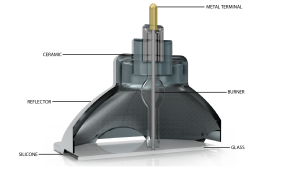
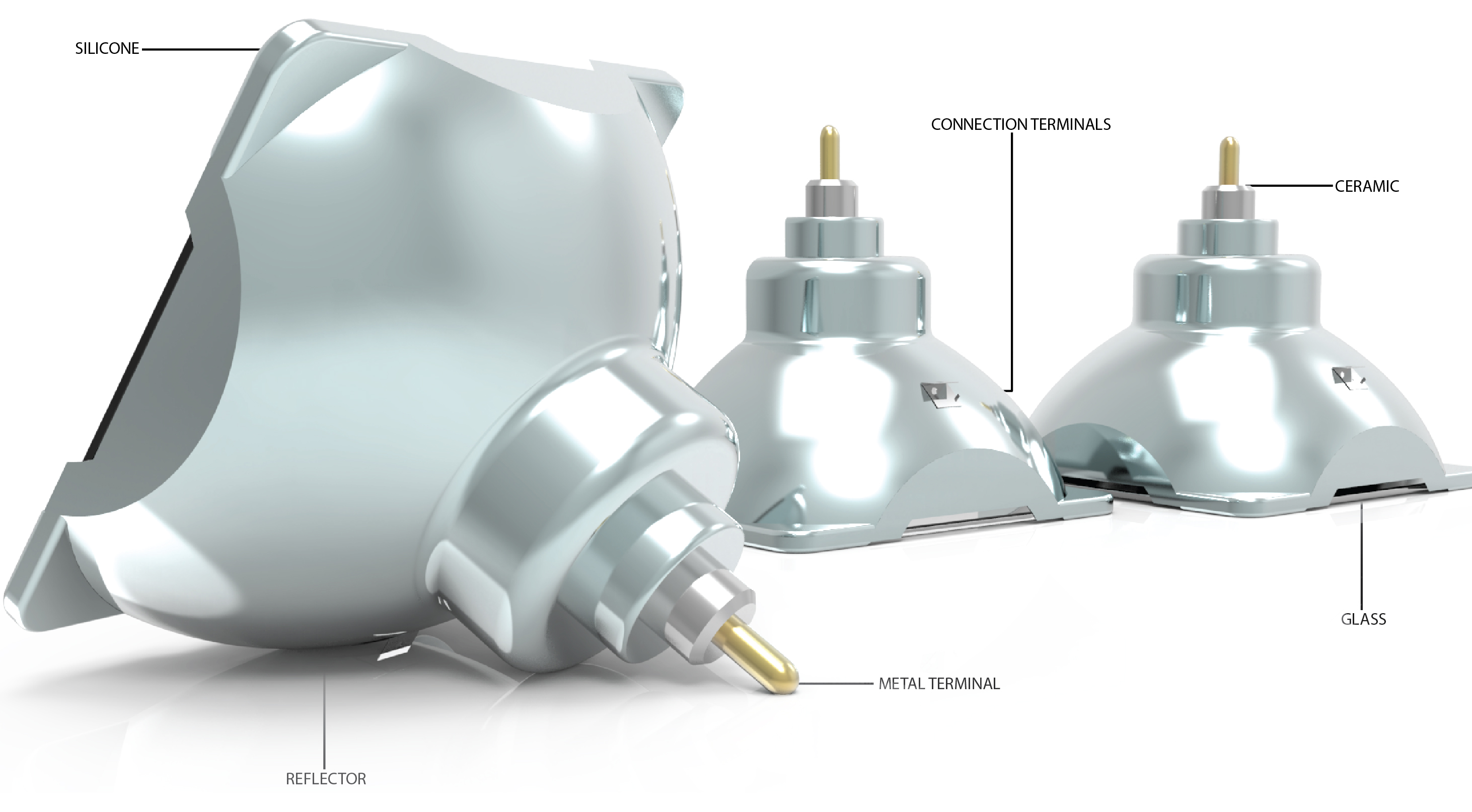
anatomy_lamp_labels

OEM Compatibale

OEM compatible lamps are replicas of the same lamp but manufactured by a different company. Usually the original bulb created by either Philips, Osram, Epson, Ushio, and Panasonic is placed into a lamp housing. Philips has 60% of the market of OEM original Front Projector Lamps. Osram does about 30% of the manufacturing and the 10% comes from Japanese manufacturers.

OEM compatibles are the most economic in the long run as well as being the most reliable since they have calibration, brightness, design and specifications designed to work with your specific projector. The difference is they are not individually measured or tested. In general an OEM compatible projector lamp lasts 3-4 times longer than counterfeit lamps.

Generic Lamps

The widest range of lamp quality is found with generics. The best generics are created with a well-manufactured bulb and lamp housing that matches the specifications of an OEM original within a specified budget but they don’t contain any original Philip parts. Certain specialized companies such Discount Merchant have been approved by Philips to create their own lamp cages for the original bulbs.

Generics do cost less but are not a bright and do have a much shorter lamp life.  They must be replaced sooner and this may actually eat up any initial savings. You also must be more cautious buying generics to ensure you are purchasing from a reputable manufacturer.

Protect_your_eyesight_DLP_projectorsShort-lived Counterfeit Lamps

Counterfeit projector lamps are produced quickly without any attention to specifications or OEM technology. Since these manufacturers don’t have access to DLP technology, equipment or materials needed to create an OEM projector lamp, they often use toxic substitutes. They also take short cuts and forego important safety measures such as UV coated reflectors that protect our eyesight from intense DLP light.

Often they are labeled as having original OEM bulbs, in order to sell them. While the low price can be tempting, they can be a poor choice because they are prone to overheating and exploding, sometime causing irreversible damage to a projector. Any cost savings can be quickly eaten up since counterfeit lamps have a significantly shorter life span. Installing a counterfeit lamp from a company unrecognized by the industry usually voids any warranties so repairs will not be covered.

Find out more about counterfeits:


Tagged with: , , ,

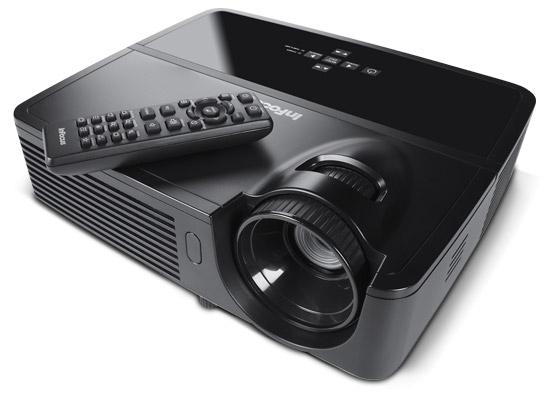
Vivitek_D963HD_projectorFollow this guide when it’s time to replace the Vivitek D963HD projector lamp.
Warning signs

When you notice the Vivitek D963HD Power LED flashing 5 times consecutively, your projector lamp is reaching its end of life and needs to be replaced immediately.

Invest in authentic

Be sure the purchase an authentic projector lamp for your Vivitek D963HD projector. Avoid knock-off counterfeit lamps. Not only do they have a shorter lamp life than original lamps they also been created with toxic substitues such as Krypton-85. Because they are prone to explosions counterfeit lamps often damage the sensitive electronics in your projectors. Invest in authentic.

Find this lamp sold on Amazon by this authorized dealer:

Replacement Lamp with Housing for VIVITEK5811116701-S with Philips Bulb Inside

Replacing the projector lamp

The Vivitek D963HD projector uses the Vivitek 5811116701-SVV projector lamp. Before changing the Vivitek D963HD projector lamp:

  • Reduce the risk of electrical shock by disconnecting the power cord on the Vivitek D963HD projector.
  • Reduce the risk of severe burns by allowing the projector to cool for at least 45 minutes.

1116701-SVV_replace_projector_lamp

Vivitek_D963HD_Replace_Vivitek_5811116701-SVV_lamp

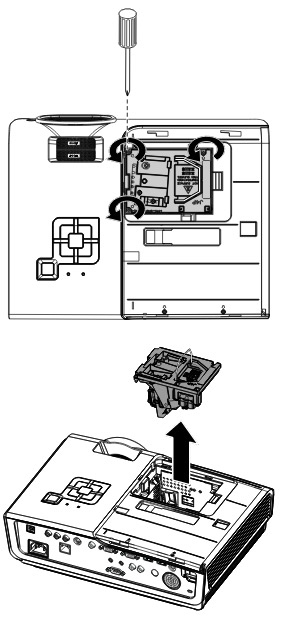
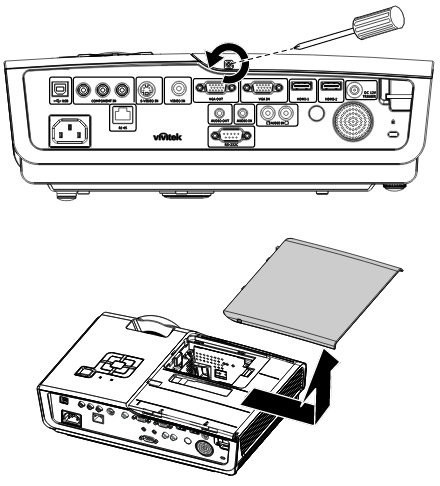
  • Loosen the captive screw holding the lamp cover in place.
  • Slide the lamp cover off and place it to one side.
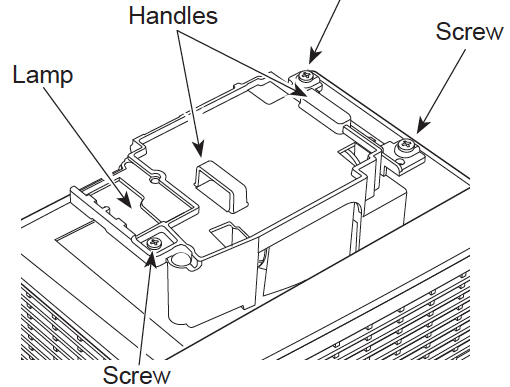
  • Remove the tw0 screws holding the Vivitek 5811116701-SVV projector lamp in place.
  • Remove the two captive screws holding the lamp cover place.
  • Remove the lamp cover and place it to one side.
  • Remove the three screws holding the Vivitek 5811116701-SVV projector lamp in place.

NOTE: The Vivitek 5811116701-SVV projector lamp contains mercury and should not be thrown into regular garbage. Recycle your used lamps!

Vivitek_D963HD_install_Vivitek_5811116701-SVV_lampTo finish the installation:

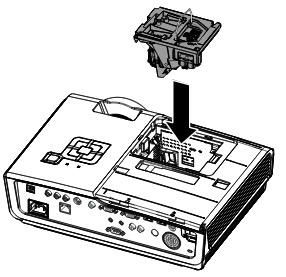
  • Take the new Vivitek 5811116701-SVV projector lamp out of its packaging. Lift up the wire handle and gently guide it into the Vivitek D963HD projector.
  • Take care not to touch the actual bulb as the oil from your fingers can leave a smudge that will burn into a black spot when the projector heats up.
  • Tighten the lamp screw.
  • Re-install the Vivitek D963HD projector lamp cover and tighten the screw.
  • Reset the total lamp hour timer.

Resetting the Vivitek D963HD Lamp Hour Timer

Vivitek_D963HD_Vivitek_5811116701-SVV

It’s important to only reset the lamp timer when the Vivitek 5811116701-SVV(5811100760S) projector lamp has been replaced.

Resetting the projector lamp timer without changing the lamp can make it work beyond its recommended hours and cause harm to your Vivitek D963HD projector.

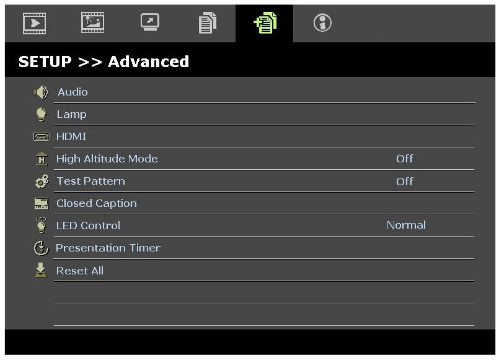
  • Press the Menu button to open the OSD menu.
  • Press left/right arrow keys to move to the Advanced menu.
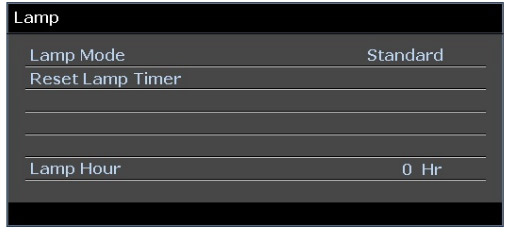
  • Press up/down arrows to move to the Lamp menu.
  • Press Enter.
  • Using the or up/down arrow keys to move down to the Reset Lamp Timer menu.
  • Press Enter.
  • Vivitek_D963HD_Vivitek_5811116701-SVV_Lamp-timerA message will appear saying the Lamp Hour has been reset to zero.
  • Press the Menu button to return to the main menu.


Extending the life of the projector lamp:

  • Keep your air filters clean to avoid overheating the projector.
  • Use the Lamp Power option on the Vivitek D963HD projector and set to Eco Mode to reduce the amount of power used but extend projector lamp life.
  • Learn more with Top tips for extending DLP projector lamp life.


Tagged with: , ,

Eiki_lc-xbl20This guide shows you how to replace the Eiki LC-XBL20 projector lamp.
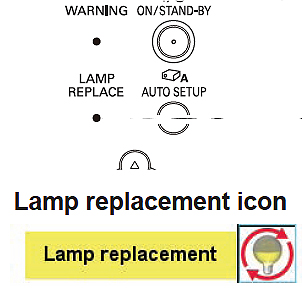
When the Eiki LC-XBL20 nears the end of life, the Lamp replacement icon appears on the screen and LAMP REPLACE indicator lights yellow. When Mode 2 is selected in the Lamp life control menu, the lamp replacement icon appears on the screen, and the projector is turned off automatically after 3 minutes. The Lamp replacement icon will not appear when the Display function is set to Off, during Freeze, or No show.Eiki_lc-xbl20_LampReplace

Buy authentic

If the price projector lamp you’re about to buy seems like an incredible bargain, chances are it’s counterfeit and has been created using inferior parts that can damage the inside of your projector since it will not fit properly. Buying a knock-off lamp will also void your warranty and should anything happen to the projector you will not be covered. These lamps are also toxic materials and carcinogenic parts including Krypton-85 and unfortunately also prone to explosions.

Protect your health and the life of your projector. Invest in authentic.

Find this lamp on Amazon sold by these authorized dealers:


How to replace the Eiki LC-XBL20 projector lamp

The Eiki LC-XBL20 projector uses Eiki POA-LMP132 projector lamp.

Before installation:

  • Turn off the projector and unplug the AC cord.
  • Allow the Eiki LC-XBL20 projector lamp projector to be cool to the touch. This can take between 45 to 60 minutes. Don’t open the projector when hot since these machines operate under high temperatures and you can burn yourself.

1. Remove the lamp cover fiki_LC-XBL20_projector_lamp_replacement_Sanyo_POA-LMP132or the Eiki LC-XBL20 projector. Loosen the screw to remove the cover.
2. Loosen all three screws holding the lamp cage in place. Grab the handles on the lamp cage and gently lift the lamp out of its socket. Place to one side.

NOTE: These lamps contain mercury and should be properly recycled. Don’t put it into the regular garbage.

3. Take the new Eiki POA-LMP132 projector lamp by the handle—avoid touching the lamp surface as oil from your fingers can cause black spots to appear when the projector is turned on. Gently maneuver the lamp into place. Don’t force the lamp as this may damage it.

4. Once the lamp is in, tighten all three screws on the Eiki POA-LMP132 Lamp Assembly. Make sure the screws have been tightened properly or the Eiki LC-XBL20 projector will not turn on.

5. Replace the Lamp Cover and tighten the screw.

Resetting the Eiki LC-XBL20 Lamp Timer

Resetting the lamp timer mode allows your projector accurately track the number of hours left in your Eiki POA-LMP132 projector lamp.

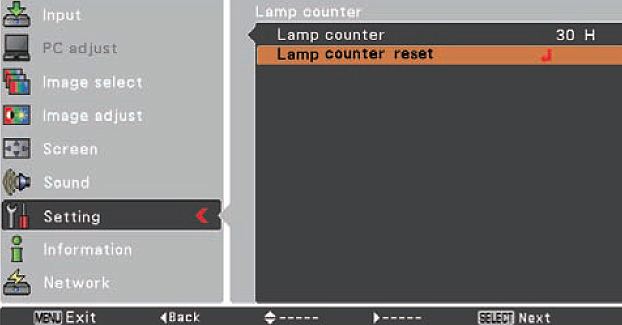
Eiki_LC-XBL20_projector_lamp_replacement_Sanyo_POA-LMP132_LampCounter

  • Turn the Eiki LC-XBL20 on.
  • Press the Menu option to display the On-Screen Menu.
  • Press Point left/right button(s) to move a red frame poster to Setting Menu icon.
  • Press the black arrow point button to move the red framed pointer to the Setting Menu Icon.
  • Press Point Down button to move the red frame pointer to Lamp counter reset.
  • Press the Select button.


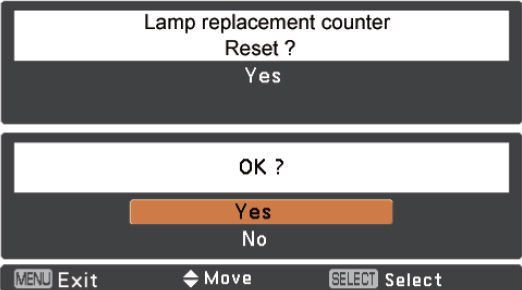
Eiki_LC-XBL20_projector_lamp_replacement_Sanyo_POA-LMP132_LampReset-3

  • Another confirmation dialog box appears, select YES.
  • The Lamp box will disappear and the Lamp Replace Dialog box appears.
  • Select YES to reset Lamp Replace Counter.
  • There are two modes for Lamp life control. Mode 1 lets the lamp be turned on even after exceeding the recommended total hours of use. Mode 2 lets the lamp be turned on even after exceeding the recommended total hours BUT the projector turns off automatically after 3 minutes.


NOTE: When you reset the Lamp Replace Counter the Lamp Replace indicator stops lighting.

Extend the life of the projector lamp

Get more hours from your Eiki POA-LMP132 projector lamp by following these maintenance tips:

  • Keep your air filters clean to avoid overheating the projector.
  • Turn off the Eiki LC-SX4UE projector and let it stand unused for at least one hour ever 24 hours. An average use of four to five hours per day will ensure longer lamp life.
  • Make sure there is enough airflow around the projector particularly if it’s been permanently mounted.
  • Learn more with Top tips for extending DLP projector lamp life.


Tagged with: , ,

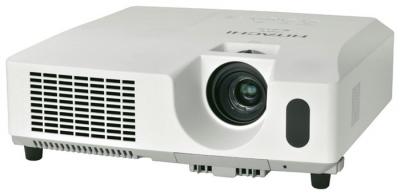
Infocus_IN114_projectorInstall a replacement Infocus IN114 projector lamp using this guide.

Why go with authentic

Buy an authentic replacement projector lamp and avoid the headaches associated with counterfeit lamps. Find the 6 most common problems associated with counterfeits at the end of this post.

Find this lamp on Amazon:

Install the replacement projector lamp

Your InFocus IN114 projector needs the InFocus SP-LAMP-069 replacement projector lamp. Follow these important safety steps BEFORE installing the replacement

  • Turn off the InFocus IN114 projector and unplug the power cord.
  • To avoid getting burned, let the projector fully cool before changing the lamp.
  • Do not operate the projectors while any of the lamps are removed as this may result in malfunctions, fire hazard and other accidents.

nfocus_-IN114_projector_remove_InFocus_SP-LAMP-069__projector_lamp_cover

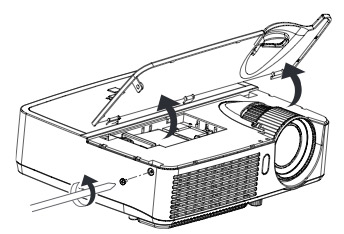
  • The projector lamp cover is found on top of the InFocus IN114 projector. Loosen the side screw of the projector lamp door. Slide the door forward and lift off. Place to one side.Infocus_IN114_projector_replace_InFocus_SP-LAMP-069_projector_lamp
  • Loosen the two captive screws on the projector lamp.
  • Carefully lift the lamp straight up and off of the alignment pins. Avoid pinching the projector lamp connector.
  • NOTE: The InFocus SP-LAMP-069 contains mercury and should not be thrown into regular garbage. Recycle this used lamp!
  • Install the new lamp module by aligning the pins properly. Be sure to keep the lamp connector free so it doesn’t get pinched.
  • Tighten the screws. NOTE: If the pins have not been aligned properly, the screws will not tighten securely.
  • Align the hinges on the lamp door with the projector. Place the projector lamp door down and lock into place. Replace the lamp door screw and tighten securely. You can now reset the projector lamp hours

Reset Lamp timer

Each time you change the InFocus IN114, you’ll need to reset the lamp timer so the projector can track the number of hours the InFocus SP-LAMP-069 has been used. To reset the timer:

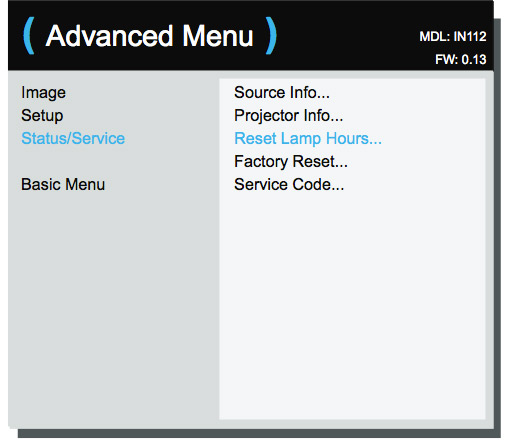
Infocus_-IN114_projector_reset_InFocus_SP-LAMP-069_projector_lamp_timer

  • Plug in the InFocus IN114 power cord.
  • Press the Power button to turn the InFocus IN114 projector back on.
  • Navigate to the Advanced Menu > Status/Service menu.
  • Select Reset Lamp Hours. Press Enter.
  • Hour will be reset to zero.

Tips for longer lamp life

  • Keep your air filters clean to avoid overheating the projector.
  • Turn off the InFocus IN114 and let it stand for at least one hour ever 24 hours.
  • Make sure there is enough airflow around the projector particularly if it’s been permanently mounted.
  • Top tips for extending DLP projector lamp life

Top reasons to avoid counterfeit lamps:

Buy from a legitimate source to keep your projector under warranty and working properly.

Tagged with: , ,

hitachi_cp-rx78

This step by step guide shows how to replace the Hitachi CP-RX78 projector lamp.

Tracking projector lamp life

Keep track of the Hitachi CP-RX78 projector lamp life so you’ll know when to replace the projector lamp. Watch for these signs that indicated the projector lamp is reaching its end of life:

  • The Power and Lamp Indicators will begin blinking.
  • Color tone on the screen may also appear weak or washed out.
  • Picture has poor color quality.

Find this lamp on Amazon sold by these authorized dealers:


Install the replacement projector lamp

Before installing the replacement Hitachi DT01022 follow these important safety tips:

      • Turn off the Hitachi CP-RX78 projector.
      • Unplug the power cord.
      • Allow the projector to cool for at least 45 minutes. It should be cool to the touch. This projector works using high heat and there is danger you can be burned.
      • NOTE: If the projector is mounted on the ceiling, don’t stand underneath the projector while opening the cover.

Hitachi_CP-RX78_projector_lamp_Hitachi_DT01022_cover

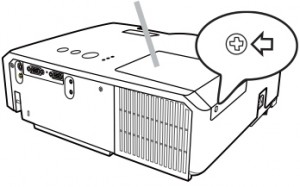
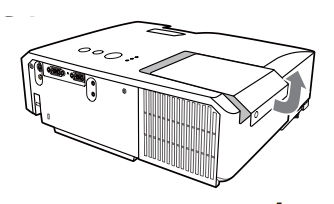
      • Loosen the screw (marked by arrow) of the lamp cover and then slide the lamp cover to the side to remove it.
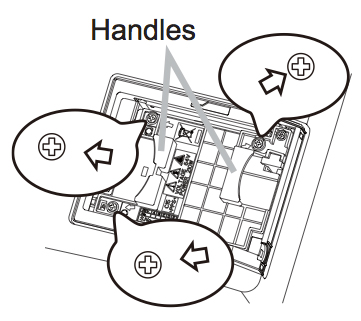
      • Hitachi_CP-RX78_projector_lamp_Hitachi_DT01022_remove_coverLoosen the 3 screws (marked by arrow) of the projector lamp, and slowly pick up the lamp by the handles. Be careful not the bang the lamp.

NOTE: The Hitachi DT01022 projector lamp contains mercury and must be recycled properly. Don’t place in regular garbage.

Hitachi_CP-RX78_Install_projector_lamp_Hitachi_DT01022_reset_lamp_timer

      • Insert the new lamp, taking care not to touch the actual bulb. Oil in your fingers will cause a dark spot on the lamp when it heats up.
      • Tighten the 3 screws of the Hitachi DT01022 projector lamp that were loosened to remove the old projector lamp.
      • Slide the lamp cover back in place and firmly fasten the screw of the lamp cover.
      • Turn on the projector and set the lamp timer

To reset the projector lamp timer:

Reset the projector lamp time only when you have replaced the lamp so the Hitachi CP-RX78 projector can properly track the lamp life. Otherwise you run the risk of using the lamp beyond its lamp life. Hitachi CP-RX78_projector_lamp_Hitachi_DT01022_reset_lamp_timer

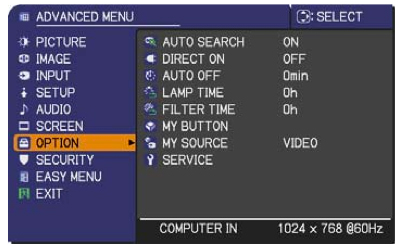
      • Press the MENU button
      • Scroll down to the GO TO ADVANCED MENU option. Press ENTER
      • Scroll down to the OPTION menu in the left column and press ENTER.
      • Scroll down to LAMP TIME. Press ENTER To make a dialogue field appear
      • Scroll up to the RESET option on the dialogue box.
      • The lamp setting will be set to zero.

Why avoid buying counterfeits

Despite their bargain prices, counterfeits have a number of major problems:

Invest in authentic lamps

Your Hitachi CP-RX78 projector uses the Hitachi DT01022 projector lamp. Only an OEM authentic replacement projector lamp will keep your projector working. Look for the seal of approval before purchasing. Learn to spot copycat lamps posing as authentic lamps.

Green your projector

Hitachi_bulb_only_lamp_Hitachi_DT01022

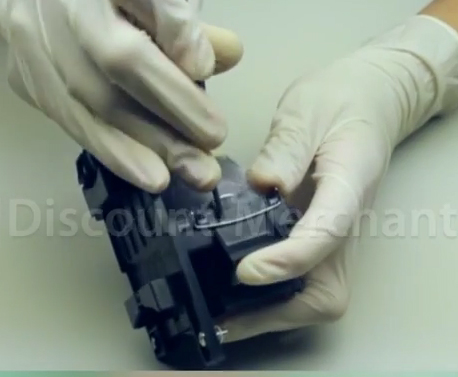
Recycle your lamp housing by only replacing the Hitachi CP-RX78 bulb. Our training video shows you how to do it. It’s easy!


Tagged with: , ,

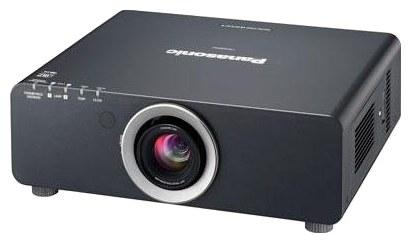
panasonic_pt-dz6700This guide shows you how to replace the Panasonic PT DZ6700 projector lamp.
When to replace

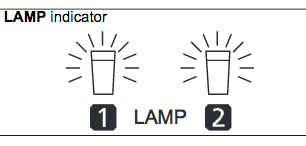
You can check the duration of usage time using the LAMP1/LAMP2 options on the STATUS option found on the PROJECTOR SETUP Menu.When it’s time to replace the Panasonic PT DZ6700 projector lamp you may see the following signs :

  • The projected image gets darker or starts to deteriorate.
  • A message appears saying to replace the lamp when the projector is turned off
  • The projector lamp warning light flashes red.

change_lamp-warning

When over 1800 hours of use, the message REPLACE LAMP is displayed in the upper left hand corner of the screen for 10 minutes. Press any button on the menu to clear the screen.

When the lamp has been used over 2000 hours the message will stay on screen until the lamp is replaced.

Buy this lamp on Amazon sold by these authorized dealers:

  • Panasonic PT-DZ6700 Projector OEM Compatible Twin-Pack Projector Lamps
  • PANASONIC PT-DZ6700 Projector Replacement Lamp with Housing

Replacing the projector lamp

Your Panasonic PT DZ6700 uses the Panasonic ET-LAD60. Before replacing the projector lamp follow these important safety step:

  • Press the POWER OFF button on the Panasonic PT DZ6700 projector.
  • Unplug the projector Press MAIN POWER to OFF.
  • The projector should be cool to the touch. Don’t attempt to change the lamp if the projector is still hot or you run the risk of being burned.

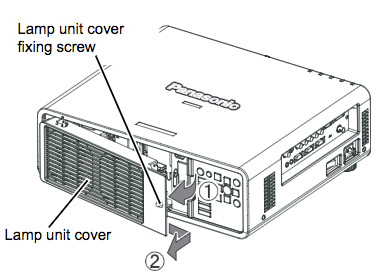
Panasonic_PT-DZ6700_replace_ET-LAD60-projector-lamp-1Using a screwdriver, loosen the screw holding the projector lamp cover. Slide the lamp unit cover to the buttons and pull to remove. Panasonic_PT-DZ6700_installing_ET-LAD60-projector--lamp
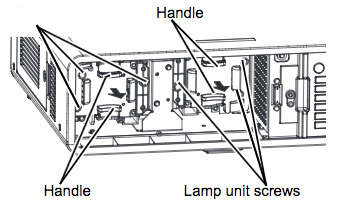
Remove the two screws keeping the Panasonic ET-LAD60 in place. Using the lamp handles, pull the lamp out.

NOTE: The Panasonic ET-LAD6 projector lamp contains mercury and should be properly recycled. 

Panasonic_PT-DZ6700_replace_E

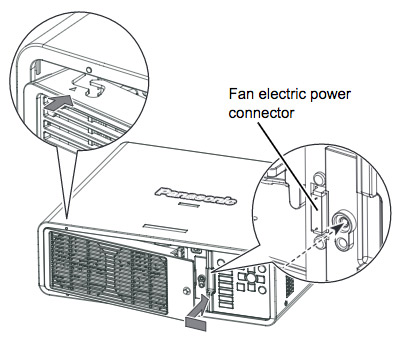
Hold the handle of the Panasonic ET-LAD60 projector  lamp unit and place it in the right direction into the projector. Press into the lamp unit until it clicks into place. After making sure the projector lamp is installed securely, tighten the two screws keeping the light in place.
Attach the lamp unit cover and tighten the lamp cover.
Slide the lamp unit cover to the hinge side and push
in to attach securely.
Make sure the fan electric power connector of the
lamp unit cover is inserted
securely to the projector’s
connector. You are ready to reset the lamp timer.

Reset the lamp timer

  1. Press the Power button so that a picture is projected onto the screen
  2. Press the Menu button to display the “Main Menu”, and then press the F or G button to select “Option”
  3. Press the Enter button to display the “Option” menu, and then press the 5 or 6 button to select “Lamp Runtime”
  4. Press and hold the Enter button for approximately 3 seconds
  5. The “Lamp Runtime” will change to “Time Reset [Power Off]”
  6. Turn off the power and disconnect the power cord

The importance of authentic lamps

It’s easy to get duped into buying an inferior knock-off lamp posing as an authentic lamp. Buyer beware! Always look for the seal of approval and watch for telltale signs you are about to purchase a counterfeit lamp

Learn more tips for extending the projector lamp life in your Panasonic PT DZ6700 projector.

Tagged with: , ,

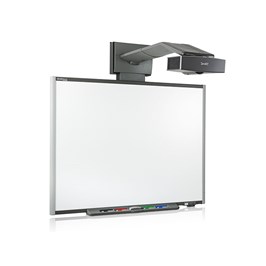
Smartboard_SB680i1_projector

Time to replace the Smartboard 680i3 projector lamp? Don’t stress out. This guide gives step by step instructions.

It’s time to replace the Smartboard 680i3 projector lamp when the projected image gets darker or starts to deteriorate.

Keep your projector working

An authentic projector lamp makes all the difference in keeping your Smartboard 680i3 projector working. Avoid the temptation of buying a cheaper projector lamp since it won’t be properly manufactured. Bargain basement prices mean problems down the road. Scroll for the for the 6 main reasons to avoid counterfeit lamps. Read the 7 Ways to Spot a Counterfeit Lamp to learn more about avoiding counterfeit lamps.

Find these lamp on Amazon sold by these authorized dealers:

Changing the Smartboard 680i3 projector lamp

Your Smartboard 680i3 projector using the SmartBoard 20-01032-20 projector lamp.

Important Safety tips BEFORE replacing the projector lamp:

  1. Close the projector lens door to prevent scratching or touching of the lens.
  2. Press the power button twice on the ECP (extended control panel) or on the remote to put the system in Standby mode The power button light on the ECP turns solid amber when the system is in Standby.
  3. Turn off the power switch and disconnect the power cord and all connected cables.
  4. This projector operates under high temperature and there is a burn risk so be sure to wait at least one hour minutes for the projector’s housing to completely cool.

Step 1: Remove the projector plate assembly from the boom

Smartboard_680i3_Smartboard_-20-01032-20_-replace_-projector_lamp_cover

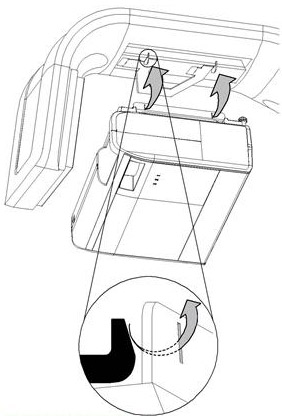
  1. To remove the projector from the boom, brace the projector with one hand and unscrew the thumbscrew connecting the projector plate to the boom. Be careful not to put any pressure or weight on the projector. Place the thumbscrew to one side.
  2. Carefully unhook the hinges on the plate assembly from the connecting flange hook on the boom Smartboard_680i3_Smartboard_20-01032-20_remove-projector_lamp_cover
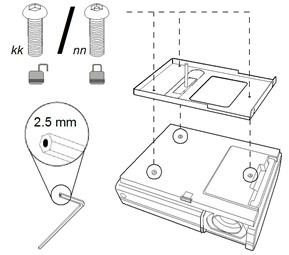
  3. Lay the projector on a flat surface and loosen the three screws connecting the projector plate to the projector. Put the screws in a safe place.
  4. Turn the projector back over so it’s face up with the warning lights and setting buttons face upwards.

Step 2: Removing the old lamp

Smartboard_680i3_Smartboard_-20-01032-20_-remove_projector_lamp_cover

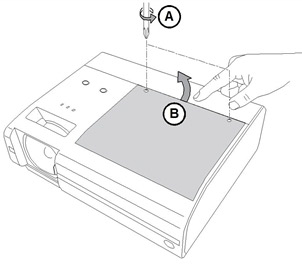
  1. Smartboard_680i3_Smartboard_20-01032-20_remove_new_projector_lampLoosen the two screws on the outer lamp cover with a Phillips No. 2 screwdriver. These screws cannot be removed. Raise the outer lamp cover using a flat screwdriver or your finger. Keep the outer lamp cover in a safe place.
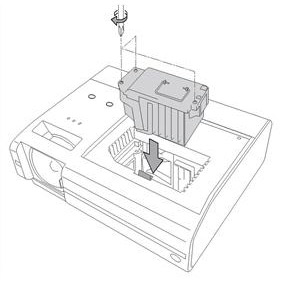
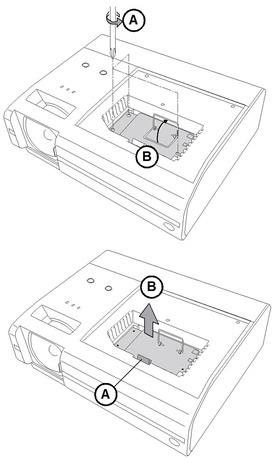
  2. Loosen the screw on the inner lamp cover. Remove the screw and raise the inner lamp cover out of the lamp slot using a flat screwdriver or your finger. Keep the inner lamp cover and the screw in a safe place.
  3. Loosen the three screws holding the SmartBoard 20-01032-20 projector lamp in place. Rotate the handle on the old lamp so it faces upwards.
  4. Press on the tab and pull up with the handle on the old lamp. Release the tab. NOTE: The SmartBoard 20-01032-20 projector lamp contains mercury and should properly recycled and NEVER thrown into regular garbage.

Inserting the new lamp

Smartboard_680i3_Smartboard_-20-01032-20_-replace_-projector_lamp

  1. Remove all packaging from the new SmartBoard 20-01032-20 projector lamp. Press the tab, put the new lamp into the lamp slot, and push it all the way down. Release the tab.
  2. Tighten the three lamp screws on the SmartBoard 20-01032-20 projector lamp.
  3. Put the inner lamp cover back on and secure the inner lamp screw back into the lamp slot. Tighten the screw to ensure the lamp cover is secure.
  4. Put the outer lamp cover back into its original position. Align the cover and tighten the screws until the outer lamp cover is secure.

To replace the projector plate assembly on the projector boom

Smartboard_680i3_Smartboard_-20-01032-20_-replace_-projector_lamp_cover

  1. Attach the projector plate to the projector using the three original screws removed during the projector plate disassembly.
  2. To place the projector back into the boom, attach the projector plate hinges into the corresponding flange hook on the projector boom. Be sure to hold the projector plate assembly firmly in place while connecting it to the boom.
  3. Pass the threaded rod through the attachment hole on the projector boom, and then secure the projector by attaching and screwing the thumbscrew.
  4. Connect the power cord and all the connector cables. Open the projector lens door. Reconnect the projector to the power and turn it on. You will need to realign the image. Does this by holding onto the projector and turning the thumbscrew to adjust the level postion.
  5. You must reset the lamp timer.

Resetting the lamp timer

  1. Press the power button on the ECP or remote twice to put the projector back into Standby mode. The power button light on the ECP turns solid amber when the projector is in Standby.
  2. Press and hold the up button on the remote control for approximately 10 seconds. When the projector beeps, press and hold the down button on the remote control for approximately 10 seconds. The lamp timer clears after another beep.
  3. Press the power button on the ECP or remote to start up the system. The power button light on the ECP turns solid green when the system starts.
  4. To confirm that the lamp timer has been reset, press the MENU button on the remote control. Scroll to the Status Display menu heading, and then confirm that 0 h appears in the Lamp timer field. Your lamp reset count has increased by one.
  5. Wait five minutes for the projector lamp to warm up.
  6. Put the system back into Standby mode by pressing either the ECP power button on the projector or on the remote. The power button light will flash amber when the projector is in Standby mode.
  7. Once the projector is in Standby mode, turn the master power switch off and then on again. The projector is now ready to use.

6 reasons to avoid generic lamps:

Learn how to extend the life of your SmartBoard 20-01032-20 projector lamp with Top tips for extending DLP projector lamp life

Tagged with: , ,
Join the discussion on Facebook! All your questions, answered! The Screen & Projector Group