We're now Screen and Projector! For updated content, visit ScreenAndProjector.com and follow @screenandproj on social media!

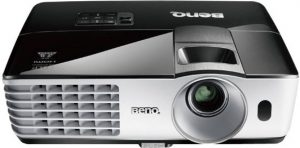
Change the BenQ DX819ST projector lamp

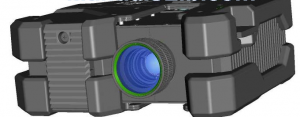
This guide shows how to install a replacement BenQ DX819ST projector lamp.

Check lamp hours

When the projector is in operation, lamp life is automatically calculated by the built-in timer. To obtain the lamp hour information:
  • Press MENU/EXIT and then press the side arrow keys to move to the SYSTEM SETUP: Advanced Menu.
  • Press to highlight Lamp Settings and press MODE/ENTER. The Lamp Settings page is displayed.
  • You will see the Equivalent Lamp Hour information appearing on the menu.
  • To leave the menu, press MENU/EXIT.
  • You can also get the lamp hour information on the INFORMATION menu.
  • Press MODE/ENTER to dismiss the message

Find this lamp on Amazon sold by:

End of life warning

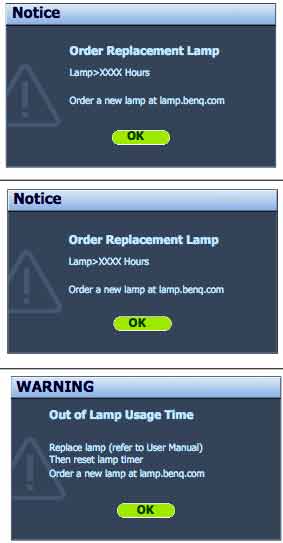
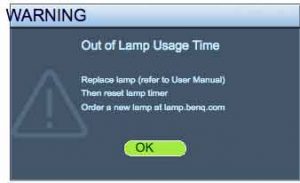
BENQ_Projector_DX819ST_Lamp_5J.J9A05.001A flashing red light BenQ DX819ST projector lamp is reaching end of life. You’ll see four warning screens on the projector screen. You may also notice the image deteriorating or the color looking off. Change the projector lamp immediately when the final warning screen “Out of Lamp Usage Time” appears or the projector will simply shut down.

Be sure to buy an authentic projector lamp. Counterfeit prices are tempting but they end up more problems. (Scroll down to find out more.)

Replacing the BenQ DX819ST projector lamp

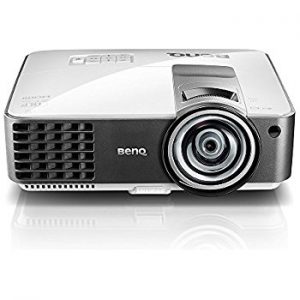
Your BenQ DX819ST projector uses the BenQ 5J.J9A05.001 lamp.

Before changing the lamp:

  • Reduce the risk of electrical shock by disconnecting the power cord on the BenQ DX819ST projector.
  • Reduce the risk of severe burns by allowing the projector to cool for at least 45 minutes.

To replace the projector lamp

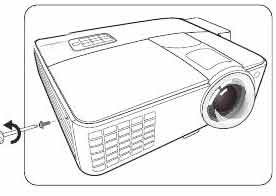
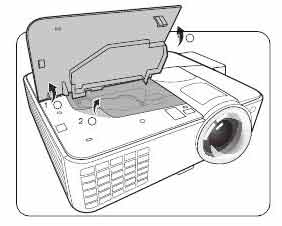
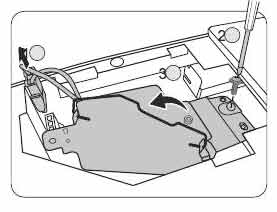
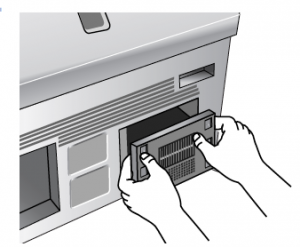
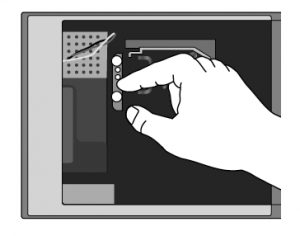
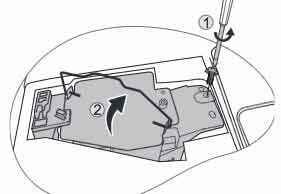
BENQ_Projector_DX8189ST_Lamp_cover_screw_5J.J9A05.001BENQ_Projector_DX819ST_Lamp_Cover_off_5J.J9A05.001BENQ_Projector_DX819ST_Lamp__screw_5J.J9A05.001


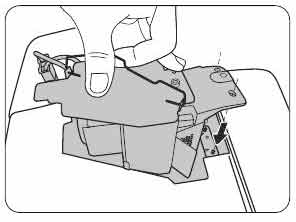
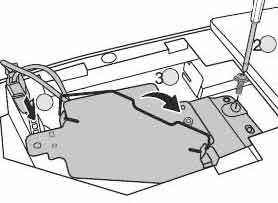
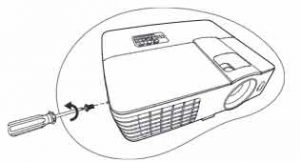
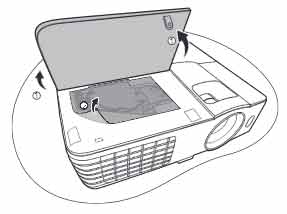
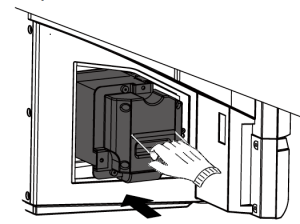
Loosen the screw that secures the BenQ DX819ST lamp cover on the side of the projector until the lamp cover loosens. Remove the BenQ DX819ST lamp cover from the projector. Disconnect the BenQ DX819ST lamp connector. Loosen the screw that secures the lamp in place

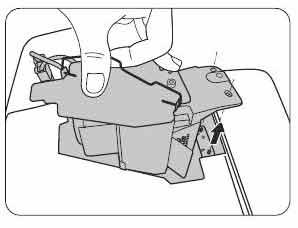
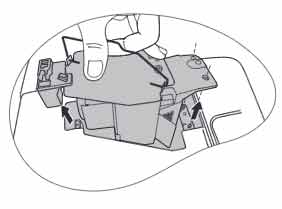
BENQ_Projector_DX819ST_Lamp_Remove_5J.J9A05.001


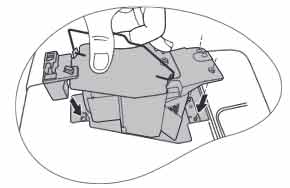
BENQ_Projector_DX819ST_Lamp_New_5J.J9A05.001

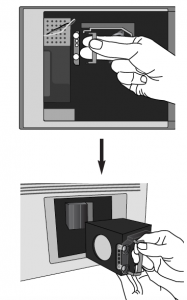
Slowly and gently pull the BenQ 5J.J9A05.001 projector lamp out of the projector. Pulling too quickly can cause the bulb to shatter. Learn what to do should the bulb shatter.

NOTE: The BenQ 5J.J9A05.001 projector lamp contains mercury and should not be thrown into regular garbage. It needs to be properly recycled.  Insert the new lamp.

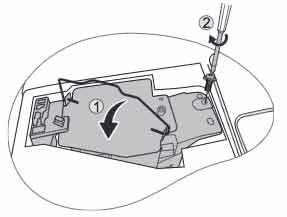
BENQ_Projector_DX819ST_Lamp__connectors_5J.J9A05.001

Make sure the handle is fully locked. Re-install the lamp connectors. Tighten the projector lamp screw. If the screw is too loose or too tight, the projector may not turn on. Replace the lamp cover. You are now reacy to reset the lamp timer.

Reset the projector lamp counter

When the BenQ 5J.J9A05.001 projector lamp in the BenQ DX819ST projector has been changed the projector lamp timer must be reset to zero. To reset the lamp timer:

  • Turn on the BenQ DX819ST projector.
  • After the startup logo, open the On-Screen Display (OSD) menu.
  • Go to the SYSTEM SETUP.
  • Scroll over to Advanced > Lamp Settings menu.
  • Press MODE/ENTER to display Lamp Settings page is displayed.
  • Highlight Reset lamp timer. A warning message is displayed asking if you want to reset the lamp timer.
  • Highlight Reset and press MODE/ENTER. The lamp time will be reset to “0”.

How to extend the life of the BenQ DX819ST projector lamp:

  • Keep your air filters clean to avoid overheating the projector.
  • Use the Lamp Power option on the BenQ DX819ST projector lamp and set to Economic Mode to reduce the amount of power used but extend lamp life.
  • Learn more with Top tips for extending DLP projector lamp life.ows you how step-by-step.

Why buy authentic

Start off on the right foot with an authentic projector lamp. Counterfeit prices are tempting but they end up more problems including:

Protect your health and keep your BenQ DX819ST projector by investing in an authentic projector lamp.

Tagged with: ,

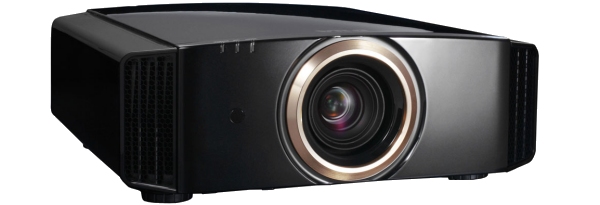
jvc-rs40_projectorReplace the JVC DLA-RS40 projector lamp

When it’s time to replace the JVC DLA-RS40 projector lamp follow this guide.

Warning signs for end of lamp life

When the JVC DLA-RS40 projector lamp has reached end of life the LAMP indicator will start flashing. Replace the lamp immediately. Other indications of end of lamp life can also be a poor picture, flicker lights darker light or strange colors.

Lamp life is approximately 3000 hours but may vary depending on maintenance and usage.

Find this lamp on Amazon from the following authorized dealers:


Buy authentic

Be sure to invest in an authentic lamp for your JVC DLA-RS40 projector lamp. This projector uses the JVC PK-L2210UP projector lamp. Be sure to invest in an authentic lamp.

Why avoid counterfeit projector lamps:

Projector lamp replacement

BEFORE replacing the lamp:

  • Turn off the projector and unplug the AC cord.
  • Allow the JVC DLA-RS40 projector lamp to cool for at least one hour. Don’t open the projector until it is cool to the touch. These projectors operate under high temperatures and you can run the risk of burning yourself.

JVC_DLA-RS40_projector_lamp_PKPK-L2210UP_cover

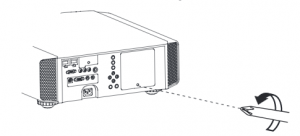
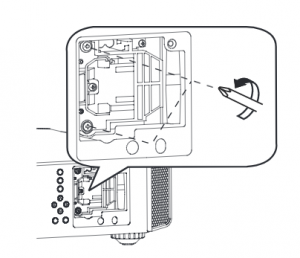
  • Loosen the screw holding the projector lamp cover into the projector. Place the cover to one side.
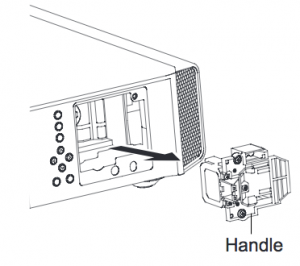
  • Loosen the two screws keeping the JVC PK-L221 projector lamp in place. Grab wire handle and gently pull the lamp out taking care not to hit the lamp.

  • Take the JVC PK-L2210UP projector lamp by the wire handle and gently pull it from the projector. NOTE: This lamp contain mercury and can’t be placed into regular garbage. Recycle this lamp.
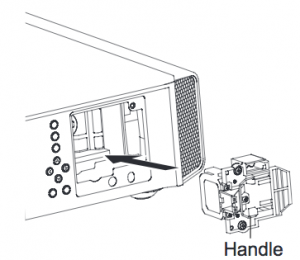
  • Place the replacement JVC PK-L2210UP into the JVC DLA-RS40 projector. Avoid touching the glass or the bulb since the oil from your fingers may cause black spots on the bulb when the projector heats up.
  • Tighten the two screws on the new JVC PK-L2210UP lamp.
  • Replace the JVC DLA-HD1 projector lamp cover. You’ll need to reset the Lamp Counter.

Resetting the projector lamp timer

Each time you replace the JVC DLA-RS40 projector lamp you need to reset the lamp timer to zero. Not resetting the lamp timer will result in your projector not turning back on because it thinks the old lamp has not been replaced.

To reset the lamp:

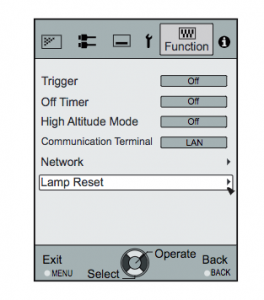
  • Display the Main Menu screen. Scroll over to select the FUNCTION option
  • Scroll down to the LAMP RESET option
  • Press the Enter button
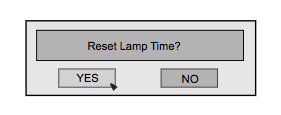
  • A second option screen will open asking toe Reset Lamp Timer
  • Scroll down to select YES
  • The lamp timer will be reset to zero.

Tips for longer projector lamp life:

  • Avoid frequent on and offs to avoid power surges.
  • Don’t let the JVC DLA-RS40 projector overheat as this puts stress on the lamp. Make sure there is enough airflow around the projector particularly if it’s been permanently mounted.
  • Let the projector stand unused for at least one hour ever 24 hours. An average use of four to five hours per day will ensure longer lamp life.
  • Keep the air filters clean and free of dust so it can do its job and keep the projector lamp for overheating.

Learn more with Top tips for extending DLP projector lamp life.

Save

Save

Tagged with: , ,

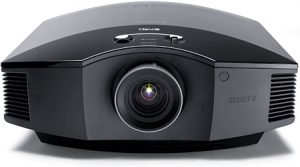
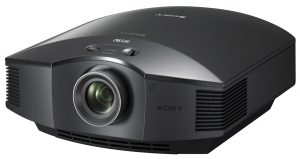
Sony VPL-HW15_projectorInstalling the Sony VPL-HW15 projector lamp

Our guide shows you how to install a replacement Sony VPL-HW15 projector lamp with easy step-by-step instructions.

Buy authentic

Don’t settle for anything but the best for your Sony VPL-HW15 projector and install an authentic projector lamp. Don’t get caught with a counterfeit lamp. Keep your projector working properly and invest in an authentic projector lamp.

Buy this lamp on Amazon from the following verified manufacturers:

When to replace?

When the this Sony VPL-HW15 projector lamp projector lamp is reaching end of life, the Lamp light will flash red in 3 second intervals. The message “Please replace the Lamp/Filter” will also start flashing on screen. If the projector lamp dims change it immediately. Sony recommends replacing the air filter at the same as replacing the lamp.

Replacing the Sony VPL-HW15 Lamp and Air Filter

Sony_VPL-HW15_Sony_LMP-H201_projector_lampBefore installations preparations:

  • Unplug the AC power cord on the Sony VPL-HW15 projector.
  • Your Sony VPL-HW15 projector uses the Sony LMP-H201 projector lamp. Before installing the lamp, let the projector cool for at least 40 minutes. It should be cool to the touch. Don’t rush the cooling as these projectors operate using extremely high temperatures and you run the risk of a serious burn.
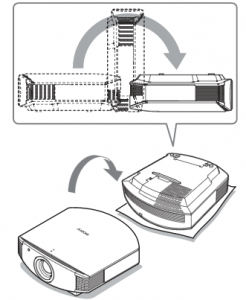
  • The projector lamp cover is on the bottom of the projector so you will need to turn it over. Put down a soft cloth on a flat surface to prevent the projector getting scratched. Turn the projector over gently. Don’t lean on the projector and make sure the surface is flat and stable.
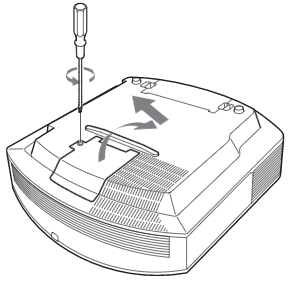
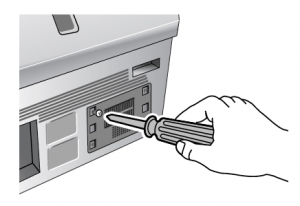
  • Using a Philips screwdriver, loosen the screw holding the projector lamp cover in place. Slide the projector lamp cover. Put it to one side.


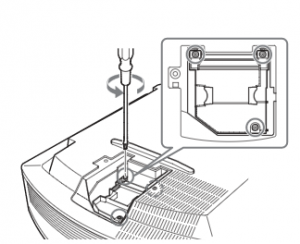
Sony_VPL-HW15_Sony_LMP-H201_remove_projector_lamp_screwLoosen the 3 screws on the Sony LMP-H201 lamp using a Phillips screwdriver. Grab the wire handle on the Sony LMP-H201 projector lamp and gently pull the lamp straight out. Take care not to bang the lamp as you can cause the bulb to break.

NOTE: The Sony LMP-H201 projector lamp contains mercury and should not be thrown into regular garbage. Recycle this lamp!

Sony_VPL-HW15_Sony_LMP-H201_remove_projector_lamp

To finish the projector lamp installation:

  • Remove the packaging from the new Sony LMP-H201 projector lamp.
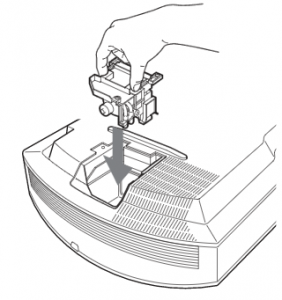
  • Lift up the handle and slowly lower the Sony LMP-H201 projector lamp into the projector.Sony_VPL-HW15_insert_Sony_LMP-H201_projector_lamp
  • Push it in securely until it reaches the end.
  • Tighten the three screws on the lamp.
  • Also don’t touch the actual bulb in the new lamp as oily fingerprints can burn a black spot on the lamp when it heats up. Sony_VPL-HW15_Sony_LMP-H201_remove_projector_lamp_screw
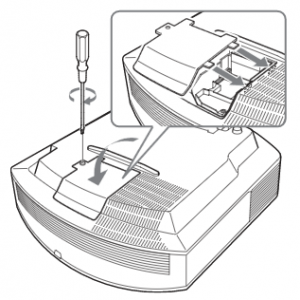
  • Slide the lamp cover back onto the Sony VPL-GH10 projector.
  • Close the projector lamp cover and tighten the screws.
    Remember to install the lamp cover properly as the projector will not turn on if the cover is loose or not installed correctly.

Replacing the Sony VPL-HW15 air filter

Sony_VPL-HW15_remove_projector_lamp_air_filter

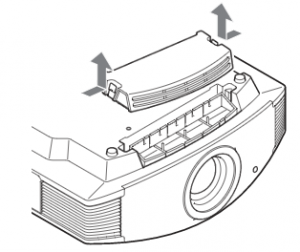
  • Remove the filter holder. The air filter will be inside the holder. Don’t touch the fan inside as this can damage the projector.
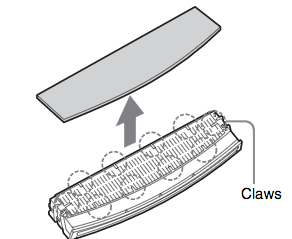
  • Remove the old Sony Sony VPL-HW15 filter and put it to one side. Attach the new air filter so that is fits into the 10 claws properly on the holder.Sony_VPL-HW15_Sony_LMP-H201_remove_projector_lamp_cover
  • Aligning the air filter with the shape of the filter holder will make it easier to install.
  • Be sure to put the air filter holder back into the projector aligned up properly. If not, the projector will not turn back on!
  • Wipe off any dust from the ventilation intake holes using a soft cloth. Put the projector back in its original position

Resetting the Sony VPL-HW15 projector lamp timer

Sony_VPL-HW15_Sony_LMP-H201_rese

  • To reset the projector lamp timer, plug the AC power cord back into Sony VPL-HW15 projector.
  • Using the remote, scroll down to the Setup Menu.
  • Press Enter.


Sony_VPL-HW15_Sony_LMP-H201_reset_projector_lamp_timer

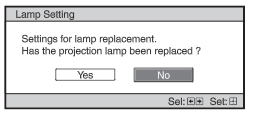
  • A Lamp Setting message will appear asking you if the projector lamp has been replaced.
  • Click on Yes.
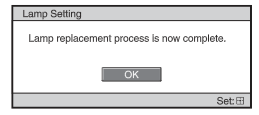
  • You will see a confirmation message and the Projector Lamp Timer will be automatically reset to zero.
  • See the number of hours left on your lamp by going to the Information Menu

You can extend the life of the Sony LMP-H201 projector lamp by always making sure the filter is clean and there is enough airflow around the projector. Learn how to get a longer projector lamp life with top tips for extending DLP projector lamp life.

4 reasons to avoid counterfeit lamps:


Tagged with: , ,

NEC LT180_projector_lamp_NEC LH02LPUse our guide to install a replacement NEC LT180 projector lamp

End of life warnings

You can expect up to 4000 hours of use with your NEC LT180 projector lamp. When the lamp is reaching end of life you’ll see the following warning signs:

  • The projected image gets darker or starts to deteriorate.
  • The projector’s lamp light flashes orange or red at half-second intervals.
  • The message Replace the lamp appears on the screen when you start projecting.
 Buy this lamp on Amazon from the following authorized dealers:

Invest in authentic lamps

The best type of projector lamp for your NEC LT180 projector is an OEM authentic lamp. You’ll need model NEC LH02LP replacement projector lamp.

While counterfeits appear of be a bargain they often end up costing more in the long run since they are prone to explosions and have a much shorter lamp life. The other concerns are the lack of proper safety guards for your eyesight and damaging the sensitive electronics in your NEC LT180 projector.

Changing the projector lamp

Follow these important safety instructions before installing the new NEC LH02LP projector lamp

  • turn off the NEC NP1000 projector.
  • unplug the projector from its power source.
  • unplug the power cable.
  • wait until the projector is cool to the touch to avoid getting burned.
NEC LT180_projector_lamp_NEC LH02LP_guide

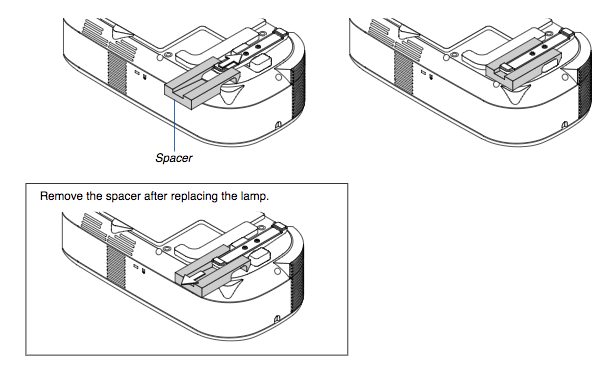
Step 1

Step 1: Be sure to insert the included spacer between the rear foot and the projector’s bottom to prevent the projector
from accidentally tilting when inserting the NEC LH02LP lamp house.

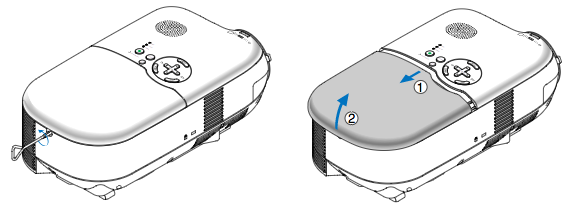
Step 2

Step 2: Loosen the lamp cover screw until the screwdriver goes into a freewheeling condition and remove the lamp cover. The lamp cover screw is not removable.

NEC LT180_projector_lamp_NEC LH02LP_remove_lamp

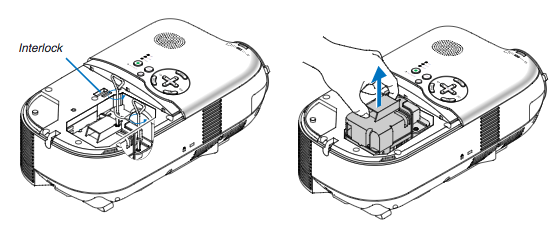
Step 3

Step 3: Loosen the two screws securing the NEC LH02LP lamp housing until the screwdriver loosens. The two screws are not removable. Remove the lamp housing by holding it by the edges. NOTE: The NEC LH02LP lamp contains mercury and should not be thrown into the garbage. Please recycle this lamp properly.

NEC LT180_projector_lamp_NEC LH02LP_insert_new

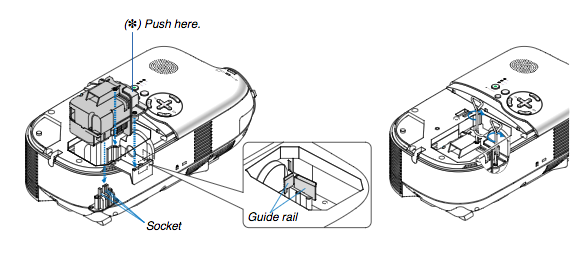
Step 4

Step 4: Insert a new NEC LH02LP lamp housing until the lamp housing is plugged into the socket. Secure it in place with the two screws. Be sure to tighten the screws. Align the lamp housing with the guide rail. Make sure the lamp housing plug goes to the socket correctly. If both screws are not tightened securely, an image may not be displayed correctly.

NEC LT180_projector_lamp_NEC LH02LP_rep

Step 5

Step 5: Reattach the lamp cover. Tighten the lamp cover screw. Be sure to tighten the screw. You are now ready to reset the lamp timer.

Reset the lamp timer

NEC LT180_projector_lamp_NEC LH02LP_reset_lamp_timerOnce the NEC LH021LP projector lamp has been replaced you’ll need to reset the timer back to zero so the NEC LT180 projector can accurately track the lamp life. To reset:
  • Open the menu
  • Scroll down to the RESET option. Press ENTER.
  • Scroll down to Clear Lamp Hour Meter. Press ENTER.
  • The lamp timer will be set to zero.

Extend lamp life

  • Keep your air filters clean to avoid overheating the projector.
  • Don’t operate the projector continuously without letting it stand for at least one hour turned off every 24 hours
  • Learn more with Top tips for extending DLP projector lamp life.
Tagged with: , , ,

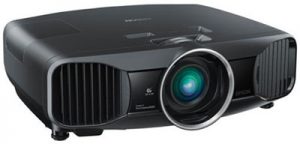
Epson-PowerLite-Pro-Cinema-6010Follow our guide for installing a new Epson PowerLite Pro 6010 projector lamp

You can expect up to 4000 hours with your projector lamp. When it’s time to replace the Epson PowerLite Home Cinema 6010 projector lamp, you’ll notice the following warning signs:

  • The projector lamp indicator flashes orange or intervals of red.
  • The message “Lamp Replace” appears on the screen
  • The images gets darker or starts to deteriorates.

Find this lamp on Amazon from the following authorized dealers:

Keep your projector working

A genuine Epson ELPLP69 projector lamp is the only lamp that will keep your Epson PowerLite Home Cinema 6010 projector lamp working at its optimum levels. OEM authentic Epson ELPLP69 lamps have been manufactured to meet the specifications of the Epson PowerLite 6010 projector.

Counterfeit projector lamps can damage the sensitive and expensive mechanisms in your Epson PowerLite 6010 projector and actually have a much shorter lamp life. They are also more prone to explosions due to the inferior materials used during their production.

Look for the seal of approval and buy from an authentic manufacturer. Learn how to protect yourself from counterfeit manufacturers.

Installing Epson ELPLP69 projector lamp

PowerLite_Home_Cinema_6010_Epson_ELPLP69_replacement_projector_lampPreparation:

1. Turn off the projector power and wait for the cool-down period which is about two minutes. Disconnect the power cord after the two minutes is over.

2. Wait at least 30 minutes to one hour for the Epson PowerLite Home Cinema 6010 projector lamp projector to cool internally before opening it up. It should be cool to the touch.

NOTE: Do not operate the projector while the projector lamp is removed as this may result in malfunctions, fire hazard and other accidents.
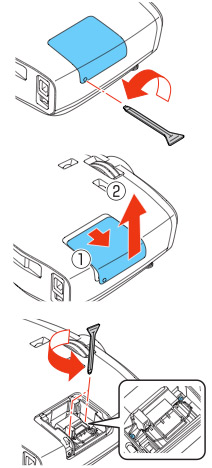
Use the screwdriver provided loosen the screw holding the Epson PowerLite Home Cinema 6010 projector lamp cover in place.

Slide the Epson PowerLite Home Cinema 5010 projector lamp cover off and place it to one side.

Loosen the two screws holding the Epson ELPLP69 projector lamp in place.

PowerLite_Home_Cinema_6010_install_Epson_ELPLP69_replace_projector_lampLift up the wire handle on the Epson ELPLP69 projector lamp and gently pull the projector lamp out of the Epson PowerLite Home Cinema 6010 projector lamp. Don’t knock the actual bulb as it may break. Learn what to do should the bulb shatter.

PowerLite_Home_Cinema_6010_Epson_ELPLP69_projector_lampNOTE: The Epson ELPLP69 projector lamp contains mercury and should not be thrown into regular garbage. Recycle your used lamps! If you bought from an authentic manufacturer they will recycle the lamp for you at no extra cost (another reason to buy authentic lamps).

Slowly insert the Epson ELPLP69 projector lamp until it clicks into place. Be sure not to touch the actual bulb as the oil from your skin will case blackouts.

Tighten the screws on the newly installed Epson ELPLP69 projector lamp. Replace the lid on the Epson PowerLite Home Cinema 6010 projector lamp projector. Tighten the screw on the projector lamp cover. Reset the lamp timer.

Resetting the lamp timer

The projector lamp timer will need to be reset after replacing the Epson ELPLP69. This timer helps the Epson PowerLite Home Cinema 6010 projector lamp proiector to properly track the lamp life. Only reset the timer when a new Epson ELPLP69 lamp has been installed, otherwise the projector will NOT know when it’s time to replace the lamp. You run the risk of damaging your projector.

  • Press the MENU button on the remote control. The Lamp Reset Menu will appear.
  • Scroll down to the RESET. Press ENTER.
  • Click on RESET ALL.
  • A prompt appears asking if you want to replace the lamp.
  • Select YES and press ENTER.
  • Press MENU to exit.

The lamp hours will be reset to zero. The lamp usage timer shows 0H until you’ve used the lamp for at least 10 hours.

How to extend the life of the Epson ELPLP69 lamp:

Extend the life of the newly installed Epson ELPLP69 with the following tips:

  • Keep your air filters clean to avoid overheating the projector.
  • Turn off the Epson PowerLite Home Cinema 6010 projector lamp projector and let it stand for at least one hour ever 24 hours. An average use of four to five hours per day will ensure longer lamp life.
  • Make sure there is enough airflow around the projector particularly if it’s been permanently mounted.
  • Learn more with Top tips for extending DLP projector lamp life.
Tagged with: , , ,

VPL-HW10_projectorsReplace the Sony VPL-HW10 projector lamp using this guide

Don’t settle for anything but the best for your Sony VPL-HW10 projector and install an authentic projector lamp. Don’t get caught with a counterfeit lamp. Keep your projector working properly and invest in an authentic projector lamp.

4 reasons to avoid counterfeit lamps:

Buy this lamp on Amazon from the following verified manufacturers:

When to replace?

When the this Sony VPL-HW10 projector lamp projector lamp is reaching end of life, the Lamp light will flash red in 3 second intervals. The message “Please replace the Lamp/Filter” will also start flashing on screen. If the projector lamp dims change it immediately. Sony recommends replacing the air filter at the same as replacing the lamp.

Replacing the Sony VPL-HW10 Lamp and Air Filter

Sony_VPL-HW10_Sony_LMP-H201_projector_lampBefore installations preparations:

  • Unplug the AC power cord on the Sony VPL-HW10 projector.
  • Your Sony VPL-HW10 projector uses the Sony LMP-H201 projector lamp. Before installing the lamp, let the projector cool for at least 40 minutes. It should be cool to the touch. Don’t rush the cooling as these projectors operate using extremely high temperatures and you run the risk of a serious burn.
  • The projector lamp cover is on the bottom of the projector so you will need to turn it over. Put down a soft cloth on a flat surface to prevent the projector getting scratched. Turn the projector over gently. Don’t lean on the projector and make sure the surface is flat and stable.
  • Using a Philips screwdriver, loosen the screw holding the projector lamp cover in place. Slide the projector lamp cover. Put it to one side.


Sony_VPL-HW10_Sony_LMP-H201_remove_projector_lamp_screwLoosen the 3 screws on the Sony LMP-H201 lamp using a Phillips screwdriver. Grab the wire handle on the Sony LMP-H201 projector lamp and gently pull the lamp straight out. Take care not to bang the lamp as you can cause the bulb to break.

NOTE: The Sony LMP-H201 projector lamp contains mercury and should not be thrown into regular garbage. Recycle this lamp!

Sony_VPL-HW10_Sony_LMP-H201_remove_projector_lamp

To finish the projector lamp installation:

  • Remove the packaging from the new Sony LMP-H201 projector lamp.
  • Lift up the handle and slowly lower the Sony LMP-H201 projector lamp into the projector.Sony_VPL-HW10_insert_Sony_LMP-H201_projector_lamp
  • Push it in securely until it reaches the end.
  • Tighten the three screws on the lamp.
  • Also don’t touch the actual bulb in the new lamp as oily fingerprints can burn a black spot on the lamp when it heats up. Sony_VPL-HW10_insert_Sony_LMP-H201_replace_projector_lamp
  • Slide the lamp cover back onto the Sony VPL-GH10 projector.
  • Close the projector lamp cover and tighten the screws. Remember to install the lamp cover properly as the projector will not turn on if the cover is loose or not installed correctly.

Replacing the Sony VPL-GH10 air filter

201_remove_projector_lamp_air_filter

  • Remove the filter holder. The air filter will be inside the holder. Don’t touch the fan inside as this can damage the projector.
  • Remove the old Sony VPL-HW10 filter and put it to one side. Attach the new air filter so that is fits into the 10 claws properly on the holder.Sony_VPL-HW10_Sony_LMP-H201_remove_projector_lamp_cover
  • Aligning the air filter with the shape of the filter holder will make it easier to install.
  • Be sure to put the air filter holder back into the projector aligned up properly. If not, the projector will not turn back on!
  • Wipe off any dust from the ventilation intake holes using a soft cloth. Put the projector back in its original position

Resetting the Sony VPL-GH10 projector lamp timer

Sony_VPL-HW10_Sony_LMP-H201_rese

  • To reset the projector lamp timer, plug the AC power cord back into the Sony VPL-HW10 projector.
  • Using the remote, scroll down to the Setup Menu.
  • Press Enter.


Sony_VPL-HW10_Sony_LMP-H201_reset_projector_lamp_timer

  • A Lamp Setting message will appear asking you if the projector lamp has been replaced.
  • Click on Yes.
  • You will see a confirmation message and the Projector Lamp Timer will be automatically reset to zero.
  • You can see the number of hours left on your lamp by going to the Information Menu.

You can extend the life of the Sony LMP-H201 projector lamp by always making sure the filter is clean and there is enough airflow around the projector. Learn how to get a longer projector lamp life with top tips for extending DLP projector lamp life.


Tagged with: , ,

Samsung_HLP4663WX XAA_TVFollow these instructions when it’s time to replace the Samsung HLP4663WX/XAA TV lamp

When the Samsung HLP4663WX/XAA TV lamp is reaching end of life you may notice all three LEDs on the front panel — Timer, Lamp, & Temp — are flashing. Colors may appear flattened and the brightness on the screen may be diminished.

Find this lamp on Amazon from the following authorized dealers:

Keep it authentic

The Samsung HLP4663WX/XAA TV lamp uses the Samsung BP96-00608A Replacement TV Lamp. Reduce hassles by always buying authentic. Counterfeits have several chronic problems including:

Replacing the lamp

Before replacing the lamp allow the Samsung HLP4663WX/XAA to cool down for one hour. There is a risk of a serious burn if the TV is not completely cool. Be sure to unplug the TV from the electrical socket.

Samsung_HLP4663WX:XAA_TV_replacement_lamp_BP96-00608A_remove_lamp_door

Step 1: Use a screwdriver to remove the screw holding the TV lamp cover in place.

Samsung_HLP4663WX:XAA_TV_replacement_lamp_BP96-00608A_lamp_door_2

Step 2: Remove the Lamp cover.

Samsung_HLP4663WX:XAA_TV_replacement_lamp_BP96-00608A_remove

Step 3: Using a screwdriver loosen the screws securing the BP96-00608A in place

Samsung_HLP4663WX:XAA_TV_replacement_lamp_BP96-00608A_replace

Step 4: Separate the Lamp from the engine by holding the handle and pulling it out.

NOTE: The contains mercury. Please recycle this lamp. Don’t throw it into conventional garbage.

Inserting the new lamp

  • Insert the new Samsung BP96-00608A Replacement TV Lamp.
  • Tighten the two screws on the lamp.
  • Replace the lamp cover and tighten the screws. NOTE: Be sure to tighten the lamp cover on the TV after changing the lamp. Note that the TV will not function if the lamp cover is not securely attached. Please tighten the holding screw on the lamp cover after it has been attached to the TV.

If any there is no picture or a very dark picture or if the TV won’t turn on, repeats the steps again to ensure the lamp has been installed properly and the lamp door has been re-installed correctly.

Extend the life of the Samsung BP96-00608A Replacement TV lamp by following these tips.

Tagged with: , , ,

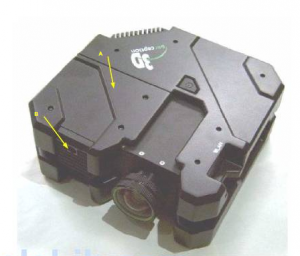
3D_HMR-15 _projectorConsult this guide when its time to change your 3D HMR-15 projector lamp

Your 3D HMR-15 projector lamp can last up to 2000 hours. You’ll need to check lamp life to determine if it’s reaching end of life. As the 3D HMR-15 projector lamp begins to wear out you’ll notice the color becoming washed out and the light dimming. If the lamp is close to end of life and the projector will not switch on, you’ll need to replace the lamp immediately.
Buy this lamp on Amazon from the following authorized dealers:

SpArc Platinum 3D Perception 400-0003-00 Projector Replacement Lamp with Housing

Go with authentic

Your 3D HMR-15 projector uses the 3D Perception 400-0003-00 lamp. Be sure to purchase an authentic projector lamp and avoid the temptation of generic lamps and their associated problems:

Save yourself hassle and go with an authentic projector lamp.

Replacing the lamp

Before replacing the projector lamp:

  • Wait until the projector is cool to the touch before removing the lamp. These projector work at a high temperatures and you can get badly burned.
  • Be sure to unplug the projector before replacing the lamp.
3D_HMR-15_projector_lamp_400-0003-00_remove_cover
Remove the 3D HMR-15 projector lamp cover by loosening the
fixing screw and sliding the cover forward.
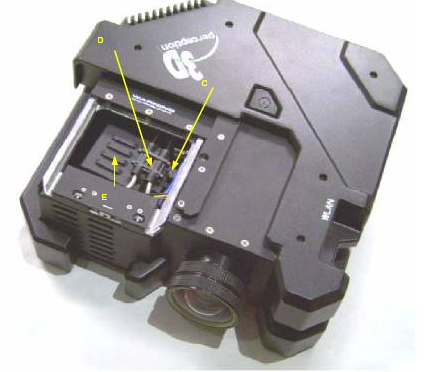
3D_HMR-15_projector_lamp_400-0003-00_remove
Undo the locking screw on the 400-0003-00 lamp
and disconnect the wiring to remove.
NOTE: The 3D Perception 400-0003-00 lamp contains mercury and should not be thrown into regular garbage. Recycle this lamp through a recycling company.
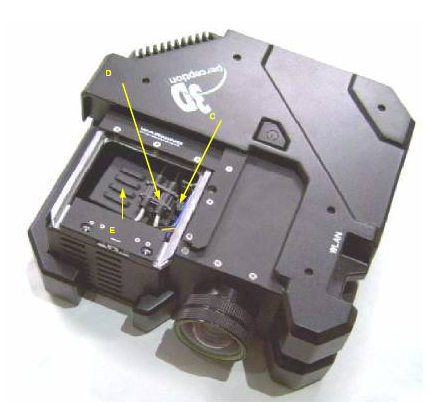
3D_HMR-15_projector_lamp_400-0003-00_insert_new

into the projector making sure the wiring element has been reconnected and clicked into place. (Step C and D) Fasten the screw on the lamp.

Slide the lamp cover back in place and refasten the screw on the cover.
NOTE: It’s critical the the 3D Perception 400-0003-00 lamp is in place the the lamp cover is correctly placed back in its slot. If either the lamp or the lamp cover is not properly secured the 3D HMR-15 projector will not turn on.
You must reset the lamp timer after replacing the lamp.

Resetting the lamp timer

 The 3D HMR-15 projector has a built in lamp hour timer. Each time you change the 3D HMR-15 projector lam you MUST reset the lamp timer.
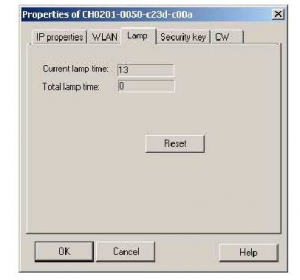
 3D_HMR-15_projector_lamp_400-0003-00_reset_timer

To reset the timer:

  • Turn on the proector.
  • Select Projectors on the drop-down menu under Maintenance under the main File menu.
  • Scroll over to the LAMP option on the top menu.
  • You’ll see the Current lamp time and Total lamp timeThis will be the old lamp information.
  • Click on RESET to set the Total lamp time back to zero. Until you do this step, the 3D HMR-15 projector will think the lamp is still old and not turn on.

Extend the 3D HMR-15 lamp life

  • Keep your air filters clean to avoid overheating the projector.
  • Turn off the projector and let it rest for at least two hours a day.
  • Make sure there is enough airflow around the projector particularly if it’s mounted on the ceiling.
  • Learn more with Top tips for extending DLP projector lamp life.


Save

Save

Save

Save

Save

Tagged with: , , ,

Replace the BenQ MX660 projector lamp

Start off with authentic

Purchase an authentic BenQ MX660 projector lamp and eliminate any potential problems associated with generics. Counterfeit “compatible” lamps may appear to be a bargain but in the long run end up costing more due to their shorter lamp life. They are prone to explosions and can put your eyesight at risk. Protect your health and keep your BenQ MX660 working at optimum levels. Go with an authentic projector lamp.

Find this lamp on Amazon from the following authorized dealers:
MX660 BenQ Projector Lamp Replacement. Projector Lamp Assembly with Genuine Original Philips UHP Bulb Inside.

End of life warning signs
Your BenQ MX660 projector uses the BenQ 5J.J3T05.001 replacement projector lamp. When it’s time to replace the BenQ MX660 projector lamp you’ll see a series warnings appear on screen.

benq-MX660 -projector_benq-5j-j3t05-001_replacement_lamp-warnings

First warning: The BenQ MX660 projector lamp has been in operation equivalent to 4500 hours or for 6,000 hours Econo Mode, you have up to 6000 hours before changing the lamp. You can wait until the second warning to replace the projector lamp. Press MODE/ENTER to dismiss the message.

Second Warning: The BenQ MX660 projector lamp has been in operation equivalent to 4000 hours or 6,000 hours in Econo mode. You should replace the lamp immediately. Press MODE/ENTER to dismiss the message.

Out of lamp: The BenQ MX660 projector lamp has reached its end of life and the projector will shut down until the lamp is replaced. Install a new BenQ 5J.J3T05.00 projector lamp immediately.

Follow these safety instructions before changing the lamp:

  • Reduce the risk of electrical shock by disconnecting the power cord on the BenQ MX660 projector.
  • Reduce the risk of severe burns by allowing the projector to cool for at least 45 minutes. The projector should be cool to the touch.

Replacing the projector lamp


benq-MX660-projector_benq-5j-j3t05-001_replace_lamp_cover

  • The projector lamp cover is found on the side of the Benbenq-MX660 -projector_benq-5j-j3t05-001_replace_lamp_cover-2Q MX660 projector.
  • Loosen the screw holding the projector lamp cover in place
  • Lift up the projector lamp cover.


benq-MX660 -projector_benq-5j-j3t05-001_replace_lamp_screw-1

  • Loosen the screw that secures the lamp.
  • Lift the handle so that it stands up. Use it to slowly pull the BenQ 5J.J3T05.00 projector lamp out of the projector. Pulling out too quickly may cause the bulb to break. benq-MX660 -projector_benq-5j-j3t05-001_remove_lamp

NOTE: The BenQ 5J.J3T05.00 projector lamp contains mercury and should not be thrown into regular garbage. Recycle your used lamps!

benq-MX660-projector_benq-5j-j3t05_insertInsert the new BenQ 5J.J3T05.00 projector lamp.

  • Tighten the screw that secures the lamp. Loose screw may cause a bad connection,
    which could result in malfunction. Do not over tighten the screw. benq-MX660-projector_benq-5j-j3t05-001_replace_lamp_screw-2
  • Replace the lamp cover on the BenQ MX660 projector.
  • Reset the lamp timer.

Resetting the lamp timer

Do not reset the BenQ MX660 projector lamp timer if the lamp has not been replaced as this could cause damage. Don’t start the if the lamp cover has not been replaced. To reset the projector lamp timer:

  • Plug the BenQ MX660 projector and get it started.
  • Open up the menu and scroll over to SYSTEM/SETUP: Advanced. Press ENTER
  • Press MODE/ENTER to display the Lamp Settings page
  • Highlight Reset lamp timer to display a warning asking it you want to reset the lamp timer.
  • Select RESET. Press ENTER.
  • Lamp time will be reset to zero.

Extend the BenQ MX660 projector lamp

  • Keep your air filters clean to avoid overheating the projector.
  • Setting Lamp Power to Eco mode. Using Whisper mode reduces system noise and power consumption. It also extends the projector lamp life. To set Econo mode, go into the Advanced Setup > Lamp > Lamp Power menu.
  • Learn more with Top tips for extending DLP projector lamp life.


Save

Save

Save

Save

Tagged with: , , ,

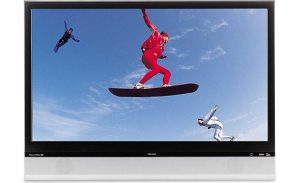
Toshiba_42HM66_TVIt’s a breeze to change your Toshiba 42HM66 TV lamp when you follow our instructions.

When the Toshiba 42HM66 TV lamp is reaching end of life you may notice that colors appear flattened and the brightness of has diminished. The quartz glass also gets weaker so if you hear a very loud bang, it means the lamp has exploded and needs to be replaced.

Buy this lamp on Amazon from the following authorized dealers:

Keep it authentic

Reduce hassles by always buying authentic. Look for the seal of approval — don’t get caught with a copycat generic projector lamp!

6 reasons to avoid generic projection lamps:

Your Toshiba 42HM66 uses the Toshiba D42-LMP TV Lamp 

Replacing the lamp

Before replacing the lamp allow the Toshiba 42HM66 TV to cool down for one hour. There is a risk of a serious burn if the TV is not completely cool. Be sure to unplug the TV from the electrical socket.

Toshiba_42HM66_TV_projector_lamp_D42-LMP_door

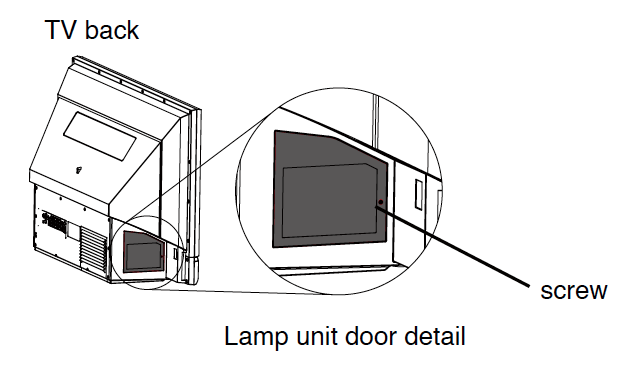
Step 1

Step 1: The Toshiba 42HM66 TV lamp door is located on the side of the TV.  Loosen the screw and then remove the lamp unit door.

Note: The lamp unit door is provided with an interlock to reduce the risk of electric shock and excessive ultraviolet radiation. Never defeat its purpose or attempt to servicewithout removing the lamp unit door completely. Failure to follow this WARNING may result in death or serious injury.

Toshiba_42HM66_TV_projector_lamp_D42-LMP_door_screws

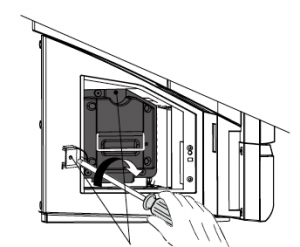
Step 2

Step 2: Using a slotted screwdriver or a coin, loosen the two screws on the Toshiba D42-LMP lamp.

Toshiba_42HM66_TV_projector_lamp_D42-LMP_remove

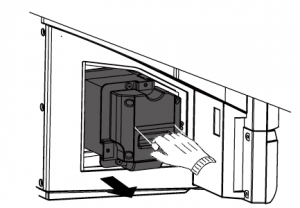
Step 3

Step 3: Grasp the Toshiba D42-LMP lamp by the handle and gently pull it straight out of the TV. Set the old lamp unit aside.

NOTE: The contains mercury. Please recycle this lamp. Don’t throw it into conventional garbage.

Toshiba_42HM66_insert_TV_projector_lamp_D42-LMP_

Step 4

Step 4: Carefully insert the new lamp unit straight into the TV until it is fully seated. Avoid touching the actual bulb as this can affect image quality.

Toshiba_42HM66_TV_projector_lamp_D42-LMP_lamp_screw_tighten

Step 5

Step 5: Hand-tighten the screws on the Toshiba D42-LMP lamp Do not use an electric screwdriver

Toshiba_42HM66_TV_projector_lamp_D42-LMP_replace_door

Step 6

Step 6: Reattach the lamp unit door, making sure to insert the hooks on the left side of the lamp unit door inside the
opening in the TV cabinet. Replace the door screw and tighten.

Plug in the power cord and turn on the TV. After the initial warmup period (which may take several seconds for full
picture brightness), the TV should operate normally.

If any there is no picture or a very dark picture or if the TV won’t turn on, repeats the steps again to ensure the lamp has been installed properly and the lamp door has been re-installed correctly.

Extend the life of the Toshiba D42-LMP lamp by following these tips.

Tagged with: , ,
Join the discussion on Facebook! All your questions, answered! The Screen & Projector Group