We're now Screen and Projector! For updated content, visit ScreenAndProjector.com and follow @screenandproj on social media!

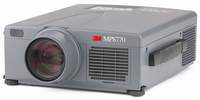
3M_MP8770_projector_3M_78-6969-8919-9_EP1635_replacement_projectorThis how-to guide teaches you how to replace the 3M MP8770 projector lamp

You need to change the 3M MP8770 projector lamp when the lamp indicator lights up red and “CHANGE THE LAMP” message appears on the screen and if the colors are washed out or distorted.

Invest in authentic

One of the best things you can do to keep your 3M MP8770 projector is to install an OEM projector lamp. Counterfeit  lamps can create a number of problems:

Invest in an authentic and look for the seal of approval before buying.

Buy this lamp on Amazon sold by these authorized dealers:

Replacing the projector lamp

Your 3M MP8770 projector uses the 3M 78-6969-8919-9 projector lamp. Be sure to follow these important safety steps before installing a new projector lamp:

  • Wait until the projector is cool to the touch before removing the lamp. This projector works at a high temperatures and you can get badly burned if you try to replace the lamp before the cool down.
  • Once cool, unplug the projector.

Replace the lamp

  • The 3M MP8770 projector lamp access door is located on the bottom of the projector. Turn over the projector onto a soft surface to loosen the screw holding the cover in place.
3M_MP8755_projector_install_3M_78-6969-8919-9_-EP1635_replacement_projector_lamp

  • Remove the cover. Place it to one side.
  • Unscrew the two projector lamp screws. Grasp the lamp module with one hand and the projector body with the other hand. Carefully slide the lamp module out. Take care not to bang the actual 3M 78-6969-8919-9 projector lamp or it may break. Learn how to do a proper clean up if the lamp breaks or explodes.
  • NOTE: The 3M 78-6969-8778-9 projector lamp contains mercury and should not be thrown into regular garbage. Recycle this lamp.
  • Insert the new 3M 78-6969-8919-9 projector lamp. Tighten the two screws on the new projector lamp.Being careful not to touch the actual bulb as the oil from your fingers will burn black marks when the lamp heats up. Re-install the 3M MP8770 projector lamp cover.

Reset the lamp timer

After changing the 3M 78-6969-8919-9 projector lamp you need to reset the lamp timer so the 3M MP8770 projector will turn back on. To reset:

  • To display the total lamp hours, press and hold for 3 seconds, the RESET button on the projector or Timer button on the remote control.
  • To reset the lamp timer, press the RESET button on the projector or MENU button on the remote while the total lamp hours are displayed. Use the arrow button on the projector or remote to select ZERO or CANCEL.

Extend the 3M MP8770 projector lamp life

  • Keep your air filters clean to avoid overheating the projector.
  • Turn off the 3M MP8770 projector projector projector and let it stand for at least one hour ever 24 hours. An average use of four to five hours per day will ensure longer lamp life.
  • Make sure there is enough airflow around the projector particularly if it’s been permanently mounted.
  • Learn more with Top tips for extending DLP projector lamp life
Tagged with: , ,

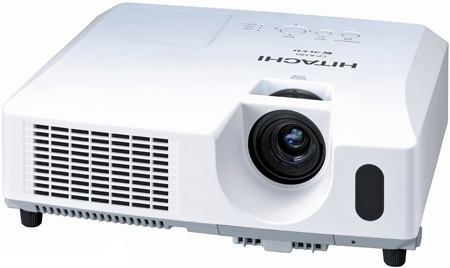
Hitachi_CP-RX80_projector_lamp_Hitachi_DT01022

When it’s time to replace the Hitachi CP-RX80 projector lamp projector lamp this guide shows you to do it.

Invest in authentic lamps

Your Hitachi CP-RX80 projector uses the Hitachi DT01022 projector lamp. Only an OEM authentic replacement Hitachi CP-RX80 projector lamp will keep your projector working. Look for the seal of approval before purchasing. Learn to spot copycat lamps posing as authentic lamps.

Tracking the projector lamp life

Keep track of projector lamp life so you’ll know when to replace the projector lamp. Watch for these signs that indicated the projector lamp is reaching its end of life:

  • The Power and Lamp Indicators will begin blinking.
  • Color tone on the screen may also appear weak or washed out.
  • Picture has poor color quality.

Find this lamp on Amazon sold by these authorized dealers:

Install the replacement projector lamp

Before installing the replacement Hitachi DT01022 follow these important safety tips:

  • Turn off the Hitachi CP-RX80 projector.
  • Unplug the power cord.
  • Allow the projector to cool for at least 45 minutes. It should be cool to the touch. This projector works using high heat and there is danger you can be burned.
  • NOTE: If the projector is mounted on the ceiling, don’t stand underneath the projector while opening the cover.

Hitachi_CP-RX80_projector_lamp_Hitachi_DT01022_cover

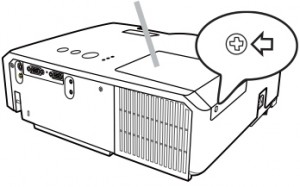
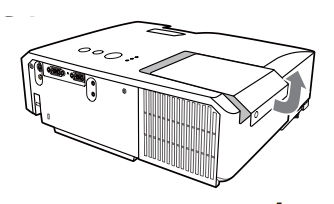
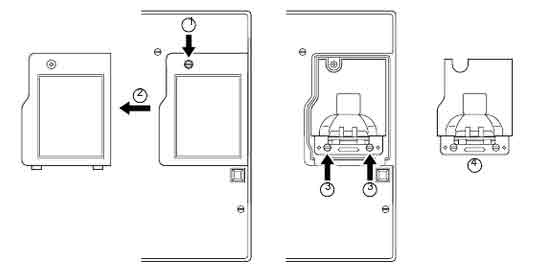
  • Loosen the screw (marked by arrow) of the lamp cover and then slide the lamp cover to the side to remove it.
  • Hitachi_CP-RX80_projector_lamp_Hitachi_DT01022_remove_cover
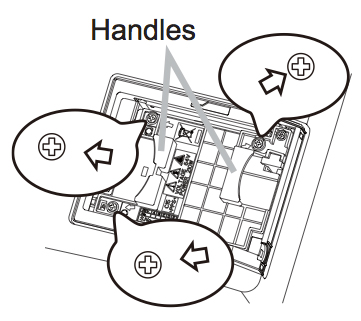
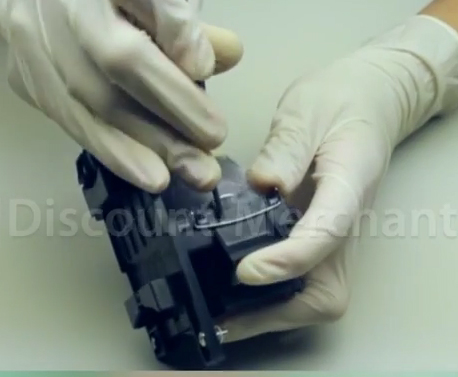
  • Loosen the 3 screws (marked by arrow) of the projector lamp, and slowly pick up the lamp by the handles. Be careful not the bang the lamp.

NOTE: The Hitachi DT01022 projector lamp contains mercury and must be recycled properly. Do not throw it in regular garbage.

Hitachi_CP-RX80_Install_projector_lamp_Hitachi_DT01022_reset_lamp_timer

  • Insert the new lamp, taking care not to touch the actual bulb. Oil in your fingers will cause a dark spot on the lamp when it heats up.
  • Tighten the 3 screws of the Hitachi DT01022 projector lamp that were loosened to remove the old projector lamp.
  • Slide the lamp cover back in place and firmly fasten the screw of the lamp cover.
  • Turn on the projector and set the lamp timer

To reset the projector lamp timer:

Reset the projector lamp time only when you have replaced the lamp so the Hitachi CP-X205 projector can properly track the lamp life. Otherwise you run the risk of using the lamp beyond its lamp life. Hitachi_CP-RX80_projector_lamp_Hitachi_DT01022_reset_lamp_timer

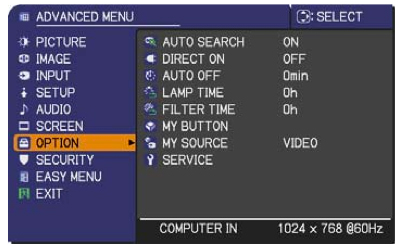
  • Press the MENU button
  • Scroll down to the GO TO ADVANCED MENU option. Press ENTER
  • Scroll down to the OPTION menu in the left column and press ENTER.
  • Scroll down to LAMP TIME. Press ENTER To make a dialogue field appear
  • Scroll up to the RESET option on the dialogue box.
  • The lamp setting will be set to zero.

Why avoid buying counterfeits

Despite their bargain prices, counterfeits have a number of major problems:

Green your projector

Hitachi_bulb_only_lamp_Hitachi_DT01022

Recycle your lamp housing by only replacing the Hitachi CP-RX80 bulb. Our training video shows you how to do it. It’s easy!


Tagged with: , ,

Vivitek_ D951HD_projector_Vivitek_5811116617-S_replacement_projector_lampThis how-to guide shows you how to install a new Vivitek D951HD projector lamp.

Watch your hours

The power LED will start flashing 5 times consecutively when the Vivitek D951HD projector lamp has reached end of life.  Other warning signs include a faded picture on screen or a image with strange colours. Check the lamp hours from the SETUP/Advanced Menu.

Replace the projector lamp

Your Vivitek D950HD projector uses the Vivitek 5811116617-S projector lamp. Be smart and invest in an Vivitek D951HD projector authentic lamp to avoid damaging the electronicsc inside your projector. Counterfeits also can’t be properly calibrated so your Vivitek D950HD projector will not work at its best.

Before changing the projector lamp do the following safety steps:

  • Reduce the risk of electrical shock by disconnecting the power cord on the Vivitek D951HD projector.
  • Reduce the risk of severe burns by allowing the projector to cool for at least 45 minutes.

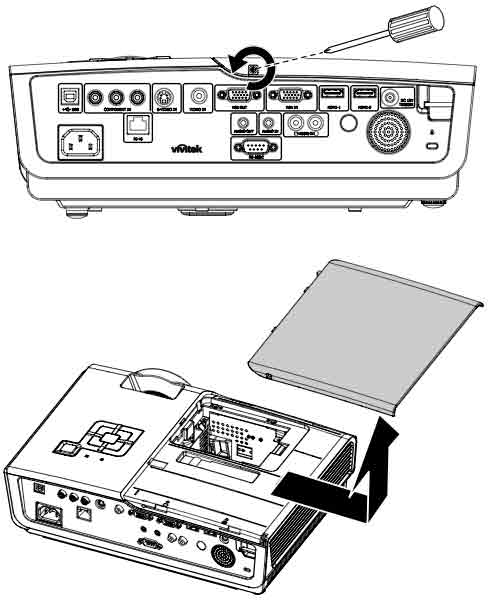
Vivitek_-D951HD_projector_Vivitek_5811116617-S_remove_projector_lamp_cover

  • Remove the two captive screw holding the lamp cover place.
  • Remove the lamp compartment cover

Vivitek_-D951HD_projector_Vivitek_5811116617-S_remove_projector_lamp

  • Insert the new Vivitek 5811116617-S projector lamp into the projector making sure it’s properly aligned.
  • Tighten the two screws.
  • Replace the projector lamp cover and tighten the screw.
  • Note: Be sure the lamp module is sitting securely in place and the lamp connector is connected properly before tightening the screws.
  • You are now ready to reset the lamp timer.

Resetting the Lamp Hour Timer

The Vivitek D951HD projector will not turn on unless the lamp timer has been reset when a new Vivitek 5811116617-S projector lamp has been installed into. To reset the lamp timer:

Vivitek_-D951HD_projector_Vivitek_5811116617-S_reset_projector_lamp_timer

  • Go to the SETUP/Advanced Menu
  • Press the MENU button to open the On ScreenDisplay menu.
  • Press the left-right cursor button to move to the SETUP/Advanced Menu
  • Press the left-right cursor button to move to the LAMP MENU.
  • Press the MENU to reset the Lamp Hour after the lamp is replaced to reset the lamp hours to zero.

Extending the life of the Vivitek 5811116617-S projector lamp:

  • Keep your air filters clean to avoid overheating the projector.
  • Use the Lamp Power option on the Vivitek D951HD projector and set to Eco Mode to reduce the amount of power used but extend lamp life.
  • Learn more with Top tips for extending DLP projector lamp life.

Why invest in an authentic projector lamp?

Be sure the purchase an authentic projector lamp and avoid the temptation counterfeit lamps with their bargain prices. These lamps have been manufactured with toxic and dangerous substitutes. Bargain prices can’t compensate for a shorter lamp life. As well as being prone to explosions, counterfeits also can’t be properly calibrated to work with your Vivitek D951HD projector. You’ll also make your projector warranty void installing one. Go with authentic.


Tagged with: , ,

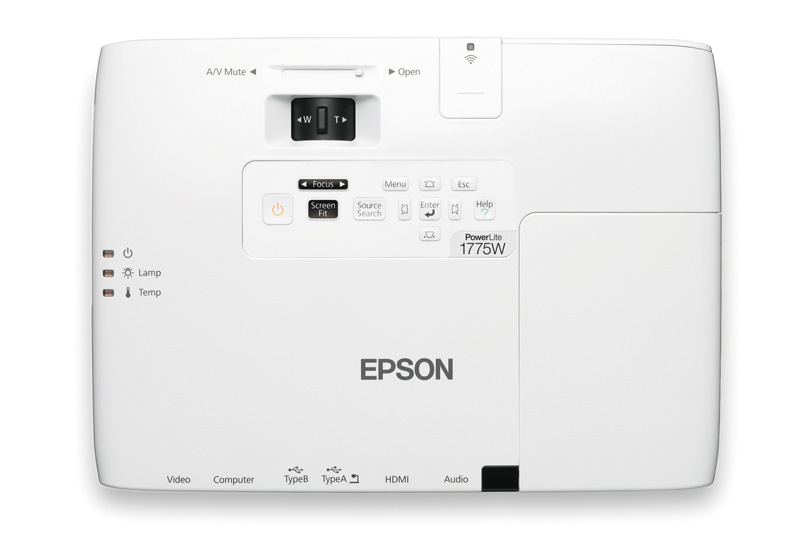
Epson_PowerLite_1775W_projector_Epson_ELPLP65_projector_lampWhen it’s time to install a replacement the Epson PowerLite 1775W projector lamp, follow this guide.

When to replace

When the Epson PowerLite 1775W projector lamp indicator starts flashing orange and the Replace the lamp message appears on screens, you’ll know it’s time for a new lamp. Other signs include a dark screen or colors that appear washed out or an image that is deteriorating on screen.

Why authentic

Your Epson PowerLite 1775W uses the Epson ELPLP65 projector lamp. Be sure to invest in an authentic lamp that’s been  properly manufactured according to the projectors specifications. Counterfeits may appear to be a bargain but will damage the damage the sensitive optics in your projector. (Scroll down to learn more about the hazards of counterfeits.)

Buy this lamp on Amazon sold by these authorized dealers:

Installing the new projector lamp

Before replacing the new Epson ELPLP65 projector lamp follow these important safety rules:

  1. Always unplug the power cord on the Epson PowerLite 1775W projector before replacing the projector lamp.
  2. This projector operates using high temperature. Wait at least 60 minutes before replacing the lamp so you don’t run the risk of getting burned.
  3. Never touch the bare projector lamp bulb as the oil from your fingers will burn black marks onto the projector lamp when it heats up.
  4. Never operate the Epson PowerLite 1775W projector with the projector lamp removed.

How to install

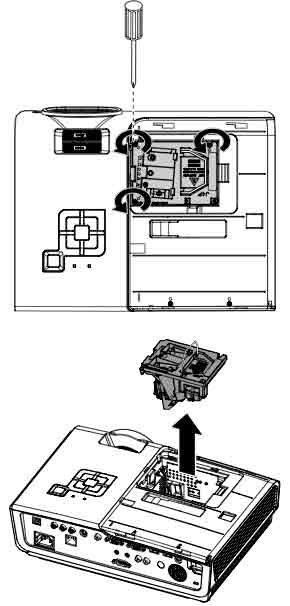
PowerLite_1775W_projector_Epson_ELPLP65_remove_projector_lamp-coverPowerLite_1775W_projector_Epson_ELPLP65_remove_projector_lamp

  • Loosen the projector lamp cover screw and place to one side.
  • Remove the lamp cover.
  • Life the metal bar securing the Epson ELPLP65 projector lamp in place.
  • Lift up the project lamp handle and lift the lamp out.

PowerLite_1775W_projector_Epson_remove_ELPLP65_projector_lamp


NOTE: The Epson ELPLP65 projector lamp contains mercury and should not be thrown into regular garbage. Recycle this lamp!


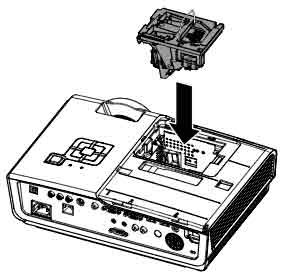
Epson_PowerLite_1775W_projector_Install_Epson_ELPLP65_projector_lampGently insert the new ELPLP65 projector lamp.

Press down to click the projector lamp into place. PowerLite_1775W_projector_Epson_insert_new_ELPLP65_projector_lamp

Place the lamp cover back onto the projector. Tighten the lamp cover screw. You can now reset the lamp timer.

Reset the lamp timer

After you replace the lamp, you need to reset the Epson PowerLite 1775W projector lamp you need to reset the timer. This will allow the projector to track the lamp life. To reset the lamp timer:

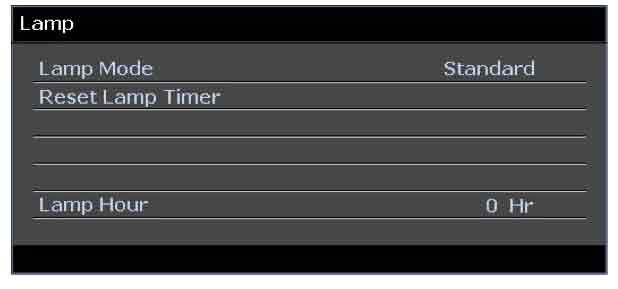
PowerLite_1775W_projector_Epson_ELPLP65_Reset_projector_lamp_timer

  • Press the MENU button on the remote control or on the projector’s control panel. You see the main menu.
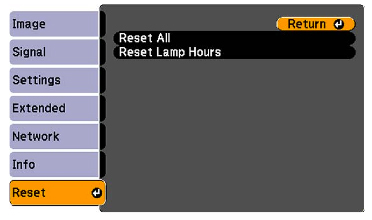
  • Select the RESET menu. Press ENTER.
  • Scroll down to select RESET LAMP HOURS. Press ENTER.
  • A prompt filed appears asking if you want to reset the lamp timer. Select YES. Press ENTER.
  • Press MENU to exit.

Extend the life of the Epson ELPLP65 projector lamp with the following tips:

  • Set the Power Consumption to ECO option.
  • Clean the air filters regularly so the PowerLite 1775W projector doesn’t overheat and put added pressure on the lamp.
  • Make sure there is enough airflow around the projector.
  • Turn off the PowerLite 1775W projector when not in use to conserve lamp life.
  • Learn more: Top tips for extending DLP projector lamp life.

Why avoid counterfeits:

Tagged with: , ,

home_theater_setups

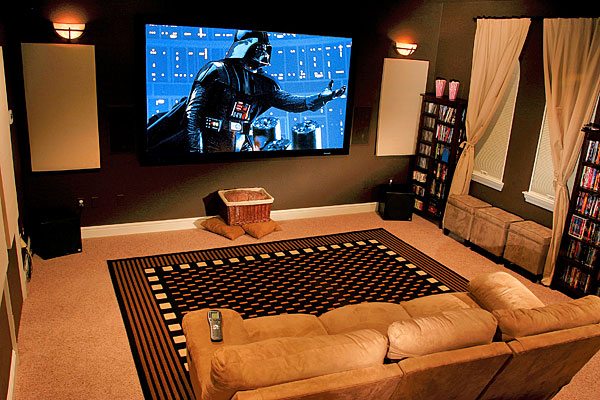
Here’s a check list for getting your home theater up and running.

Entertainment options have never been more varied or easy to access. Whether it’s streaming, watching DVD, satellite or cables feeds, setting up a home theater gives you a chance to enjoy all the action

Where will you be watching?

Ideally, your home theater needs a room large enough for a setting area and some distance between the screen and speakers. Ambient light should be minimum and you’ll also need ceilings high enough for mount your projector.

Projectors

Today’s digital projectors handle a wide variety of media from video, TV, photos or documents. The type of digital projector you buy will depend on how you’re going to use it. Home theater projectors are generally used in completely dark room, so don’t need to bright as home projectors. A general TV projector used in a bright room with more ambient light may need a brighter projector. It may be worth spending a big more money for a projector that can handle different types of lighting with more focus options. Look for a projector with a lens shift option if you will be changing locations of the screen. A high definition TV projector will give you the clearest picture and sharpest colors for your home theater.

Consider your ceilings

Any home theater also needs a screen and that is dependent on your ceiling. Ceiling height controls screen height and width and ultimately how far back your projector will need to be.  Any screen must be at least three feet off the floor.  The formula for screen height is to subtract three feet from your ceiling height to get  your maximum screen height. Low ceiling present some challenges and may require either a smaller screen or a short-throw projector. Look for a projector with a lens shift option. One of the most important considerations when setting up your home theater is looking at the aspect ratio as well as the projector’s gain.

Pick out the screen

The type of screen you need depends on your projector, the amount of light in the room, the size of the room and the viewing angle distance from the screen. The first step to buying your screen is learning about the various kinds of projector screens that both your budget and projector. There are four basic types of projectors screens:

  • Electric
  • Permanent, fixed frame
  • Manual pull down
  • Portable

Read more about screens and their material.

Speakers

Good sound is an important as the screen. With your home theater, the speakers are not going to be next to the projector so you’ll need some connecting cables to hook up everything up. You can forego the cables and use a wireless connection for your speakers. If there isn’t room for cables or you don’t want unsightly clutter, you can also invest on wireless speaker. A Sound Bar system produces a surround sound listening environment using one speaker box.  An AV input switcher is also an important piece of equipment by allowing you to swap between your different video sources such as your computer, DVD player or BlueRay device.

Building your home theater takes some time. Start off gradually and build up. If you need more advice join the FixYourDLP forum or the AV Forum where a community of experts are waiting to help you with your home theater.

Tagged with: , ,

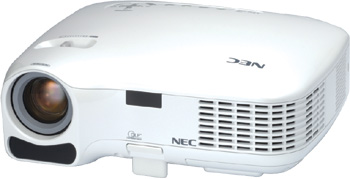
NEC_LT35_projector_NEC_NP35LP_projector_lampThis easy to follow guide shows how to install a new NEC LT35 projector lamp.

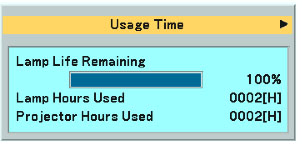
How much time is left?NEC_LT35_projector_NEC_NP35LP_projector_lamp_hours

Consult the Information/Usage Time to see how many NEC LT35 projector lamp  hours remain.

End of life warnings

When the NEC LT35 projector lamp is reaching end of life you’ll see the following warning signs:

  • On screen message: The lamp has reached the end of its usable life. Please replace the lamp.
  • LAMP indicator blinking red.
  • Screen colours looks off
  • Picture is faint or has deteriorated

Find this lamp on Amazon sold by these authorized dealers:

Changing the projector lamp

Your NEC LT35 projector uses the NEC LT35LP projector lamp. Be sure to invest in an authentic lamp.
Follow these important safety instructions before installing the new NEC LT35LP projector lamp

  • turn off the NEC LT35 projector.
  • unplug the projector from its power source.
  • unplug the power cable.
  • wait until the projector is cool to the touch to avoid getting burned.

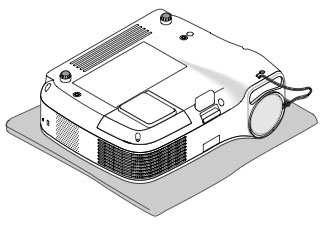
NEC_LT35_projector_NEC_NP35LP_replace_projector_lampPlace the NEC LT35 projector on a soft surface and turn the projector upside down to access the projector lamp cover.

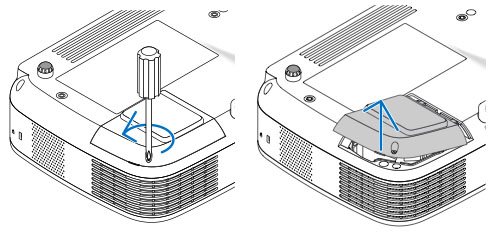
NEC_LT35_projector_NEC_NP35LP_New_projector_lampLoosen the screw holding NEC LT35 projector lamp cover in place. Push and slide the LT35 projector cover off.

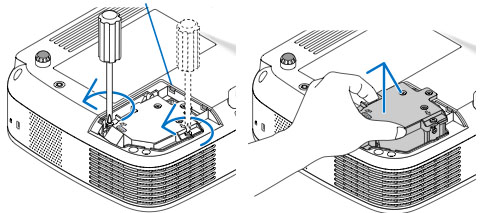
NEC_LT35_projector_NEC_NP35LP_remove_projector_lamp


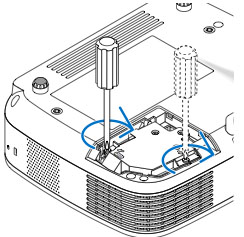
Loosen the two screws holding the NEC LT35LP projector lamp in place. (The screws will not come out only loosen.)

Remove the projector lamp by holding the indent and pulling up.

NOTE: Your NEC LT35LP projector lamp should be properly recycled because it contains mercury.

NEC_LT35_projector_NEC_NP35LP_insert_projector_lampInstall a new lamp housing into the NEC LT35 projector, gently pressing the projector lamp housing into the socket. Take care not to touch the actual bulb as your finger prints can leave oil marks that burn black marks onto the bulb.

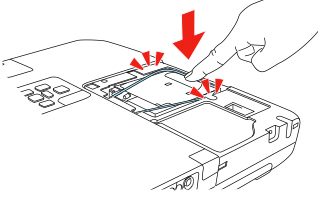
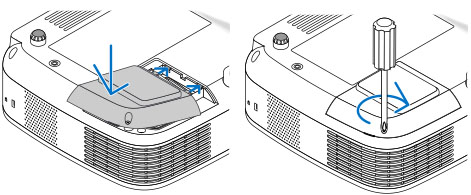
NEC_LT35_projector_NEC_NP35LP_tigthen_projector_lamp_screwsPush the top center on the projector lamp to secure it. Tighten the screw on the projector lamp.

Re-attach the NEC LT35 lamp cover by sliding the cover until it snaps into place. Tighten the screw on the lamp cover.

NEC_LT35_projector_NEC_NP35LP_Replace_projector_lamp_coverYou can now reset the lamp timer.

Reset the lamp timer

Once the NEC LT35LP projector lamp has been replaced you will need to reset the timer in order for the lamp life to be accurately tracked.

  • Plug in the power cord into the wall outlet. NEC_LT35_projector_NEC_NP35LP_projector_lamp_reset_menu
  • Turn on the projector.
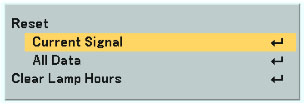
  • From the MAIN MENU select RESET.
  • Choose CLEAR LAMP HOURS.
  • A confirmation message appears.
  • Select YES.

Green your projector lamp

EC LT35LP_replace_bulb_greenIf you are looking make your projector more enviro-friendly consider replacing only the NEC LT35LP bulb. The plastic lamp housing gets re-used and reduces waste. Our video shows you how to do with step-by-step instructions.

Learn more tips to extend the life of the NEC NP07LP lamp.

Invest in authentic lamps

The best type of projector lamp for your NEC LT35 projector is one from a North American OEM. Despite their bargain prices, counterfeits often end up damaging the sensitive electronics in your NEC LT35 since they are prone to explosions. The substandard toxic materials used give these counterfeit projector lamps a much shorter life as well. The other concerns are the lack of proper safety guards for your eyesight. Save yourself the hassles and buy an authentic NEC NP07LP projector lamp for your NEC LT35 projector.

Save

Tagged with: , ,

Optoma_TX779P-3DP_projector_Optoma_BL-FS300C_lampWhen it’s time for a new Optoma TX779P-3D projector lamp, our step-by-step guide is here to help.

Scroll down for an important message about counterfeit lamps!

Optoma_TX779P-3D_projector_Optoma_BL-FS300C _lampEnd of life warnings

When the Optoma TX779P-3D is reaching end of life a warning message will appear on screen. Change the projector lamp immediately. Other warning signs include a poor picture, distorted color or a dim light.

Buy this lamp on Amazon sold by these authorized dealers:

Replace the Optoma TX779P-3D projector lamp

Your Optoma TX779P-3D projector uses the Optoma BL-FS300C projector lamp. Follow these safety steps BEFORE installing the new projector lamp.

  • Switch off the power to the projector by pressing the Power/Standby button.
  • Allow the projector to cool down for at least 30 minutes. If should be cool to the touch. These projectors run using high temperatures and you can burn yourself badly if you don’t allow the projector to cool down.
  • Disconnect the power cord.

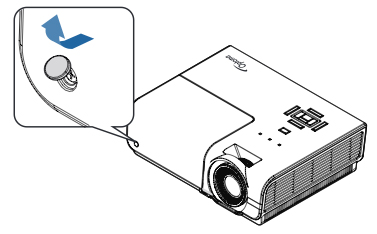
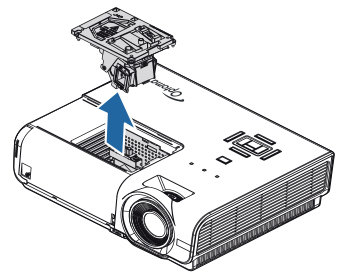
Optoma_TX779P-3D_projector_Optoma_BL-FS300C _remove_lamp_cover_buttonRemove tOptoma_TX779P-3D_projector_Optoma_BL-FS300C _Remove_lamp_coverhe protective cover covering the projector lamp screw.

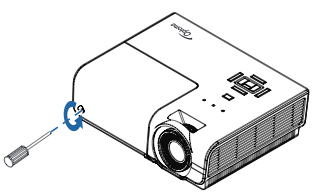
Using a screwdriver, remove the screws holding the cover in place.

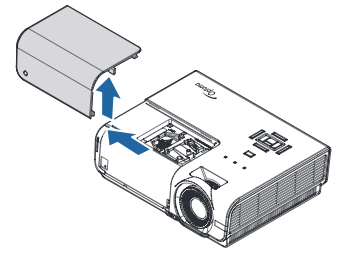
a_BL-FS300C _lamp_cover

Push the cover up to remove it.

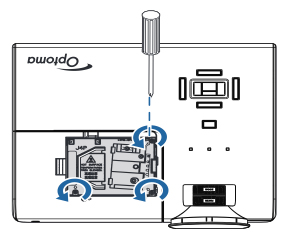
Optoma_TX779P-3D_projector_remove_Optoma_BL-FS300C _projector_lamp_screws


Use a screwdriver to remove the two screws holding the projector lamp Optoma_TX779P-3D_projector_replace_Optoma_BL-FS300C _projector_lampin place.

Slowly put out the old Optoma BL-FS300C projector lamp. Be careful not to bang the lamp against the projector as this may case the bulb to break. Learn what to do if the lamp has exploded inside the projector.

Note: The Optoma BL-FS300C contains mercury and should not be put in regular garbage. Recycle this lamp. Place the new Optoma BL-FS300C projector lamp into the Optoma TX779P-3D projector. Tighten the three screws on the lamp. Replace the lamp cover and tighten its two screws. You must now reset the Lamp Replacement Timer.

Reset the lamp timing on the Optoma TX779P-3D

  • Turn on the projector
  • Press the MENU option on either the remote or on the projector.
  • Scroll down to SYSTEM
  • Scroll over the LAMP SETTING. Press ENTER.
  • Select LAMP RESET. Press ENTER.
  • Select YES.

Why avoid generics:

Protect the life of your OptomaTH1060P and reduce your stress levels. Invest in authentic.

Tagged with: , ,

Ask_Proxima__C460_projector_SP-LAMP-016_projector_lampUse this step-by-step manual to install a new ASK Proxima C460 projector lamp.

End of life warnings

When the Ask Proxima C460 projector lamp is reaching end of life, the message “Replace lamp” appears on the screen. Replace the projector lamp immediately. After 20 hours the projector will turn off automatically.

Buy authentic

Be sure to buy your replacement Ask Proxima C460 from an authentic source. Avoid counterfeit lamps claiming to be “compatible.” These lamps created with inferior materials making them prone to explosions. Aside from exposure to toxic substances, these lamps also don’t have the proper protections for your eyes. Learn how to spot a counterfeit lamp so you can avoid purchasing them.

Buy this lamp on Amazon from the following authorized dealers:

Installing the projector lamp

The ASK Proxima C460 projector needs the Ask Proxima SP-LAMP-016. Follow these steps to install the new projector lamp.

Ask_Proxima__C460_projector_SP-LAMP-016_projector_lamp_remove_coverAsk_Proxima__C450_projector_SP-LAMP-016_replace_projector_lamp

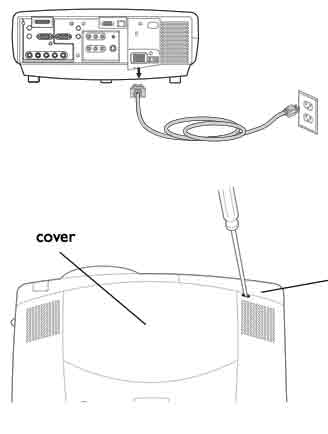
  • Disconnect the power cord and allow the projector to cool for one hour before replacing the lamp. The ASK Proxima C460 operates under high heat and can cause burns.
  • The lamp lid for the ASK Proxima C460 is found on the bottom of the projector.
  • To remove the cover: Gently place a flathead screwdriver into the slot on the top of the projector by the right speaker and slide the small lever toward the right speaker. The cover will pop out.
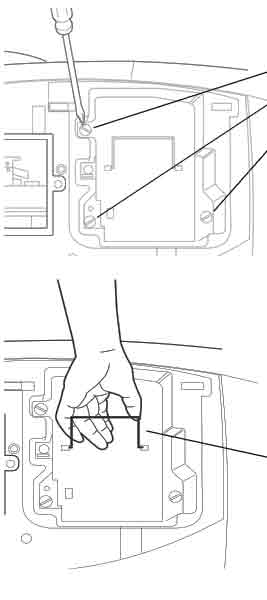
  • Unscrew the three screws holding the Ask Proxima SP-LAMP-016 in place.
  • Gently grab the wire handle and pull out the Ask Proxima SP-LAMP-016. NOTE: The LAMP-016. projector lamp contains mercury and should not be thrown into regular garbage. Recycle your used lamps!
  • Inset the new Ask Proxima SP-LAMP-016 projector lamp all the way into the ASK Proxima C460 projector.Tighten the three screws that hold the SP-LAMP-016 lamp in place.
  • Replace the lamp lid and tighten the screw holding the lamp lid in place.
  • You’re now ready to reset the lamp timer.

Reset the lamp timer

In order for the ASK Proxima C460 to correctly track the lamp life of your newly installed Ask Proxima SP-LAMP-016 projector lamp, you’ll need to reset the timer.

Ask_Proxima__C460_projector_SP-LAMP-016_reset_projector_lamp_timer

  • Press the MENU button to display the MAIN MENU option.
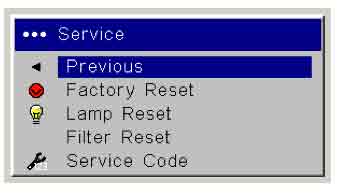
  • Scroll across the top menu to the SEREVICE menu. Another pull down menu will appear.
  • Scroll down to LAMP RESET. Press SELECT.
  • The lamp replace time is reset to zero.

Extend the life of the Ask Proxima SP-LAMP-016:

  • Turning on the Eco Mode to lower power consumption and extend the lamp life by 130%.
  • Keep your air filters clean to avoid overheating the projector.
  • Turn off the ASK Proxima C460 projector and let it stand for at least one hour ever 24 hours.
  • Make sure there is enough airflow around the projector particularly if it’s been permanently mounted.
  • Learn more with Top tips for extending DLP projector lamp life.


Tagged with: , ,

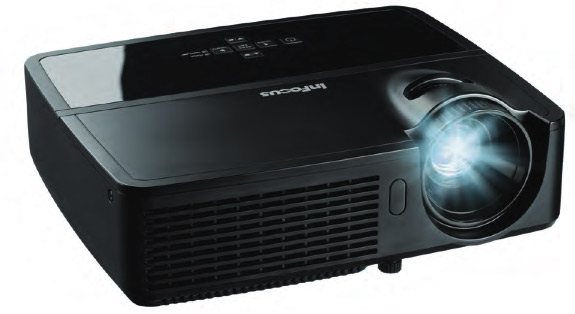
Infocus_IN122_projector_Infocus_SP-LAMP-070This guide gives step-by-step instructions for replacing the InFocus IN122 projector lamp.

End of life warning signs

When it’s time to replace the InFocus IN122 projector lamp you may see the projector image get darker or start to deteriorate. The warning message REPLACE LAMP appears on screen when there are 20 hours of lamp life left.

Invest in authentic

Your InFocus IN122 projector is equipped with sophisticated optics that need the right projector lamp. That means resisting the lure of cheaper counterfeit models. Lower priced counterfeit lamps are made with inferior parts that can give you a lower quality light and poor image. They may end up costing you more. Buy from a legitimate source to keep your projector under warranty and protect your health. Look for the seal of approval before buying.

Buy this lamp on Amazon sold by these authorized dealers:

Install

Install the replacement projector lamp

Your InFocus IN122 projector uses the InFocus SP-LAMP-070.  Follow these important safety steps BEFORE installing the replacement projecotr lamp:

  • Turn off the InFocus IN122 projector and unplug the power cord.
  • To avoid getting burned, let the projector fully cool before changing the lamp.
  • Do not operate the projector while the lamp is being removed as this may result in malfunctions, fire hazard and other accidents.
  • Caution: Don’t touch the actual bulb with your fingers since the oil from your skin can cause a black spot on the bulb.

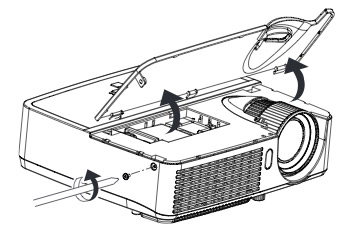
Infocus_IN122_projector_remove_Infocus_SP-LAMP-0701. The projector lamp door is found on top of the InFocus IN122 projector. To remove, loosen the screw on the side of the lamp door, sliding the door forward, and lifting the lamp door off.

Infocus_IN122_projector_install_Infocus_SP-LAMP-070

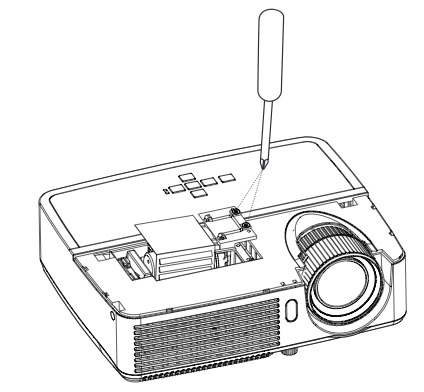
    2. Loosen the captive screws attaching the projector lamp to the projector. Be careful not to drop the lamp module if the projector has been mounted on the ceiling.

3. Gently lift the old InFocus SP-LAMP-070 projector lamp straight up, off the alignment pins. Take care not to pinch the lamp connector.
NOTE: The InFocus SP-LAMP-070 projector lamp contains mercury and other heavy metals. Please recycle this lamp properly and never dispose in regular garbage.
4. Install the new InFocus SP-LAMP-070 projector lamp by aligning it with the projector pins and gently lowering into the projector. Be careful not to pinch the lamp connector.
5. Tighten the two projector lamp screws. If the projector pins are not aligned properly, the screws will not tighten properly. This may cause the projector not to turn back on. Take the InFocus SP-LAMP-070 projector lamp lack out and re-insert, lining up the projector pins.
6. Replace the lamp door by aligning the hinges and locking the lamp door in place by pressing down. Replace the lamp door  screw and tighten securely. You may now reset the lamp timer.

Reset the projector lamp timer

After replacing the InFocus SP-LAMP-070 projector lamp be sure to reset the lamp timer on the InFocus IN122 projector. Failure to do so will mean your InFocus IN122 will NOT TURN ON.

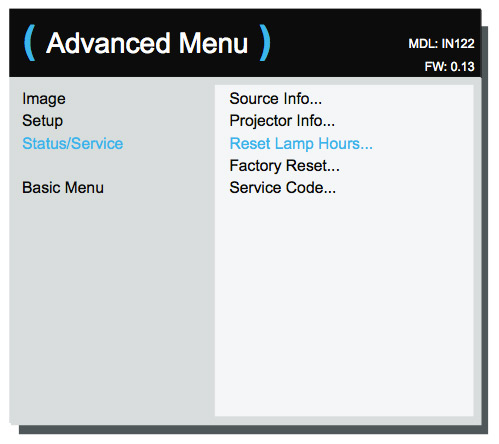
Infocus_IN122_projector_Infocus_SP-LAMP-070_reset_lamp_timer

  • Open the MAIN menu. Press SELECT
  • Scroll down to the ADVANCED menu.
  • Scroll down to RESET LAMP HOURS.
  • Lamp hours will be reset to zero.

Tips for longer lamp life

  • Keep your air filters clean to avoid overheating the projector.
  • Turn off the InFocus IN122 and let it stand for at least one hour ever 24 hours.
  • Make sure there is enough airflow around the projector particularly if it’s been permanently mounted.
  • Top tips for extending DLP projector lamp life
Tagged with: , ,

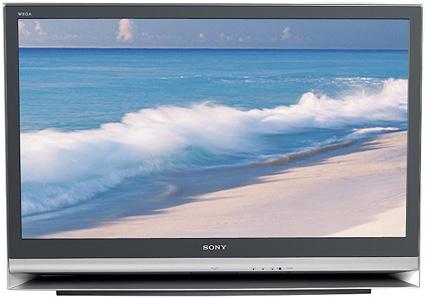
Sony_KDF-55E2000_RPTV_Sony_XL-2400_projector_lampOur guide walks you through replacing the Sony KDF-55E2000 LCD TV lamp.

When to replace?

The Sony KDF-55E2000 LCD TV lamp should last up to 8,000 hours depending on how much you use the TV. When the lamp is reaching end of life, you will see a message on screen and the lamp indicator on the TV will start flashing. Other end of life signs may also include darker images and colors that look off. You may hear a noticeable popping and this is normal.
Buy this lamp on Amazon sold by these authorized dealers:

To replace the LCD projector lamp

The Sony KDF-55E2000 TV uses the Sony XL-2400 (F-9308-750-0) projection lamp. Perform there safety steps before installing the new projector lamp:

  • Turn off the power on the main unit.
  • The cooling fan will continue to operate for two minutes after the power is turned off.
  • Wait several minutes before unplugging the power cord.
  • Wait an additional 30 minutes to allow the lamp to cool down. The lamp operates under extreme so avoid touching it before changing the lamp.

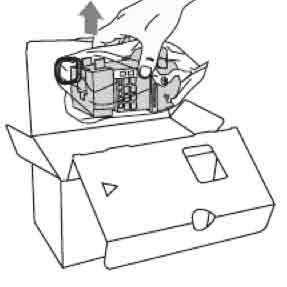
Sony_KDF-55E2000_LCD_Sony_XL-2400_replace_projection_lampTake the new Sony XL-2400 projector lamp out of the box. Don’t shake the lamp as vibrations can damage the lamp. Avoiding touching the glass portion on the lamp as the oil from your fingers can burn black marks on the lamp.

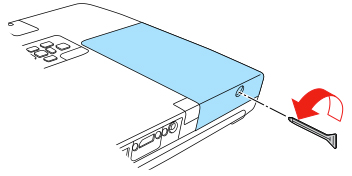
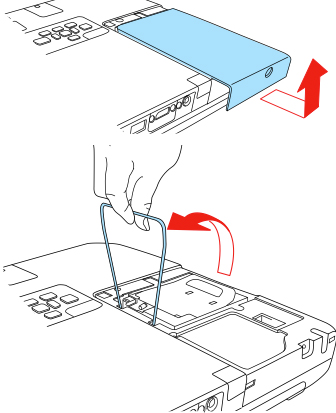
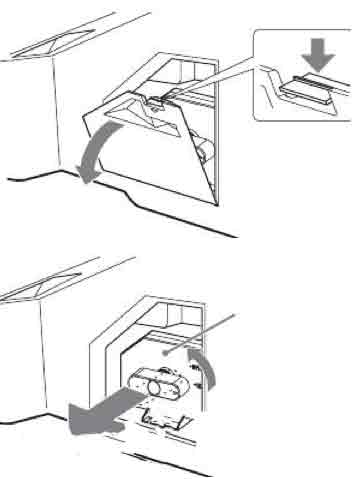
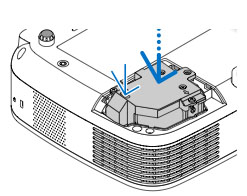
Sony_KDF-55E2000_LCD_Sony_XL-2400_projector_lamp_open_doorRemove the outside Sony XL-2400 projector lamp cover. Turn the knob counterclockwise to open. Pull out the cover.


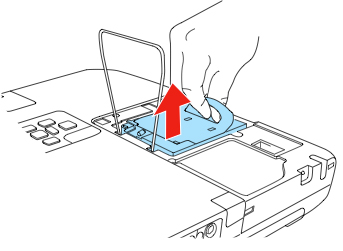
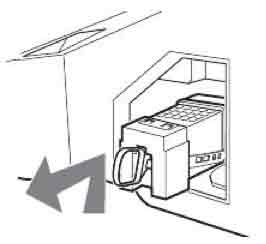
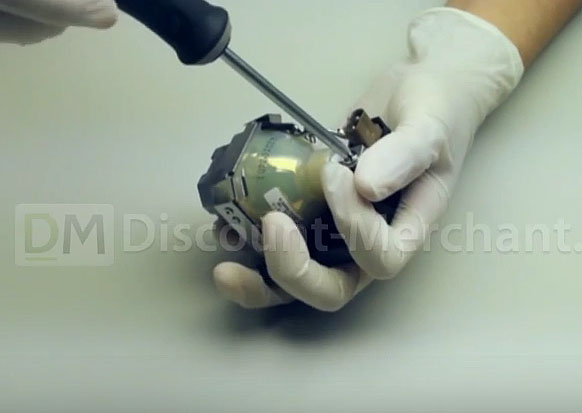
Pull out the Sony XL-2400 projector Sony_KDF-55E2000_LCD_Sony_XL-2400_Remove_projector_lamp_coverlamp by first hooking a finger through the loop of the lamp handle and pulling the handle upwards. Then pull the Sony XL-2400 lamp straight out.

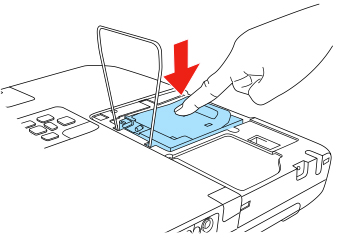
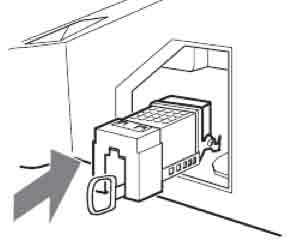
Sony_KDF-55E2000_LCD_Sony_XL-2400_projection_lampPut the new Sony XL-2400 projector lamp into its place. Mount the new lamp securely or the self-diagnostic function will be triggered. A loose lamp can also cause the screen to go dark.

Sony_KDF-55E2010_LCD_Sony_XL-2400_replace_projection_lamp_cover

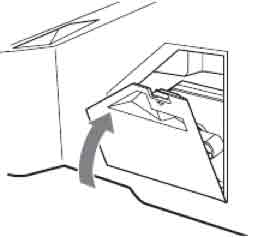
Reattach the Sony KDF-55E2000 LCD TV lamp door. Turn the knob back to CLOSE and secure the cover


Authentic lamps are critical!

Don’t settle for anything but the best for your Sony KDF-55E2000 LCD TV. When buying look for the seal of approval.

6 reasons to avoid generic LCD projector lamps:


Green your Sony KDF-55E2000 LCD TV

Sanyo_XL-2400_projector_bulb_replacement_video

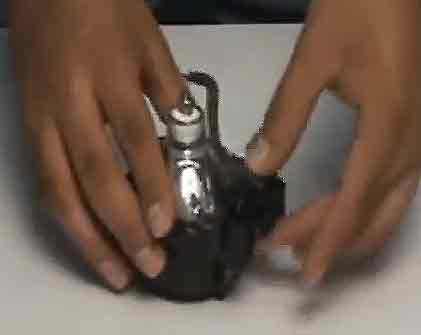
If you interested in going green with your Sony KDF-55E2000 LCD TV, you can replace only the projector bulb and re-used the plastic casing. This can save your money plus help reduce waste. Watch our training video to learn more.


Tagged with: , ,
Join the discussion on Facebook! All your questions, answered! The Screen & Projector Group