

Multisync Projector Manuals
MULTISYNC MT1045 Projector Lamp User Manual
MULTISYNC MT1065 Projector Lamp User Manual
MULTISYNC MT840E Projector Lamp User Manual
MULTISYNC MT1040E Projector Lamp User Manual
MULTISYNC MT1040 Projector Lamp User Manual
MULTISYNC MT850 Projector Lamp User Manual
MULTISYNC MT1045E Projector Lamp User Manual
MULTISYNC MT1060 Projector Lamp User Manual
MULTISYNC MT840 Projector Lamp User Manual
MULTISYNC MT1050 Projector Lamp User Manual
MULTISYNC MT1055 Projector Lamp User Manual
MULTISYNC MT860 Projector Lamp User Manual
Canon Projector Manuals
CANON LV 7345 Projector Lamp User Manual
CANON LV 7350 Projector Lamp User Manual
CANON LV 7355 Projector Lamp User Manual
CANON LV 7275 Projector Lamp User Manual
CANON LV 7250 Projector Lamp User Manual
CANON LV 7215 Projector Lamp User Manual
CANON LV 7230 Projector Lamp User Manual
CANON LV 7565 Projector Lamp User Manual
CANON LV 7220 Projector Lamp User Manual
CANON LV 5210 Projector Lamp User Manual
CANON LV 7375 Projector Lamp User Manual
CANON LV 8300 Projector Lamp User Manual
CANON LV 7340 Projector Lamp User Manual
CANON LV 5220 Projector Lamp User Manual
CANON LV 7210 Projector Lamp User Manual
CANON LV 5100 Projector Lamp User Manual
CANON LV 7245 Projector Lamp User Manual
CANON LV 5200 Projector Lamp User Manual
CANON LV 7385 Projector Lamp User Manual
CANON LV 7240 Projector Lamp User Manual
CANON LV 7265 Projector Lamp User Manual
CANON LV 7225 Projector Lamp User Manual
CANON LV 7545 Projector Lamp User Manual
CANON LV 5110 Projector Lamp User Manual
CANON LV 7370 Projector Lamp User Manual
CANON LV 7255 Projector Lamp User Manual
CANON LV 7105 Projector Lamp User Manual
CANON LV 7260 Projector Lamp User Manual
Epson Projector Manuals
EPSON EMP 503 Projector Lamp User Manual
EPSON PowerLite 820p Projector Lamp User Manual
EPSON PowerLite 7550C Projector Lamp User Manual
EPSON PowerLite 800p Projector Lamp User Manual
EPSON PowerLite Cinema 500 Projector Lamp User Manual
EPSON PowerLite 8150NL Projector Lamp User Manual
EPSON EB W7 Projector Lamp User Manual
EPSON EMP 400W Projector Lamp User Manual
EPSON EMP 30 Projector Lamp User Manual
EPSON EMP 73 Projector Lamp User Manual
EPSON PowerLite 7350 Projector Lamp User Manual
EPSON PowerLite 51c Projector Lamp User Manual
EPSON EMP TW20 Projector Lamp User Manual
EPSON EH TW3500 Projector Lamp User Manual
EPSON EMP 5600 Projector Lamp User Manual
EPSON EMP 7600 Projector Lamp User Manual
EPSON EMP 82 Projector Lamp User Manual
EPSON PowerLite 8100i Projector Lamp User Manual
EPSON PowerLite 9300i Projector Lamp User Manual
EPSON EMP TW1000 Projector Lamp User Manual
EPSON EMP DM1 Projector Lamp User Manual
EPSON PowerLite 54c Projector Lamp User Manual
EPSON PowerLite 7000 Projector Lamp User Manual
EPSON EMP 83 Projector Lamp User Manual
EPSON EMP 62 Projector Lamp User Manual
EPSON EMP S3 Projector Lamp User Manual
EPSON EMP 700 Projector Lamp User Manual
EPSON EB 84 Projector Lamp User Manual
EPSON PowerLite 50c Projector Lamp User Manual
EPSON PowerLite Cinema 200 Projector Lamp User Manual
EPSON EMP S5 Projector Lamp User Manual
EPSON PowerLite 7500C Projector Lamp User Manual
EPSON EMP S1 Projector Lamp User Manual
EPSON EMP 755 Projector Lamp User Manual
EPSON PowerLite 8200NL Projector Lamp User Manual
EPSON PowerLite 30c Projector Lamp User Manual
EPSON PowerLite 52c Projector Lamp User Manual
EPSON EMP 737 Projector Lamp User Manual
EPSON EX30 Projector Lamp User Manual
EPSON EH TW450 Projector Lamp User Manual
EPSON EX51 Projector Lamp User Manual
EPSON EMP TW600 Projector Lamp User Manual
EPSON EMP 1815 Projector Lamp User Manual
EPSON PowerLite 53c Projector Lamp User Manual
EPSON EMP 760 Projector Lamp User Manual
EPSON EMP 810 Projector Lamp User Manual
EPSON EMP 1700 Projector Lamp User Manual
EPSON PowerLite Home 10 Projector Lamp User Manual
EPSON EB 825 Projector Lamp User Manual
EPSON EMP 765 Projector Lamp User Manual
EPSON PowerLite 5300 Projector Lamp User Manual
EPSON EMP 500 Projector Lamp User Manual
EPSON ELP 3500 Projector Lamp User Manual
EPSON EMP 715 Projector Lamp User Manual
EPSON EMP 5350 Projector Lamp User Manual
EPSON EMP 5550 Projector Lamp User Manual
EPSON ELP 3300 Projector Lamp User Manual
EPSON EMP 51 Projector Lamp User Manual
EPSON EB S7 Projector Lamp User Manual
EPSON EH TW4000 Projector Lamp User Manual
EPSON EMP 1710 Projector Lamp User Manual
EPSON EMP 600 Projector Lamp User Manual
EPSON PowerLite 700c Supplement Projector Lamp User Manual
EPSON PowerLite 7800p Projector Lamp User Manual
EPSON EB 410W Projector Lamp User Manual
EPSON EMP 7200 Projector Lamp User Manual
EPSON PowerLite 710c Projector Lamp User Manual
EPSON EB X7 Projector Lamp User Manual
EPSON EB 1830 Projector Lamp User Manual
EPSON EMP 1715 Projector Lamp User Manual
EPSON EMP 53 Projector Lamp User Manual
EPSON EH TW5000 Projector Lamp User Manual
EPSON PowerLite 703c Projector Lamp User Manual
EPSON EB W6 Projector Lamp User Manual
EPSON EMP 8200 Projector Lamp User Manual
EPSON EMP TW500 Projector Lamp User Manual
EPSON EB G5300 Projector Lamp User Manual
EPSON EB W8D Projector Lamp User Manual
EPSON EB 1915 Projector Lamp User Manual
EPSON EMP 745 Projector Lamp User Manual
EPSON PowerLite 8300NL Projector Lamp User Manual
EPSON EMP TW620 Projector Lamp User Manual
EPSON EMP 720 Projector Lamp User Manual
EPSON ELP 3000 Projector Lamp User Manual
EPSON EB 450WI Projector Lamp User Manual
EPSON PowerLite 503c Projector Lamp User Manual
EPSON EMP TW200H Projector Lamp User Manual
EPSON PowerLite 70c Projector Lamp User Manual
EPSON PowerLite 600p Projector Lamp User Manual
EPSON PowerLite 500c Projector Lamp User Manual
EPSON EMP TS10 Projector Lamp User Manual
EPSON EH TW3000 Projector Lamp User Manual
EPSON EB S8 Projector Lamp User Manual
EPSON EMP 1705 Projector Lamp User Manual
EPSON PowerLite 9100i Projector Lamp User Manual
EPSON EX31 Projector Lamp User Manual
EPSON EMP 703 Projector Lamp User Manual
EPSON EB S6 Projector Lamp User Manual
EPSON EB X8 Projector Lamp User Manual
EPSON EH TW4400 Projector Lamp User Manual
EPSON PowerLite 9100NL Projector Lamp User Manual
EPSON PowerLite 7700p Projector Lamp User Manual
EPSON EB 440W Projector Lamp User Manual
EPSON EMP 820 Projector Lamp User Manual
EPSON PowerLite 8150i Projector Lamp User Manual
EPSON EX71 Projector Lamp User Manual
EPSON EMP 61 Projector Lamp User Manual
EPSON EX70 Projector Lamp User Manual
EPSON PowerLite 5600p Projector Lamp User Manual
EPSON PowerLite 71c Projector Lamp User Manual
EPSON PowerLite 7850p Projector Lamp User Manual
EPSON EMP 800 Projector Lamp User Manual
EPSON EB 1925W Projector Lamp User Manual
EPSON EMP 54 Projector Lamp User Manual
EPSON EMP 750 Projector Lamp User Manual
EPSON PowerLite 8300i Projector Lamp User Manual
EPSON EH TW5500 Projector Lamp User Manual
EPSON EX90 Projector Lamp User Manual
EPSON EB G5100 Projector Lamp User Manual
EPSON EB 450W Projector Lamp User Manual
EPSON PowerLite 5000XB Projector Lamp User Manual
EPSON EB 1900 Projector Lamp User Manual
EPSON EMP 822 Projector Lamp User Manual
EPSON PowerLite 715c Projector Lamp User Manual
EPSON PowerLite 5550C Projector Lamp User Manual
EPSON EMP TW520 Projector Lamp User Manual
EPSON EH DM3 Projector Lamp User Manual
EPSON EH TW2800 Projector Lamp User Manual
EPSON PowerLite 810p Projector Lamp User Manual
EPSON PowerLite 8100NL Projector Lamp User Manual
EPSON PowerLite TW100 Projector Lamp User Manual
EPSON EMP 713 Projector Lamp User Manual
EPSON EMP 732 Projector Lamp User Manual
EPSON EB 1910 Projector Lamp User Manual
EPSON PowerLite 9000NL Projector Lamp User Manual
EPSON EMP 52 Projector Lamp User Manual
EPSON PowerLite 5350 Projector Lamp User Manual
EPSON EB 460 Projector Lamp User Manual
EPSON EMP 821 Projector Lamp User Manual
EPSON EMP 7700 Projector Lamp User Manual
EPSON EMP 740 Projector Lamp User Manual
EPSON PowerLite 735c Projector Lamp User Manual
EPSON EMP 710 Projector Lamp User Manual
EPSON PowerLite 7200 Projector Lamp User Manual
EPSON PowerLite 7800p Addendum Projector Lamp User Manual
EPSON EB 460I Projector Lamp User Manual
EPSON EB 824 Projector Lamp User Manual
EPSON EMP TW680 Projector Lamp User Manual
EPSON EX50 Projector Lamp User Manual
EPSON PowerLite 713c Projector Lamp User Manual
EPSON EMP 5500 Projector Lamp User Manual
EPSON PowerLite 505c Projector Lamp User Manual
EPSON EMP TW2000 Projector Lamp User Manual
EPSON EB W8 Projector Lamp User Manual
EPSON EMP 7300 Projector Lamp User Manual
EPSON EMP TW700 Projector Lamp User Manual
EPSON PowerLite 5000 Projector Lamp User Manual
EPSON EMP 7100 Projector Lamp User Manual
EPSON PowerLite 730c Projector Lamp User Manual
EPSON EH TW2900 Projector Lamp User Manual
EPSON PowerLite 74c Projector Lamp User Manual
EPSON PowerLite 9000i Projector Lamp User Manual
EPSON PowerLite 7250 Projector Lamp User Manual
EPSON PowerLite 8000i Projector Lamp User Manual
EPSON EB G5150 Projector Lamp User Manual
EPSON EMP S4 Projector Lamp User Manual
EPSON PowerLite S1 Projector Lamp User Manual
EPSON EB 85 Projector Lamp User Manual
EPSON PowerLite 8200i Projector Lamp User Manual
EPSON EMP S1H Projector Lamp User Manual
EPSON EMP 7500 Projector Lamp User Manual
EPSON EX100 Projector Lamp User Manual
EPSON EB X6 Projector Lamp User Manual
EPSON PowerLite 8000NL Projector Lamp User Manual
EPSON EB G5350 Projector Lamp User Manual
EPSON PowerLite 811p Projector Lamp User Manual
EPSON EMP 505 Projector Lamp User Manual
EPSON EH TW3800 Projector Lamp User Manual
EPSON PowerLite 720c Projector Lamp User Manual
EPSON EMP 5300 Projector Lamp User Manual
EPSON EB G5200W Projector Lamp User Manual
EPSON PowerLite 5500C Projector Lamp User Manual
EPSON EB 826W Projector Lamp User Manual
EPSON EH TW4500 Projector Lamp User Manual
EPSON EB 1920W Projector Lamp User Manual
EPSON EMP 5100 Projector Lamp User Manual
EPSON EMP 74 Projector Lamp User Manual
EPSON PowerLite 7000XB Projector Lamp User Manual
EPSON PowerLite 7600p Projector Lamp User Manual
EPSON EMP 81 Projector Lamp User Manual
EPSON PowerLite 7300 Projector Lamp User Manual
EPSON EMP TW200 Projector Lamp User Manual
EPSON PowerLite 700c Projector Lamp User Manual
EPSON EMP 811 Projector Lamp User Manual
EPSON PowerLite 73c Projector Lamp User Manual
Runco Projector Manuals
RUNCO VX 3000 Projector Lamp User Manual
RUNCO VX 2C Projector Lamp User Manual
RUNCO CL 710 Projector Lamp User Manual
RUNCO CL 510LT Projector Lamp User Manual
RUNCO VX 2DC Projector Lamp User Manual
RUNCO VX 22D Projector Lamp User Manual
RUNCO CL 420 Projector Lamp User Manual
RUNCO RS 900 Projector Lamp User Manual
RUNCO VX 2CX Projector Lamp User Manual
RUNCO RS 1100 Projector Lamp User Manual
RUNCO CL 510 Projector Lamp User Manual
RUNCO RS 440 Projector Lamp User Manual
RUNCO CL 410 Projector Lamp User Manual
RUNCO CL 610 Projector Lamp User Manual
RUNCO CL 810 Projector Lamp User Manual
RUNCO CL 610LT Projector Lamp User Manual
RUNCO VX 22I Projector Lamp User Manual
Consumer Alert: The dangers of counterfeit projector lamps
 Shelagh McNallyPosted on
Posted in Counterfeit Lamp Awareness, FixYourDLP, Guides and Manuals, Philips, Philips Lamps, Projector Lamp Replacement Guides
—
2 Comments ↓
Shelagh McNallyPosted on
Posted in Counterfeit Lamp Awareness, FixYourDLP, Guides and Manuals, Philips, Philips Lamps, Projector Lamp Replacement Guides
—
2 Comments ↓ The d angers of counterfeit projector lamps are very real
Counterfeit projector lamps may seem like quite the bargain. Would you compromise your health and risk your eyesight for the sake of a few dollars?
Using counterfeit, knock-off projector or rear-projector TV (RPTV) lamps puts you at risk for potential damage to your eyesight as well as exposure to , a radioactive gas that is linked to cancer.
Toxic bargain
What is Krypton-85 doing in counterfeit projector and RPTV lamps? Using this toxic element is the only way for copy-cat manufacturers to re-produce the technology created by PHILIPS, the original manufacturer of DLP projector and RPTV lamps.
After years of research, PHILIPS developed a revolutionary arc tube filled with mercury-argon mixture that created intense light but lowered the heat allowing both the lamp and projector to become smaller.
Since PHILIPS patented technology is not available to counterfeit manufacturers, they resort to using Krypton-85 for the same result. This radioactive gas is created from by nuclear reactors during the fission between uranium and plutonium and has a number of industrial and medical applications. It’s safe when used in a controlled environment.
Lack of durability
Unfortunately, Krypton-85 is not being used under safe conditions when it comes to counterfeit lamps, often referred to as “compatible lamps.” In order to create the knock-off lamp, counterfeit manufacturers usually replace the arc tube or refit old projector lamps with counterfeit parts; others replace the complete module. Whichever method they choose, they are still producing a lamp with a shorter life cycle and inferior technology.
 Lack of accountability
Exposure to Krypton-85 happens when these lamps break or explode inside the projector from overheating. Short-term effects of Krypton-85 exposure are dizziness, nausea, vomiting, and loss of consciousness. Long-term effects are more serious. According to the Department of Energy (DOE) exposure to Krypton-85 can increase the likelihood of cancer. (more…)
How to replace the NEC NP110 projector lamp
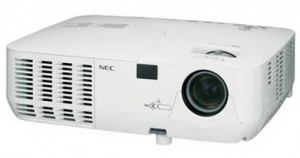
- NEC NP110 projector

This guide shows you how to replace the NEC NP110 projector lamp.
When its time to replace the NEC NP13LP lamp, the Lamp Indicator on the NEC NP110 projector will blink red. The lamp will continue to work for an 100 additional hours but will immediately go into standby mode when it hits the 100th hour. Using the lamp past the recommended time may cause it to overheat and shatter inside the lamp case.
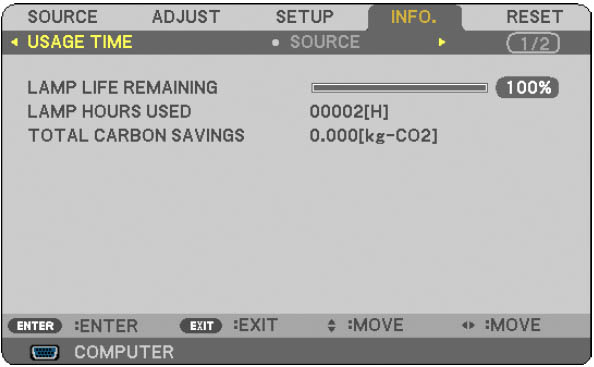 You can also determine the status of your lamp by referring to the Usage Time screen. Press the HELP button on the remote to display the INFO screen. The progress indicator shows the percentage of remaining life for the NEC NP13LP lamp. When the remaining lamp reaches zero, the LAMP LIFE REMAINING indicator changes from 0% to 100 hours and starts counting down.
The importance of authentic lamps
Always invest in a genuine NEC NP13LP lamp in order to keep your NEC NP110 projector working. Your original manufacturer (OEM) has created these lamps to fit your NEC NP110 projector and keep the sophisticated components working properly. While generic lamps may be sold at discount prices, their inferior workmanship and cheap materials often result in damage to the interior of projectors. They are also prone to explosions which can release toxic heavy metals into the air as well as damage your projector beyond repair. Read more about the 7 Ways to Spot a Counterfeit Lamp.
Installing the NEC NP13LP lamp
NOTE: Before installation allow one hour for the NEC NP13LP lamp to cool before replacing.
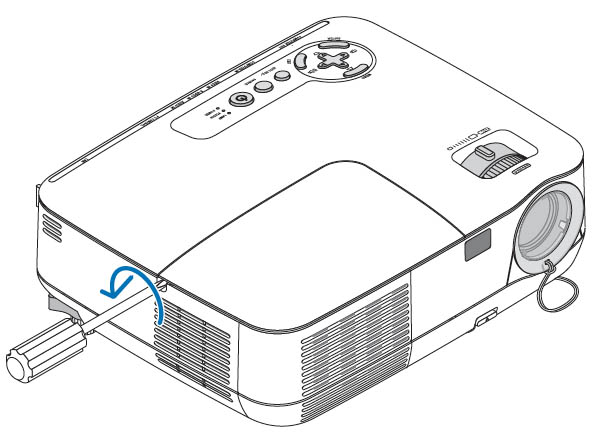
Loosen the screw
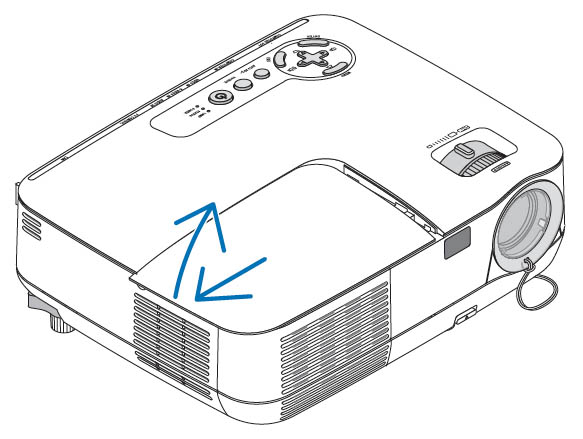
Slide the cover o
The front cover is found at the top of the NEC NP110 projector. Loosen the side screw to release the cover. Push the cover off the tack and place it to one side.
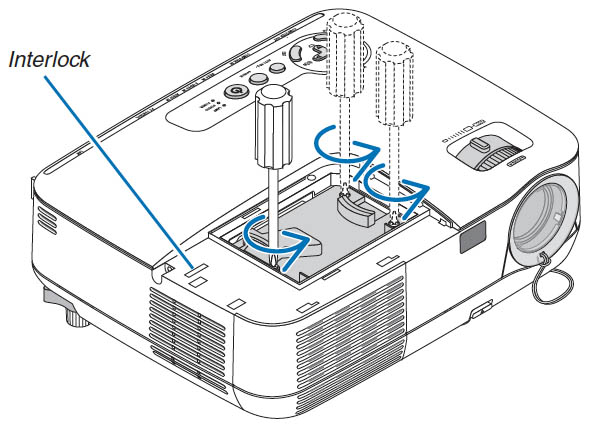
Loosen all three screws
Loosen the three screws holing the NEC NP13LP lamp in place. The three screws can’t be removed only loosened.
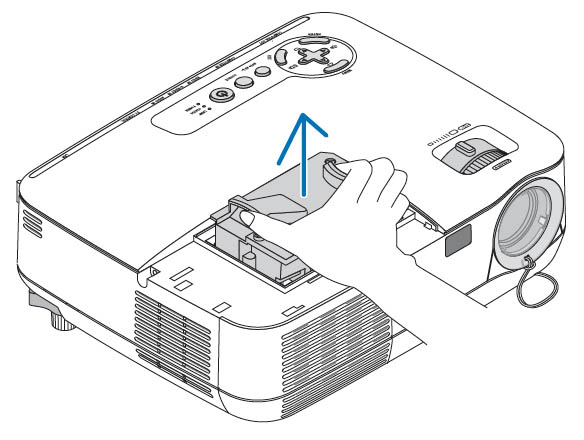
Grasp both sides of the lamp
Leave the interlock on the side untouched as this prevents the risk of electrical shock.
Remove the NEC NP13LP lamp housing by pressing both sides of the handles on either side. Be sure to dispose of the used lamp through a local recycling program. Don’t throw this lamp into regular garbage as it contains mercury.
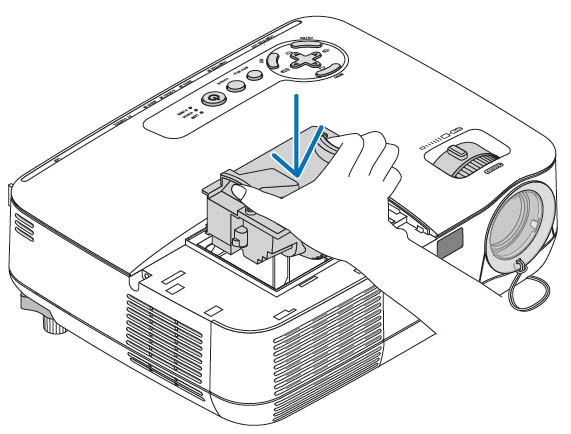
Place lamp into projector
Insert the new NEC NP13LP lamp into the socket. Gently push the top center of the NEC NP13LP lamp to ensure it’s in place. Be careful not to break the glass in the lamp. Don’t touch the glass surface on the NEC NP13LP lamp as this can cause an unwanted shadow on the lamp and dark spots resulting in poor picture quality.
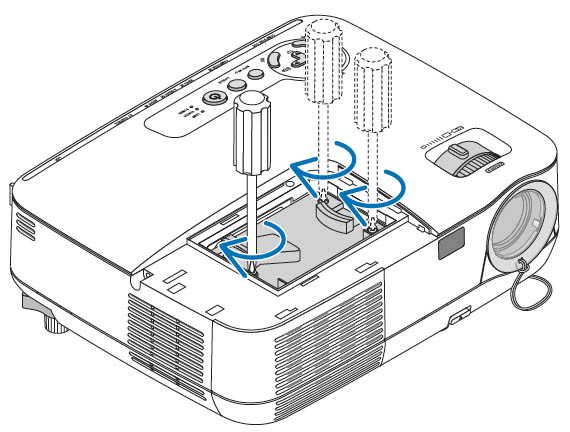
Tighten all 3 screws
Tighten all three screws holding the lamp in place. Slide the NEC NP110 lamp cover back in place until it snaps shut. Tighten the screw. Now, you’re ready to reset the Lamp Hour Meter.
NOTE: Your old NEC NP13LP lamp should be properly recycled. These lamps contain mercury and can’t be placed into common garbage.
Resetting the NEW NP100 Lamp Hour Meter
After installing the new NEC NP13LP lamp, you must reset the lamp clock back to zero.
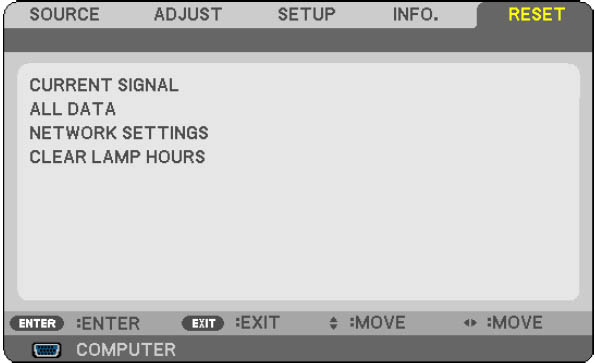
- Using the remote control, click the MENU option.
- Move to RESET menu.
- Move down to CLEAR LAMP HOURS.
- Select YES.
- Press the ENTER button. Lamp life will be returned to zero.
Extending the life of the NEC NP13LP lamp
The NEC NP110 projector has an ECO option that extends the life cycle of your newly installed NEC NP13LP lamp.
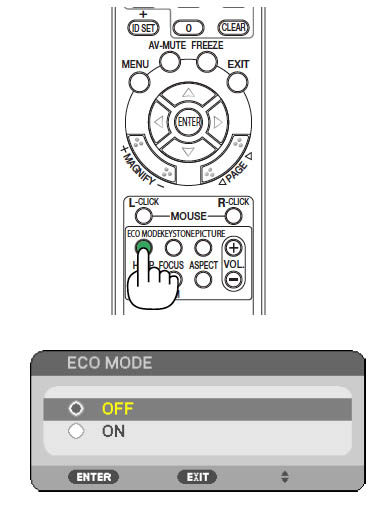 To activate ECO MODE using the remote control:
- Using the remote control press the ECO MODE button
- Use the up or down arrows to select ON
- Press the ENTER button
To activate ECO MODE from the projector screen:
- Press SETUP
- Move to the GENERAL option
- Scroll down to ECO MODE
- Turn ECO MODE on
- Press the ENTER button.
NOTE: The POWER indicator will blink green when ECO MODE is on and the brightness of the screen will decrease.
If the projector becomes overheated, the Forced ECO MODE will automatically switch on and a thermometer symbol will also turn off. When the projector cools down the Forced ECO MODE will turn off.
Replacing the BenQ MP511 projector lamp
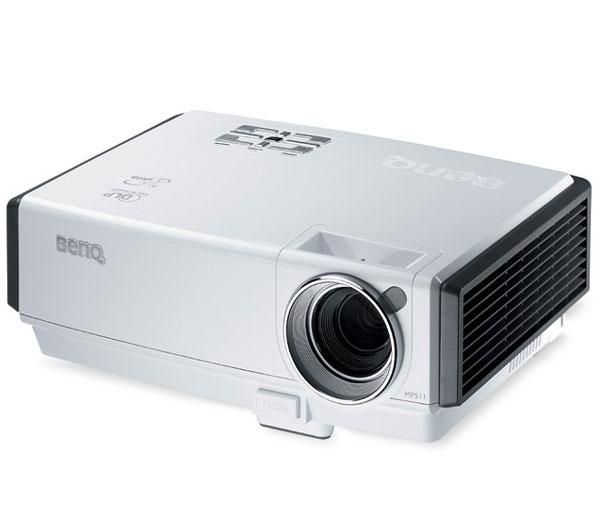
BENQ MP511 projector, lamp BenQ 5J.08001.001
Wondering when it’s time to replace BenQ 5J.08001.001 lamp in your BenQ MP511 projector? Your built-in timer calculates the end of the lamp life and will let you know when it’s time to replace the BenQ 5J.08001.001 projector lamp. Scroll down for step-by-step instructions on how to replace the lamp.
NOTE: When the BenQ MP511 projector becomes too hot, both the Lamp indicator light and Temperature warning light will light up. Turn the projector off, letting it cool for 45 minutes. If the Lamp indicator still lights after turning the projector back on, it may be time to replace the BenQ 5J.08001.001 lamp
Looking for a less expensive option? Want more information? Watch our step-by-step video on replacing only the BenQ 5J.08001.001 bulb instead of the entire lamp housing.
Warning Messages
Warning Messages will appear on screen, informing when it’s time to install a new BenQ 5J.08001.001 lamp.
First Message: The BenQ 5J.08001.001 lamp has been in operation for 2000 hours. Install a new lamp for optimal performance. You may continue to operate the projector until the 2950 hour lamp warning appears.
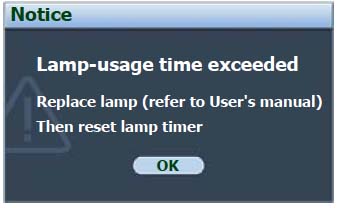
BenQ MP511 final lamp warning message
Second Message: The BenQ 5J.08001.001 lamp has been in operation for 2950 hours. A new lamp should be fitted to avoid the inconvenience when the projector runs out of lamp time.
Third Message: The BenQ 5J.08001.001 lamp has been in operation for 3000 hours. It is strongly recommended that you replace the lamp at this age.
Final Message: Lamp-usage time exceeded. The BenQ 5J.08001.001 lamp MUST be replaced before the projector will operate normally.
The importance of authentic lamps
Always invest in a genuine BenQ 5J.08001.001 lamp in order to keep your BenQ MP511 projector working. Your original manufacturer (OEM) has created these lamps to fit your BenQ MP511 projector and keep the sophisticated components working properly. While generic lamps may be sold at discount prices, their inferior workmanship and cheap materials often result in damage to the interior of projectors. They are also prone to explosions which can release toxic heavy metals into the air as well as damage your projector beyond repair. Read more about the 7 Ways to Spot a Counterfeit Lamp.
Replacing the BenQ 5J.08001.001 lamp
Turn the power off and disconnect the BenQ MP511 projector from the wall socket. Avoid burns by waiting until the projector and lamp are cool to the touch (usually 45 minutes wait time.
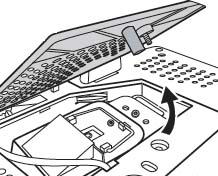
Open lamp cover
The lamp cover is found on the bottom of the BenQ MP511 projector.
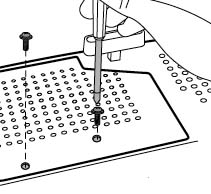
Unscrew lamp cover
Turn it over and loosen the screws on the lamp cover. Put it to one side. DO NOT turn the power back on with no lamp in the projector.
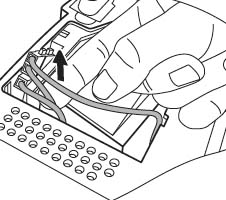
Locate lamp connectors
Locate the BenQ 5J.08001.001 lamp connectors.
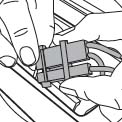
Disconnect lamp connectors
Disconnect the BenQ 5J.08001.001 lamp cords from the slots.
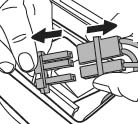
Unplug the lamp connectors
Gently remove the BenQ 5J.08001.001 lamp connector by pushing against it while pulling up.
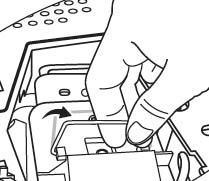
Grab lamp handle
Loosen the screw holding the lamp in place. Grab the lamp handle to lift it up and slowly pull the lamp out of BenQ MP511 projector. Too much force may make the lamp break inside the projector so proceed slowly. Avoid touching any of the components inside, particularly the color wheel as this can cause the images to become distorted.

Insert the lamp
Lineup the new BenQ 5J.08001.001 lamp with the projector compartment and insert the lamp all the way into the projector.
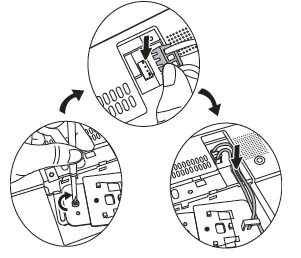
Connect the lamp
Tighten the BenQ 5J.08001.001 lamp screw to secure the lamp in place. Make sure the screw is properly connected to prevent a bad connection and the projector turning off.
Connect the BenQ 5J.08001.001 lamp connectors into the projector and tuck the lamp cords back into the slots. Place the lamp cords back to the slots.
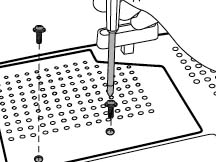
Screw lamp cover
Replace the lamp cover on the projector and tighten the screws that hold it in place.
Shut the lamp cover and restart the projector to reset the Lamp Settings Page.
Resetting the Lamp Setting Menu
It’s important to reset the Lamps Settings menu in order for your BenQ MP511 projector to accurately track the life of your newly installed lamp. Failure to properly set the lamp can result in the projector stopping suddenly.
 1. After startup logo, open the On-Screen Display (OSD) menu.
2. Go to the SYSTEM SETUP: Advanced > Lamp Settings menu.
3. Press ENTER to display the Lamp Settings page.
4. Choose Reset Lamp Timer to display the message: Reset Lamp Timer?
5. Click reset. The lamp time is now set to ‘0’ and the projector will begin tracking the lamp life of the newly installed.
NOTE: Only reset this option in a new lamp as been installed other you can damage your projector.
Lamp Modes
There are two lamps modes on the BenQ MP511:
Normal: Gives you the brightest screen but also reduces the lamp life.
Economic: Reduces system noise and power consumption by 20% prolonging to life of the lamp but does result in darker projected images.
Mitsubishi white death can be solved for under $300
Shelagh McNallyPosted on
Posted in FixYourDLP, Mitsubishi, Rear Projection TV Lamp Replacement
—
103 Comments ↓ 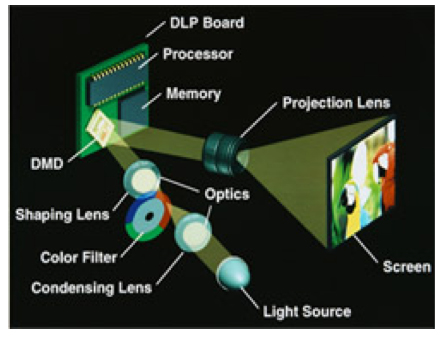
White dots on your screen? Here’s how to solve them.
You’ve settled down to watch TV when you notice white star-like clusters on the screen. It’s not dust and it’s not a problem with the brightness. It’s the Mitsubishi white death caused by a worn out DMD chip.
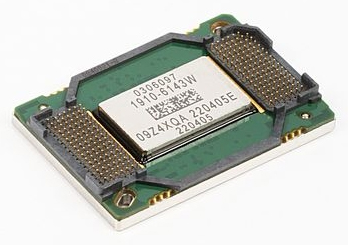
Find this New Mitsubishi/Toshiba 4719-001997 DLP Chip 1910-6143W
Mitsubishi DLP TVs have been plagued with the problems for several years now. Various forums talk about customers being given quotes of $600 and upwards for solving the white spot syndrome or replacing the DMD DLP chip . Fortunately, there are companies offering the offering the DLP chip for under $300.
Causes of white death
No matter what the brand, at the heart of any DLP TV the DMD chip invented in 1987 by Dr. Larry Hornbeck of Texas Instruments. This optical semiconductor contains an array of up to 2 million hinge-mounted microscopic mirrors, so small they measure one-fifth the width of a human hair.
White death: why??
As it receives the signal, the small mirrors rotate, either tilting away from the light or towards it to produce those stunning images that have made these TVs a frontrunner for the consumer. Since they are mounted on a yoke with an axle that literally twists in the middle, these micro mirrors get stuck and can no longer reflect the signal. The result is a white or black dot on the screen. As more and more mirrors become stuck, more white dots appear on screen creating an image that can’t be viewed.
The affordable solution
In order to address the issue, Texas Instrument has created a replacement DMD DLP chip that is affordable and readily available from recognized distributors. While part numbers may vary, the chip remains the same. The following part numbers are interchangeable:
Mitsubishi DMD Chip 276P595010
Board Number DMD Panel IC# 1910-6143W
Board Number DMD Panel IC# 1910-6145W
Board Number DMD Panel IC# 1910-6103W
Samsung DMD Chip 4719-001997
Samsung DMD Chip 4719-001985
Samsung DMD Chip 4719-001999
Samsung DMD Chip W1272-5003
Avoid an expensive repair bill and let your service center know about the DMD DLP chip for under $300.
Find this New Mitsubishi/Toshiba 4719-001997 DLP Chip 1910-6143W
Replacing the BenQ MP610 projector lamp
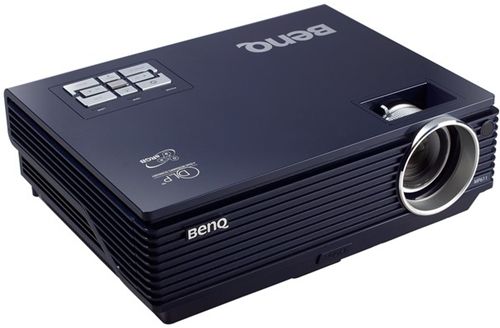
Time to replace the BenQ MP610 projector lamp? Follow our guide
There is a built-in timer to calculate lamp usage and let you know when it’s time to replace the BenQ MP610 projector lamp.
Warning Messages
When the Lamp Indicator lights up red or the Lamp Message appears on screen, it’s time to install a new BenQ MP610 projector lamp. Warning messages on screen also give ample warning of when to install a new lamp.
Invest in an authentic lamp and find it on Amazon from an authorized dealer:
Benq 5J.J1S01.001 High Quality Original Bulb with Housing for BENQ MP610 MP610-B5A MP620P W100

NOTE: When the BenQ MP610 projector becomes too hot, both the Lamp indicator light and Temperature warning light will light up. Turn the projector off, letting it cool for 45 minutes. If the Lamp indicator still lights after turning the projector back on, then it’s time for a new lamp.
Warning Messages
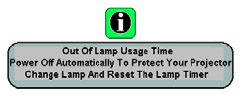
BenMPQ610 final lamp warning
Message 1: The BenQ MP610 projector lamp has been in operation for 2800 hours. Install a new lamp for optimal performance. If the projector is normally run with “Economic Mode” the lamps is good until the 2950 hour lamp warning appears.
Message 2: The BenQ MP610 projector lamp has been in operation for 2950 hour. A new lamp should be fitted to avoid the inconvenience when the projector runs out of lamp time.
Message 3: The BenQ MP610 projectorlamp has been in operation for over 3000 hours. This message will flash in the center of the screen for about 30 seconds together with the Lamp indicator lighting up red for 40 seconds.
Message 4: The projector will shutdown in 40 seconds. The BenQ MP610 projector lamp MUST be replaced before the projector will operate normally.
The importance of authentic lamps
Always invest in a genuine BenQ MP610 projector lamp in order to keep your BenQ MP610 projector working. You will need an original BenQ 5J.J1S01.001 lamp. Your original manufactur er (OEM) has created these lamps to fit your BenQ MP610 projector and keep the sophisticated components working properly. While generic lamps may be sold at discount prices, their inferior workmanship and cheap materials often result in damage to the interior of projectors. They are also prone to explosions which can release toxic heavy metals into the air as well as damage your projector beyond repair. Read more about the 7 Ways to Spot a Counterfeit Lamp.
Replacing the lamp
NOTE: Disconnect the power cord before changing the lamp and allow the BenQ MP610 projector to cool for at least 45 minutes.
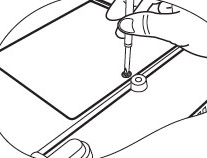
Unscrew the lid
1. Turn the BenQ MP610 projector off and once it’s cooled, turn it over. Loosen the screw on the lamp cover so you can remove it and put it to one side. You
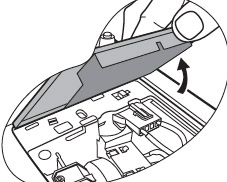
Open the lid
2. Open the lid.
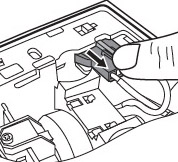
Uplug the lamp
3. Disconnect the BenQ 5J.J1S01.001 lamp connector from the projector.
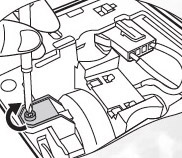
Unscrew the lamp
4. Loosen the screw that secures the BenQ 5J.J1S01.001 lamp into the lamp cage,
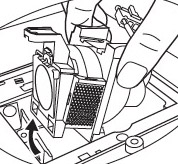
Gently remove lamp
5. Gently pull the BenQ 5J.J1S01.001 lamp from the projector. Pulling too quickly or with too much force can cause the bulb to break, scattering broken glass into the projector. Avoid touching any of the optical components as this can cause uneven color and image distortion.
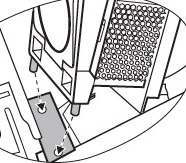
Line up the lamp
6. Holding the BenQ 5J.J1S01.001 new lamp, align the two male locators on the lamp with the female holes in the lamp cage. Gently pull the lamp all the way in the projector making sure it clicks into place. Be sure to dispose of the used Ben Q5J.J1S01.001 lamp through a local recycling program. Don’t throw this lamp into regular garbage as it contains mercury.
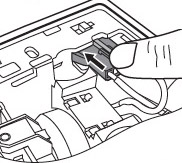
Plug in the lamp
7. Connect the BenQ 5J.J1S01.001 lamp connector to the projector
Tighten the screw
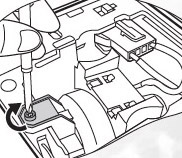
8. Tighten the screws on the BenQ 5J.J1S01.001 lamp. Make sure the screw is tight enough — any loose screws may cause a bad connection
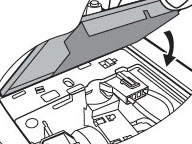
Close lid, tighten screw
9. Replace lamp cover and tighten the screw.
10. Restart the BenQ MP610 projector and reset the Lamp Counter
Resetting the Lamp Counter
NOTE: Do not reset the Lamp Counter if the lamp has not replaced as this could cause damage. Reset the Lamp Counter only when a new lamp has been installed in order to have an accurate reading of the lamp life.
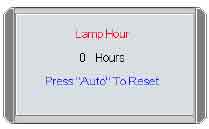
- Press and hold the Exit 5 button on the BenQ MP610 projector for 5 seconds to display the total used lamp time.
- Press Auto on the projector or on the remote control to reset the Lamp Hour to “0”.
- Wait about 5 seconds to let the on screen display (OSD) disappear.
- Only reset the Lamp Hour when a new lamp has been installed in order that the life BenQ 5J.J1S01.001 can be properly tracked and prevent the projector shutting down unexpectedly.
Learn more tips for extending the projector lamp life in your BenQ MP610 projector.
Join the discussion on Facebook! All your questions, answered! The Screen & Projector Group